mirror of
https://github.com/element-hq/element-web.git
synced 2025-12-15 02:00:24 +00:00
Compare commits
6 Commits
v1.11.17
...
travis/thi
| Author | SHA1 | Date | |
|---|---|---|---|

|
bdd34120f0 | ||
|
|
0c6c0f32dd | ||
|
|
447db3df62 | ||
|
|
24a695e9a3 | ||
|
|
8c4b8f281c | ||
|
|
3456b4c58a |
@@ -21,9 +21,3 @@ insert_final_newline = true
|
||||
indent_style = space
|
||||
indent_size = 4
|
||||
trim_trailing_whitespace = true
|
||||
|
||||
[*.{yml,yaml}]
|
||||
indent_size = 2
|
||||
|
||||
[package.json]
|
||||
indent_size = 2
|
||||
|
||||
16
.env.example
16
.env.example
@@ -1,16 +0,0 @@
|
||||
# To enable CSS hot-reload, set the following variable to 1.
|
||||
CSS_HOT_RELOAD=1
|
||||
# To use the full page error dialog, set this to 1. Please report false positives to
|
||||
# the issue tracker for handling.
|
||||
FULL_PAGE_ERRORS=0
|
||||
# To use a single theme, uncomment the line with the theme you want to hot-reload.
|
||||
MATRIX_THEMES='light'
|
||||
#MATRIX_THEMES='dark'
|
||||
#MATRIX_THEMES='legacy-light'
|
||||
#MATRIX_THEMES='legacy-dark'
|
||||
#MATRIX_THEMES='light-custom'
|
||||
#MATRIX_THEMES='dark-custom'
|
||||
# You can also enable multiple themes by using a comma-separated list.
|
||||
# When multiple themes are enabled, switching between them may require a full page reload.
|
||||
# Note that compilation times are proportional to the number of enabled themes.
|
||||
#MATRIX_THEMES='light,dark'
|
||||
@@ -1,5 +1,2 @@
|
||||
src/vector/modernizr.js
|
||||
# Legacy skinning file that some people might still have
|
||||
src/component-index.js
|
||||
# Auto-generated file
|
||||
src/modules.ts
|
||||
|
||||
101
.eslintrc.js
101
.eslintrc.js
@@ -1,90 +1,23 @@
|
||||
module.exports = {
|
||||
plugins: ["matrix-org"],
|
||||
extends: ["plugin:matrix-org/babel", "plugin:matrix-org/react"],
|
||||
env: {
|
||||
browser: true,
|
||||
node: true,
|
||||
"extends": ["matrix-org", "matrix-org/react"],
|
||||
"env": {
|
||||
"browser": true,
|
||||
"node": true,
|
||||
},
|
||||
rules: {
|
||||
// Things we do that break the ideal style
|
||||
quotes: "off",
|
||||
"rules": {
|
||||
"quotes": "off",
|
||||
},
|
||||
settings: {
|
||||
react: {
|
||||
version: "detect",
|
||||
"overrides": [{
|
||||
"files": ["src/**/*.{ts,tsx}"],
|
||||
"extends": ["matrix-org/ts", "matrix-org/react"],
|
||||
"env": {
|
||||
"browser": true,
|
||||
},
|
||||
},
|
||||
overrides: [
|
||||
{
|
||||
files: ["src/**/*.{ts,tsx}", "test/**/*.{ts,tsx}", "module_system/**/*.{ts,tsx}"],
|
||||
extends: ["plugin:matrix-org/typescript", "plugin:matrix-org/react"],
|
||||
// NOTE: These rules are frozen and new rules should not be added here.
|
||||
// New changes belong in https://github.com/matrix-org/eslint-plugin-matrix-org/
|
||||
rules: {
|
||||
// Things we do that break the ideal style
|
||||
"prefer-promise-reject-errors": "off",
|
||||
"quotes": "off",
|
||||
|
||||
// We disable this while we're transitioning
|
||||
"@typescript-eslint/no-explicit-any": "off",
|
||||
// We're okay with assertion errors when we ask for them
|
||||
"@typescript-eslint/no-non-null-assertion": "off",
|
||||
|
||||
// Ban matrix-js-sdk/src imports in favour of matrix-js-sdk/src/matrix imports to prevent unleashing hell.
|
||||
"no-restricted-imports": [
|
||||
"error",
|
||||
{
|
||||
paths: [
|
||||
{
|
||||
name: "matrix-js-sdk",
|
||||
message: "Please use matrix-js-sdk/src/matrix instead",
|
||||
},
|
||||
{
|
||||
name: "matrix-js-sdk/",
|
||||
message: "Please use matrix-js-sdk/src/matrix instead",
|
||||
},
|
||||
{
|
||||
name: "matrix-js-sdk/src",
|
||||
message: "Please use matrix-js-sdk/src/matrix instead",
|
||||
},
|
||||
{
|
||||
name: "matrix-js-sdk/src/",
|
||||
message: "Please use matrix-js-sdk/src/matrix instead",
|
||||
},
|
||||
{
|
||||
name: "matrix-js-sdk/src/index",
|
||||
message: "Please use matrix-js-sdk/src/matrix instead",
|
||||
},
|
||||
{
|
||||
name: "matrix-react-sdk",
|
||||
message: "Please use matrix-react-sdk/src/index instead",
|
||||
},
|
||||
{
|
||||
name: "matrix-react-sdk/",
|
||||
message: "Please use matrix-react-sdk/src/index instead",
|
||||
},
|
||||
],
|
||||
patterns: [
|
||||
{
|
||||
group: ["matrix-js-sdk/lib", "matrix-js-sdk/lib/", "matrix-js-sdk/lib/**"],
|
||||
message: "Please use matrix-js-sdk/src/* instead",
|
||||
},
|
||||
{
|
||||
group: ["matrix-react-sdk/lib", "matrix-react-sdk/lib/", "matrix-react-sdk/lib/**"],
|
||||
message: "Please use matrix-react-sdk/src/* instead",
|
||||
},
|
||||
],
|
||||
},
|
||||
],
|
||||
},
|
||||
"rules": {
|
||||
"quotes": "off",
|
||||
// While converting to ts we allow this
|
||||
"@typescript-eslint/no-explicit-any": "off",
|
||||
"prefer-promise-reject-errors": "off",
|
||||
},
|
||||
{
|
||||
files: ["test/**/*.{ts,tsx}"],
|
||||
rules: {
|
||||
// We don't need super strict typing in test utilities
|
||||
"@typescript-eslint/explicit-function-return-type": "off",
|
||||
"@typescript-eslint/explicit-member-accessibility": "off",
|
||||
},
|
||||
},
|
||||
],
|
||||
}],
|
||||
};
|
||||
|
||||
4
.github/CODEOWNERS
vendored
4
.github/CODEOWNERS
vendored
@@ -1,4 +0,0 @@
|
||||
* @vector-im/element-web
|
||||
/.github/workflows/** @vector-im/element-web-app-team
|
||||
/package.json @vector-im/element-web-app-team
|
||||
/yarn.lock @vector-im/element-web-app-team
|
||||
46
.github/ISSUE_TEMPLATE.md
vendored
Normal file
46
.github/ISSUE_TEMPLATE.md
vendored
Normal file
@@ -0,0 +1,46 @@
|
||||
<!-- Please report security issues by email to security@matrix.org -->
|
||||
|
||||
<!-- This is a bug report template. By following the instructions below and
|
||||
filling out the sections with your information, you will help the us to get all
|
||||
the necessary data to fix your issue.
|
||||
|
||||
You can also preview your report before submitting it. You may remove sections
|
||||
that aren't relevant to your particular case.
|
||||
|
||||
Text between <!-- and --> marks will be invisible in the report.
|
||||
-->
|
||||
|
||||
### Description
|
||||
|
||||
Describe here the problem that you are experiencing, or the feature you are requesting.
|
||||
|
||||
### Steps to reproduce
|
||||
|
||||
- For bugs, list the steps
|
||||
- that reproduce the bug
|
||||
- using hyphens as bullet points
|
||||
|
||||
Describe how what happens differs from what you expected.
|
||||
|
||||
Log: sent/not sent? <!-- You can send us the app's logs via the 'Report bug'
|
||||
link on the 'Settings' page. Very important for hard-to-reproduce bugs. Please
|
||||
file a bug here too! -->
|
||||
|
||||
<!-- Include screenshots if possible: you can drag and drop images below. -->
|
||||
|
||||
### Version information
|
||||
|
||||
<!-- IMPORTANT: please answer the following questions, to help us narrow down the problem -->
|
||||
|
||||
- **Platform**: web (in-browser) or desktop?
|
||||
|
||||
For the web app:
|
||||
|
||||
- **Browser**: Chrome, Safari, Firefox? which version?
|
||||
- **OS**: Windows, macOS, Ubuntu, Arch Linux, etc?
|
||||
- **URL**: develop.element.io / app.element.io / somewhere else? If a private server, what version of Element Web?
|
||||
|
||||
For the desktop app:
|
||||
|
||||
- **OS**: Windows, macOS, Ubuntu, Arch Linux, etc?
|
||||
- **Version**: 1.x.y <!-- check the user settings panel if unsure -->
|
||||
76
.github/ISSUE_TEMPLATE/bug-desktop.yml
vendored
76
.github/ISSUE_TEMPLATE/bug-desktop.yml
vendored
@@ -1,76 +0,0 @@
|
||||
name: Bug report for the Element desktop app (not in a browser)
|
||||
description: File a bug report if you are using the desktop Element application.
|
||||
labels: [T-Defect]
|
||||
body:
|
||||
- type: markdown
|
||||
attributes:
|
||||
value: |
|
||||
Thanks for taking the time to fill out this bug report!
|
||||
|
||||
Please report security issues by email to security@matrix.org
|
||||
- type: textarea
|
||||
id: reproduction-steps
|
||||
attributes:
|
||||
label: Steps to reproduce
|
||||
description: Please attach screenshots, videos or logs if you can.
|
||||
placeholder: Tell us what you see!
|
||||
value: |
|
||||
1. Where are you starting? What can you see?
|
||||
2. What do you click?
|
||||
3. More steps…
|
||||
validations:
|
||||
required: true
|
||||
- type: textarea
|
||||
id: result
|
||||
attributes:
|
||||
label: Outcome
|
||||
placeholder: Tell us what went wrong
|
||||
value: |
|
||||
#### What did you expect?
|
||||
|
||||
#### What happened instead?
|
||||
validations:
|
||||
required: true
|
||||
- type: input
|
||||
id: os
|
||||
attributes:
|
||||
label: Operating system
|
||||
placeholder: Windows, macOS, Ubuntu, Arch Linux…
|
||||
validations:
|
||||
required: false
|
||||
- type: input
|
||||
id: version
|
||||
attributes:
|
||||
label: Application version
|
||||
description: You can find the version information in Settings -> Help & About.
|
||||
placeholder: e.g. Element version 1.7.34, olm version 3.2.3
|
||||
validations:
|
||||
required: false
|
||||
- type: input
|
||||
id: source
|
||||
attributes:
|
||||
label: How did you install the app?
|
||||
description: Where did you install the app from? Please give a link or a description.
|
||||
placeholder: e.g. From https://element.io/get-started
|
||||
validations:
|
||||
required: false
|
||||
- type: input
|
||||
id: homeserver
|
||||
attributes:
|
||||
label: Homeserver
|
||||
description: |
|
||||
Which server is your account registered on? If it is a local or non-public homeserver, please tell us what is the homeserver implementation (ex: Synapse/Dendrite/etc.) and the version.
|
||||
placeholder: e.g. matrix.org or Synapse 1.50.0rc1
|
||||
validations:
|
||||
required: false
|
||||
- type: dropdown
|
||||
id: rageshake
|
||||
attributes:
|
||||
label: Will you send logs?
|
||||
description: |
|
||||
Did you know that you can send a /rageshake command from your application to submit logs for this issue? Trigger the defect, then type `/rageshake` into the message input area followed by a description of the problem and send the command. You will be able to add a link to this defect report and submit anonymous logs to the developers.
|
||||
options:
|
||||
- "Yes"
|
||||
- "No"
|
||||
validations:
|
||||
required: true
|
||||
84
.github/ISSUE_TEMPLATE/bug-web.yml
vendored
84
.github/ISSUE_TEMPLATE/bug-web.yml
vendored
@@ -1,84 +0,0 @@
|
||||
name: Bug report for Element Web (in browser)
|
||||
description: File a bug report if you are using Element in a web browser like Firefox, Chrome, Edge, and so on.
|
||||
labels: [T-Defect]
|
||||
body:
|
||||
- type: markdown
|
||||
attributes:
|
||||
value: |
|
||||
Thanks for taking the time to fill out this bug report!
|
||||
|
||||
Please report security issues by email to security@matrix.org
|
||||
- type: textarea
|
||||
id: reproduction-steps
|
||||
attributes:
|
||||
label: Steps to reproduce
|
||||
description: Please attach screenshots, videos or logs if you can.
|
||||
placeholder: Tell us what you see!
|
||||
value: |
|
||||
1. Where are you starting? What can you see?
|
||||
2. What do you click?
|
||||
3. More steps…
|
||||
validations:
|
||||
required: true
|
||||
- type: textarea
|
||||
id: result
|
||||
attributes:
|
||||
label: Outcome
|
||||
placeholder: Tell us what went wrong
|
||||
value: |
|
||||
#### What did you expect?
|
||||
|
||||
#### What happened instead?
|
||||
validations:
|
||||
required: true
|
||||
- type: input
|
||||
id: os
|
||||
attributes:
|
||||
label: Operating system
|
||||
placeholder: Windows, macOS, Ubuntu, Arch Linux…
|
||||
validations:
|
||||
required: false
|
||||
- type: input
|
||||
id: browser
|
||||
attributes:
|
||||
label: Browser information
|
||||
description: Which browser are you using? Which version?
|
||||
placeholder: e.g. Chromium Version 92.0.4515.131
|
||||
validations:
|
||||
required: false
|
||||
- type: input
|
||||
id: webapp-url
|
||||
attributes:
|
||||
label: URL for webapp
|
||||
description: Which URL are you using to access the webapp? If a private server, tell us what version of Element Web you are using.
|
||||
placeholder: e.g. develop.element.io, app.element.io
|
||||
validations:
|
||||
required: false
|
||||
- type: input
|
||||
id: version
|
||||
attributes:
|
||||
label: Application version
|
||||
description: You can find the version information in Settings -> Help & About.
|
||||
placeholder: e.g. Element version 1.7.34, olm version 3.2.3
|
||||
validations:
|
||||
required: false
|
||||
- type: input
|
||||
id: homeserver
|
||||
attributes:
|
||||
label: Homeserver
|
||||
description: |
|
||||
Which server is your account registered on? If it is a local or non-public homeserver, please tell us what is the homeserver implementation (ex: Synapse/Dendrite/etc.) and the version.
|
||||
placeholder: e.g. matrix.org or Synapse 1.50.0rc1
|
||||
validations:
|
||||
required: false
|
||||
- type: dropdown
|
||||
id: rageshake
|
||||
attributes:
|
||||
label: Will you send logs?
|
||||
description: |
|
||||
Did you know that you can send a /rageshake command from the web application to submit logs for this issue? Trigger the defect, then type `/rageshake` into the message input area followed by a description of the problem and send the command. You will be able to add a link to this defect report and submit anonymous logs to the developers.
|
||||
options:
|
||||
- "Yes"
|
||||
- "No"
|
||||
validations:
|
||||
required: true
|
||||
56
.github/ISSUE_TEMPLATE/bug_report.md
vendored
Normal file
56
.github/ISSUE_TEMPLATE/bug_report.md
vendored
Normal file
@@ -0,0 +1,56 @@
|
||||
---
|
||||
name: Bug report
|
||||
about: Create a report to help us improve
|
||||
title: ''
|
||||
labels: bug
|
||||
assignees: ''
|
||||
|
||||
---
|
||||
|
||||
<!-- Please report security issues by email to security@matrix.org -->
|
||||
|
||||
<!-- This is a bug report template. By following the instructions below and
|
||||
filling out the sections with your information, you will help the us to get all
|
||||
the necessary data to fix your issue.
|
||||
|
||||
You can also preview your report before submitting it. You may remove sections
|
||||
that aren't relevant to your particular case.
|
||||
|
||||
Text between <!-- and --> marks will be invisible in the report.
|
||||
-->
|
||||
|
||||
### Description
|
||||
|
||||
Describe here the problem that you are experiencing, or the feature you are requesting.
|
||||
|
||||
### Steps to reproduce
|
||||
|
||||
- For bugs, list the steps
|
||||
- that reproduce the bug
|
||||
- using hyphens as bullet points
|
||||
|
||||
Describe how what happens differs from what you expected.
|
||||
|
||||
<!-- Please send us logs for your bug report. They're very important for bugs
|
||||
which are hard to reproduce. To do this, create this issue then go to your
|
||||
account settings and click 'Submit Debug Logs' from the Help & About tab -->
|
||||
Logs being sent: yes/no
|
||||
|
||||
<!-- Include screenshots if possible: you can drag and drop images below. -->
|
||||
|
||||
### Version information
|
||||
|
||||
<!-- IMPORTANT: please answer the following questions, to help us narrow down the problem -->
|
||||
|
||||
- **Platform**: web (in-browser) or desktop?
|
||||
|
||||
For the web app:
|
||||
|
||||
- **Browser**: Chrome, Safari, Firefox? which version?
|
||||
- **OS**: Windows, macOS, Ubuntu, Arch Linux, etc?
|
||||
- **URL**: develop.element.io / app.element.io / somewhere else? If a private server, what version of Element Web?
|
||||
|
||||
For the desktop app:
|
||||
|
||||
- **OS**: Windows, macOS, Ubuntu, Arch Linux, etc?
|
||||
- **Version**: 1.x.y <!-- check the user settings panel if unsure -->
|
||||
5
.github/ISSUE_TEMPLATE/config.yml
vendored
5
.github/ISSUE_TEMPLATE/config.yml
vendored
@@ -1,5 +0,0 @@
|
||||
blank_issues_enabled: false
|
||||
contact_links:
|
||||
- name: Questions & support
|
||||
url: https://matrix.to/#/#element-web:matrix.org
|
||||
about: Please ask and answer questions here.
|
||||
36
.github/ISSUE_TEMPLATE/enhancement.yml
vendored
36
.github/ISSUE_TEMPLATE/enhancement.yml
vendored
@@ -1,36 +0,0 @@
|
||||
name: Enhancement request
|
||||
description: Do you have a suggestion or feature request?
|
||||
labels: [T-Enhancement]
|
||||
body:
|
||||
- type: markdown
|
||||
attributes:
|
||||
value: |
|
||||
Thank you for taking the time to propose an enhancement to an existing feature. If you would like to propose a new feature or a major cross-platform change, please [start a discussion here](https://github.com/vector-im/element-meta/discussions/new?category=ideas).
|
||||
- type: textarea
|
||||
id: usecase
|
||||
attributes:
|
||||
label: Your use case
|
||||
description: What would you like to be able to do? Please feel welcome to include screenshots or mock ups.
|
||||
placeholder: Tell us what you would like to do!
|
||||
value: |
|
||||
#### What would you like to do?
|
||||
|
||||
#### Why would you like to do it?
|
||||
|
||||
#### How would you like to achieve it?
|
||||
validations:
|
||||
required: true
|
||||
- type: textarea
|
||||
id: alternative
|
||||
attributes:
|
||||
label: Have you considered any alternatives?
|
||||
placeholder: A clear and concise description of any alternative solutions or features you've considered.
|
||||
validations:
|
||||
required: false
|
||||
- type: textarea
|
||||
id: additional-context
|
||||
attributes:
|
||||
label: Additional context
|
||||
placeholder: Is there anything else you'd like to add?
|
||||
validations:
|
||||
required: false
|
||||
20
.github/ISSUE_TEMPLATE/suggestion-or-feature-request.md
vendored
Normal file
20
.github/ISSUE_TEMPLATE/suggestion-or-feature-request.md
vendored
Normal file
@@ -0,0 +1,20 @@
|
||||
---
|
||||
name: Suggestion or Feature request
|
||||
about: Suggest an idea for this project
|
||||
title: ''
|
||||
labels: suggestion
|
||||
assignees: ''
|
||||
|
||||
---
|
||||
|
||||
**Is your suggestion related to a problem? Please describe.**
|
||||
A clear and concise description of what the problem is. Ex. I'm always frustrated when [...]
|
||||
|
||||
**Describe the solution you'd like**
|
||||
A clear and concise description of what you want to happen.
|
||||
|
||||
**Describe alternatives you've considered**
|
||||
A clear and concise description of any alternative solutions or features you've considered.
|
||||
|
||||
**Additional context**
|
||||
Add any other context or screenshots about the feature request here.
|
||||
58
.github/ISSUE_TEMPLATE/user-interface-or-usability-bug-report.md
vendored
Normal file
58
.github/ISSUE_TEMPLATE/user-interface-or-usability-bug-report.md
vendored
Normal file
@@ -0,0 +1,58 @@
|
||||
---
|
||||
name: User Interface or Usability Bug report
|
||||
about: Please include screenshots in UI/UX bug reports
|
||||
title: ''
|
||||
labels: bug, ui/ux
|
||||
assignees: ''
|
||||
|
||||
---
|
||||
|
||||
<!-- A picture's worth a thousand words: PLEASE INCLUDE A SCREENSHOT :P -->
|
||||
|
||||
<!-- Please report security issues by email to security@matrix.org -->
|
||||
|
||||
<!-- This is a bug report template. By following the instructions below and
|
||||
filling out the sections with your information, you will help the us to get all
|
||||
the necessary data to fix your issue.
|
||||
|
||||
You can also preview your report before submitting it. You may remove sections
|
||||
that aren't relevant to your particular case.
|
||||
|
||||
Text between <!-- and --> marks will be invisible in the report.
|
||||
-->
|
||||
|
||||
### Description
|
||||
|
||||
Describe here the problem that you are experiencing, or the feature you are requesting.
|
||||
|
||||
### Steps to reproduce
|
||||
|
||||
- For bugs, list the steps
|
||||
- that reproduce the bug
|
||||
- using hyphens as bullet points
|
||||
|
||||
Describe how what happens differs from what you expected.
|
||||
|
||||
<!-- Please send us logs for your bug report. They're very important for bugs
|
||||
which are hard to reproduce. To do this, create this issue then go to your
|
||||
account settings and click 'Submit Debug Logs' from the Help & About tab -->
|
||||
Logs being sent: yes/no
|
||||
|
||||
<!-- Include screenshots if possible: you can drag and drop images below. -->
|
||||
|
||||
### Version information
|
||||
|
||||
<!-- IMPORTANT: please answer the following questions, to help us narrow down the problem -->
|
||||
|
||||
- **Platform**: web (in-browser) or desktop?
|
||||
|
||||
For the web app:
|
||||
|
||||
- **Browser**: Chrome, Safari, Firefox? which version?
|
||||
- **OS**: Windows, macOS, Ubuntu, Arch Linux, etc?
|
||||
- **URL**: develop.element.io / app.element.io / somewhere else? If a private server, what version of Element Web?
|
||||
|
||||
For the desktop app:
|
||||
|
||||
- **OS**: Windows, macOS, Ubuntu, Arch Linux, etc?
|
||||
- **Version**: 1.x.y <!-- check the user settings panel if unsure -->
|
||||
18
.github/PULL_REQUEST_TEMPLATE.md
vendored
18
.github/PULL_REQUEST_TEMPLATE.md
vendored
@@ -1,18 +0,0 @@
|
||||
<!-- Thanks for submitting a PR! Please ensure the following requirements are met in order for us to review your PR -->
|
||||
|
||||
## Checklist
|
||||
|
||||
- [ ] Tests written for new code (and old code if feasible)
|
||||
- [ ] Linter and other CI checks pass
|
||||
- [ ] Sign-off given on the changes (see [CONTRIBUTING.md](https://github.com/vector-im/element-web/blob/develop/CONTRIBUTING.md))
|
||||
|
||||
<!--
|
||||
If you would like to specify text for the changelog entry other than your PR title, add the following:
|
||||
|
||||
Notes: Add super cool feature
|
||||
|
||||
For PRs which *only* affect the desktop version, please use:
|
||||
|
||||
Notes: none
|
||||
element-desktop notes: Add super cool feature
|
||||
-->
|
||||
10
.github/cfp_headers
vendored
10
.github/cfp_headers
vendored
@@ -1,10 +0,0 @@
|
||||
/*
|
||||
X-XSS-Protection: 1; mode=block
|
||||
X-Content-Type-Options: nosniff
|
||||
Strict-Transport-Security: max-age=31536000; includeSubDomains; preload
|
||||
|
||||
/version
|
||||
Content-Type: text/plain
|
||||
|
||||
/apple-app-site-association
|
||||
Content-Type: application/json
|
||||
4
.github/renovate.json
vendored
4
.github/renovate.json
vendored
@@ -1,4 +0,0 @@
|
||||
{
|
||||
"$schema": "https://docs.renovatebot.com/renovate-schema.json",
|
||||
"extends": ["github>matrix-org/renovate-config-element-web"]
|
||||
}
|
||||
30
.github/workflows/backport.yml
vendored
30
.github/workflows/backport.yml
vendored
@@ -1,30 +0,0 @@
|
||||
name: Backport
|
||||
on:
|
||||
pull_request_target:
|
||||
types:
|
||||
- closed
|
||||
- labeled
|
||||
branches:
|
||||
- develop
|
||||
|
||||
jobs:
|
||||
backport:
|
||||
name: Backport
|
||||
runs-on: ubuntu-latest
|
||||
# Only react to merged PRs for security reasons.
|
||||
# See https://docs.github.com/en/actions/using-workflows/events-that-trigger-workflows#pull_request_target.
|
||||
if: >
|
||||
github.event.pull_request.merged
|
||||
&& (
|
||||
github.event.action == 'closed'
|
||||
|| (
|
||||
github.event.action == 'labeled'
|
||||
&& contains(github.event.label.name, 'backport')
|
||||
)
|
||||
)
|
||||
steps:
|
||||
- uses: tibdex/backport@v2
|
||||
with:
|
||||
labels_template: "<%= JSON.stringify([...labels, 'X-Release-Blocker']) %>"
|
||||
# We can't use GITHUB_TOKEN here or CI won't run on the new PR
|
||||
github_token: ${{ secrets.ELEMENT_BOT_TOKEN }}
|
||||
26
.github/workflows/build.yml
vendored
26
.github/workflows/build.yml
vendored
@@ -1,26 +0,0 @@
|
||||
name: Build
|
||||
on:
|
||||
pull_request: {}
|
||||
push:
|
||||
branches: [master]
|
||||
# develop pushes and repository_dispatch handled in build_develop.yaml
|
||||
env:
|
||||
# These must be set for fetchdep.sh to get the right branch
|
||||
REPOSITORY: ${{ github.repository }}
|
||||
PR_NUMBER: ${{ github.event.pull_request.number }}
|
||||
jobs:
|
||||
build:
|
||||
name: "Build"
|
||||
runs-on: ubuntu-latest
|
||||
steps:
|
||||
- uses: actions/checkout@v3
|
||||
|
||||
- uses: actions/setup-node@v3
|
||||
with:
|
||||
cache: "yarn"
|
||||
|
||||
- name: Install Dependencies
|
||||
run: "./scripts/layered.sh"
|
||||
|
||||
- name: Build
|
||||
run: "yarn build"
|
||||
114
.github/workflows/build_develop.yml
vendored
114
.github/workflows/build_develop.yml
vendored
@@ -1,114 +0,0 @@
|
||||
# Separate to the main build workflow for access to develop
|
||||
# environment secrets, largely similar to build.yaml.
|
||||
name: Build and Deploy develop
|
||||
on:
|
||||
push:
|
||||
branches: [develop]
|
||||
repository_dispatch:
|
||||
types: [element-web-notify]
|
||||
concurrency:
|
||||
group: ${{ github.repository_owner }}-${{ github.workflow }}-${{ github.ref_name }}
|
||||
cancel-in-progress: true
|
||||
jobs:
|
||||
build:
|
||||
name: "Build & Deploy develop.element.io"
|
||||
# Only respect triggers from our develop branch, ignore that of forks
|
||||
if: github.repository == 'vector-im/element-web'
|
||||
runs-on: ubuntu-latest
|
||||
environment: develop
|
||||
env:
|
||||
R2_BUCKET: "element-web-develop"
|
||||
R2_URL: ${{ secrets.CF_R2_S3_API }}
|
||||
R2_PUBLIC_URL: "https://element-web-develop.element.io"
|
||||
steps:
|
||||
- uses: actions/checkout@v3
|
||||
|
||||
- uses: actions/setup-node@v3
|
||||
with:
|
||||
cache: "yarn"
|
||||
|
||||
- name: Install Dependencies
|
||||
run: "./scripts/layered.sh"
|
||||
|
||||
- name: Build, Package & Upload sourcemaps
|
||||
run: "./scripts/ci_package.sh"
|
||||
env:
|
||||
SENTRY_AUTH_TOKEN: ${{ secrets.SENTRY_AUTH_TOKEN }}
|
||||
SENTRY_DSN: ${{ secrets.SENTRY_DSN }}
|
||||
SENTRY_URL: ${{ secrets.SENTRY_URL }}
|
||||
SENTRY_ORG: element
|
||||
SENTRY_PROJECT: riot-web
|
||||
# We only deploy the latest bundles to Cloudflare Pages and use _redirects to fallback to R2 for
|
||||
# older ones. This redirect means that 'self' is insufficient in the CSP,
|
||||
# and we have to add the R2 URL.
|
||||
# Once Cloudflare redirects support proxying mode we will be able to ditch this.
|
||||
# See Proxying in support table at https://developers.cloudflare.com/pages/platform/redirects
|
||||
CSP_EXTRA_SOURCE: ${{ env.R2_PUBLIC_URL }}
|
||||
|
||||
- run: mv dist/element-*.tar.gz dist/develop.tar.gz
|
||||
|
||||
- uses: actions/upload-artifact@v3
|
||||
with:
|
||||
name: webapp
|
||||
path: dist/develop.tar.gz
|
||||
retention-days: 1
|
||||
|
||||
- name: Extract webapp
|
||||
run: |
|
||||
mkdir _deploy
|
||||
tar xf dist/develop.tar.gz -C _deploy --strip-components=1
|
||||
|
||||
- name: Copy config
|
||||
run: cp element.io/develop/config.json _deploy/config.json
|
||||
|
||||
- name: Populate 404.html
|
||||
run: echo "404 Not Found" > _deploy/404.html
|
||||
|
||||
- name: Populate _headers
|
||||
run: cp .github/cfp_headers _deploy/_headers
|
||||
|
||||
# Redirect requests for the develop tarball and the historical bundles to R2
|
||||
- name: Populate _redirects
|
||||
run: |
|
||||
{
|
||||
echo "/develop.tar.gz $R2_PUBLIC_URL/develop.tar.gz 301"
|
||||
for bundle in $(aws s3 ls s3://$R2_BUCKET/bundles/ --endpoint-url $R2_URL --region=auto | awk '{print $2}'); do
|
||||
echo "/bundles/${bundle}* $R2_PUBLIC_URL/bundles/${bundle}:splat 301"
|
||||
done
|
||||
} | tee _deploy/_redirects
|
||||
env:
|
||||
AWS_ACCESS_KEY_ID: ${{ secrets.CF_R2_ACCESS_KEY_ID }}
|
||||
AWS_SECRET_ACCESS_KEY: ${{ secrets.CF_R2_TOKEN }}
|
||||
|
||||
- name: Wait for other steps to succeed
|
||||
uses: lewagon/wait-on-check-action@v1.2.0
|
||||
with:
|
||||
ref: ${{ github.ref }}
|
||||
running-workflow-name: "Build & Deploy develop.element.io"
|
||||
repo-token: ${{ secrets.GITHUB_TOKEN }}
|
||||
wait-interval: 10
|
||||
check-regexp: ^((?!SonarCloud|SonarQube|issues|board).)*$
|
||||
|
||||
# We keep the latest develop.tar.gz on R2 instead of relying on the github artifact uploaded earlier
|
||||
# as the expires after 24h and requires auth to download.
|
||||
# Element Desktop's fetch script uses this tarball to fetch latest develop to build Nightlies.
|
||||
- name: Deploy to R2
|
||||
run: |
|
||||
aws s3 cp dist/develop.tar.gz s3://$R2_BUCKET/develop.tar.gz --endpoint-url $R2_URL --region=auto
|
||||
aws s3 cp _deploy/bundles s3://$R2_BUCKET/bundles --recursive --endpoint-url $R2_URL --region=auto
|
||||
env:
|
||||
AWS_ACCESS_KEY_ID: ${{ secrets.CF_R2_ACCESS_KEY_ID }}
|
||||
AWS_SECRET_ACCESS_KEY: ${{ secrets.CF_R2_TOKEN }}
|
||||
|
||||
- name: Deploy to Cloudflare Pages
|
||||
id: cfp
|
||||
uses: cloudflare/pages-action@1
|
||||
with:
|
||||
apiToken: ${{ secrets.CF_PAGES_TOKEN }}
|
||||
accountId: ${{ secrets.CF_PAGES_ACCOUNT_ID }}
|
||||
projectName: element-web-develop
|
||||
directory: _deploy
|
||||
gitHubToken: ${{ secrets.GITHUB_TOKEN }}
|
||||
|
||||
- run: |
|
||||
echo "Deployed to ${{ steps.cfp.outputs.url }}" >> $GITHUB_STEP_SUMMARY
|
||||
61
.github/workflows/dockerhub.yaml
vendored
61
.github/workflows/dockerhub.yaml
vendored
@@ -1,61 +0,0 @@
|
||||
name: Dockerhub
|
||||
on:
|
||||
workflow_dispatch: {}
|
||||
push:
|
||||
tags: [v*]
|
||||
schedule:
|
||||
# This job can take a while, and we have usage limits, so just publish develop only twice a day
|
||||
- cron: "0 7/12 * * *"
|
||||
concurrency: ${{ github.ref_name }}
|
||||
jobs:
|
||||
buildx:
|
||||
name: Docker Buildx
|
||||
runs-on: ubuntu-latest
|
||||
environment: dockerhub
|
||||
steps:
|
||||
- uses: actions/checkout@v3
|
||||
with:
|
||||
fetch-depth: 0 # needed for docker-package to be able to calculate the version
|
||||
|
||||
- name: Set up QEMU
|
||||
uses: docker/setup-qemu-action@v2
|
||||
|
||||
- name: Set up Docker Buildx
|
||||
uses: docker/setup-buildx-action@v2
|
||||
with:
|
||||
install: true
|
||||
|
||||
- name: Login to Docker Hub
|
||||
uses: docker/login-action@v2
|
||||
with:
|
||||
username: ${{ secrets.DOCKERHUB_USERNAME }}
|
||||
password: ${{ secrets.DOCKERHUB_TOKEN }}
|
||||
|
||||
- name: Docker meta
|
||||
id: meta
|
||||
uses: docker/metadata-action@v4
|
||||
with:
|
||||
images: |
|
||||
vectorim/element-web
|
||||
tags: |
|
||||
type=ref,event=branch
|
||||
type=ref,event=tag
|
||||
flavor: |
|
||||
latest=${{ contains(github.ref_name, '-rc.') && 'false' || 'auto' }}
|
||||
|
||||
- name: Build and push
|
||||
uses: docker/build-push-action@v3
|
||||
with:
|
||||
context: .
|
||||
push: true
|
||||
platforms: linux/amd64,linux/arm64
|
||||
tags: ${{ steps.meta.outputs.tags }}
|
||||
labels: ${{ steps.meta.outputs.labels }}
|
||||
|
||||
- name: Update repo description
|
||||
uses: peter-evans/dockerhub-description@v3
|
||||
continue-on-error: true
|
||||
with:
|
||||
username: ${{ secrets.DOCKERHUB_USERNAME }}
|
||||
password: ${{ secrets.DOCKERHUB_TOKEN }}
|
||||
repository: vectorim/element-web
|
||||
156
.github/workflows/issue_closed.yml
vendored
156
.github/workflows/issue_closed.yml
vendored
@@ -1,156 +0,0 @@
|
||||
# For duplicate issues, ensure the close type is right (not planned), update it if not
|
||||
# For all closed (completed) issues, cascade the closure onto any referenced rageshakes
|
||||
# For all closed (not planned) issues, comment on rageshakes to move them into the canonical issue if one exists
|
||||
on:
|
||||
issues:
|
||||
types: [closed]
|
||||
jobs:
|
||||
tidy:
|
||||
name: Tidy closed issues
|
||||
runs-on: ubuntu-latest
|
||||
steps:
|
||||
- uses: actions/github-script@v6
|
||||
id: main
|
||||
with:
|
||||
# PAT needed as the GITHUB_TOKEN won't be able to see cross-references from other orgs (matrix-org)
|
||||
github-token: ${{ secrets.ELEMENT_BOT_TOKEN }}
|
||||
script: |
|
||||
const variables = {
|
||||
owner: context.repo.owner,
|
||||
name: context.repo.repo,
|
||||
number: context.issue.number,
|
||||
};
|
||||
|
||||
const query = `query($owner:String!, $name:String!, $number:Int!) {
|
||||
repository(owner: $owner, name: $name) {
|
||||
issue(number: $number) {
|
||||
stateReason,
|
||||
timelineItems(first: 100, itemTypes: [MARKED_AS_DUPLICATE_EVENT, UNMARKED_AS_DUPLICATE_EVENT, CROSS_REFERENCED_EVENT]) {
|
||||
edges {
|
||||
node {
|
||||
__typename
|
||||
... on MarkedAsDuplicateEvent {
|
||||
canonical {
|
||||
... on Issue {
|
||||
repository {
|
||||
nameWithOwner
|
||||
}
|
||||
number
|
||||
}
|
||||
... on PullRequest {
|
||||
repository {
|
||||
nameWithOwner
|
||||
}
|
||||
number
|
||||
}
|
||||
}
|
||||
}
|
||||
... on UnmarkedAsDuplicateEvent {
|
||||
canonical {
|
||||
... on Issue {
|
||||
repository {
|
||||
nameWithOwner
|
||||
}
|
||||
number
|
||||
}
|
||||
... on PullRequest {
|
||||
repository {
|
||||
nameWithOwner
|
||||
}
|
||||
number
|
||||
}
|
||||
}
|
||||
}
|
||||
... on CrossReferencedEvent {
|
||||
source {
|
||||
... on Issue {
|
||||
repository {
|
||||
nameWithOwner
|
||||
}
|
||||
number
|
||||
}
|
||||
... on PullRequest {
|
||||
repository {
|
||||
nameWithOwner
|
||||
}
|
||||
number
|
||||
}
|
||||
}
|
||||
}
|
||||
}
|
||||
}
|
||||
}
|
||||
}
|
||||
}
|
||||
}`;
|
||||
|
||||
const result = await github.graphql(query, variables);
|
||||
const { stateReason, timelineItems: { edges } } = result.repository.issue;
|
||||
|
||||
const RAGESHAKE_OWNER = "matrix-org";
|
||||
const RAGESHAKE_REPO = "element-web-rageshakes";
|
||||
const rageshakes = new Set();
|
||||
const duplicateOf = new Set();
|
||||
|
||||
console.log("Edges: ", JSON.stringify(edges));
|
||||
|
||||
for (const { node } of edges) {
|
||||
switch(node.__typename) {
|
||||
case "MarkedAsDuplicateEvent":
|
||||
duplicateOf.add(node.canonical.repository.nameWithOwner + "#" + node.canonical.number);
|
||||
break;
|
||||
case "UnmarkedAsDuplicateEvent":
|
||||
duplicateOf.remove(node.canonical.repository.nameWithOwner + "#" + node.canonical.number);
|
||||
break;
|
||||
case "CrossReferencedEvent":
|
||||
if (node.source.repository.nameWithOwner === (RAGESHAKE_OWNER + "/" + RAGESHAKE_REPO)) {
|
||||
rageshakes.add(node.source.number);
|
||||
}
|
||||
break;
|
||||
}
|
||||
}
|
||||
|
||||
console.log("Duplicate of: ", duplicateOf);
|
||||
console.log("Found rageshakes: ", rageshakes);
|
||||
|
||||
if (duplicateOf.size) {
|
||||
const body = Array.from(duplicateOf).join("\n");
|
||||
|
||||
// Comment on all rageshakes to create relationship to the issue this was closed as duplicate of
|
||||
for (const rageshake of rageshakes) {
|
||||
github.rest.issues.createComment({
|
||||
owner: RAGESHAKE_OWNER,
|
||||
repo: RAGESHAKE_REPO,
|
||||
issue_number: rageshake,
|
||||
body,
|
||||
});
|
||||
}
|
||||
|
||||
// Duplicate was closed with wrong reason, fix it
|
||||
if (stateReason === "COMPLETED") {
|
||||
core.setOutput("closeAsNotPlanned", "true");
|
||||
}
|
||||
} else {
|
||||
// This issue was closed, close all related rageshakes
|
||||
for (const rageshake of rageshakes) {
|
||||
github.rest.issues.update({
|
||||
owner: RAGESHAKE_OWNER,
|
||||
repo: RAGESHAKE_REPO,
|
||||
issue_number: rageshake,
|
||||
state: "closed",
|
||||
});
|
||||
}
|
||||
}
|
||||
- uses: actions/github-script@v6
|
||||
name: Close duplicate as Not Planned
|
||||
if: steps.main.outputs.closeAsNotPlanned
|
||||
with:
|
||||
# We do this step separately, and with the default token so as to not re-trigger this workflow when re-closing
|
||||
script: |
|
||||
await github.graphql(`mutation($id:ID!) {
|
||||
closeIssue(input: { issueId:$id, stateReason:NOT_PLANNED }) {
|
||||
clientMutationId
|
||||
}
|
||||
}`, {
|
||||
id: context.payload.issue.node_id,
|
||||
});
|
||||
12
.github/workflows/pull_request.yaml
vendored
12
.github/workflows/pull_request.yaml
vendored
@@ -1,12 +0,0 @@
|
||||
name: Pull Request
|
||||
on:
|
||||
pull_request_target:
|
||||
types: [opened, edited, labeled, unlabeled, synchronize]
|
||||
concurrency: ${{ github.workflow }}-${{ github.event.pull_request.head.ref }}
|
||||
jobs:
|
||||
action:
|
||||
uses: matrix-org/matrix-js-sdk/.github/workflows/pull_request.yaml@develop
|
||||
with:
|
||||
labels: "T-Defect,T-Enhancement,T-Task"
|
||||
secrets:
|
||||
ELEMENT_BOT_TOKEN: ${{ secrets.ELEMENT_BOT_TOKEN }}
|
||||
15
.github/workflows/sonarqube.yml
vendored
15
.github/workflows/sonarqube.yml
vendored
@@ -1,15 +0,0 @@
|
||||
name: SonarQube
|
||||
on:
|
||||
workflow_run:
|
||||
workflows: ["Tests"]
|
||||
types:
|
||||
- completed
|
||||
concurrency:
|
||||
group: ${{ github.workflow }}-${{ github.event.workflow_run.head_branch }}
|
||||
cancel-in-progress: true
|
||||
jobs:
|
||||
sonarqube:
|
||||
name: 🩻 SonarQube
|
||||
uses: matrix-org/matrix-js-sdk/.github/workflows/sonarcloud.yml@develop
|
||||
secrets:
|
||||
SONAR_TOKEN: ${{ secrets.SONAR_TOKEN }}
|
||||
119
.github/workflows/static_analysis.yaml
vendored
119
.github/workflows/static_analysis.yaml
vendored
@@ -1,119 +0,0 @@
|
||||
name: Static Analysis
|
||||
on:
|
||||
pull_request: {}
|
||||
push:
|
||||
branches: [develop, master]
|
||||
repository_dispatch:
|
||||
types: [element-web-notify]
|
||||
env:
|
||||
# These must be set for fetchdep.sh to get the right branch
|
||||
REPOSITORY: ${{ github.repository }}
|
||||
PR_NUMBER: ${{ github.event.pull_request.number }}
|
||||
jobs:
|
||||
ts_lint:
|
||||
name: "Typescript Syntax Check"
|
||||
runs-on: ubuntu-latest
|
||||
steps:
|
||||
- uses: actions/checkout@v3
|
||||
|
||||
- uses: actions/setup-node@v3
|
||||
with:
|
||||
cache: "yarn"
|
||||
|
||||
- name: Install Dependencies
|
||||
run: "./scripts/layered.sh"
|
||||
|
||||
- name: Typecheck
|
||||
run: "yarn run lint:types"
|
||||
|
||||
tsc-strict:
|
||||
name: Typescript Strict Error Checker
|
||||
if: github.event_name == 'pull_request'
|
||||
runs-on: ubuntu-latest
|
||||
permissions:
|
||||
pull-requests: read
|
||||
checks: write
|
||||
steps:
|
||||
- uses: actions/checkout@v3
|
||||
|
||||
- name: Install Deps
|
||||
run: "scripts/layered.sh"
|
||||
|
||||
- name: Get diff lines
|
||||
id: diff
|
||||
uses: Equip-Collaboration/diff-line-numbers@v1.0.0
|
||||
with:
|
||||
include: '["\\.tsx?$"]'
|
||||
|
||||
- name: Detecting files changed
|
||||
id: files
|
||||
uses: futuratrepadeira/changed-files@v4.0.0
|
||||
with:
|
||||
repo-token: ${{ secrets.GITHUB_TOKEN }}
|
||||
pattern: '^.*\.tsx?$'
|
||||
|
||||
- uses: t3chguy/typescript-check-action@main
|
||||
with:
|
||||
repo-token: ${{ secrets.GITHUB_TOKEN }}
|
||||
use-check: false
|
||||
check-fail-mode: added
|
||||
output-behaviour: annotate
|
||||
ts-extra-args: "--strict --noImplicitAny"
|
||||
files-changed: ${{ steps.files.outputs.files_updated }}
|
||||
files-added: ${{ steps.files.outputs.files_created }}
|
||||
files-deleted: ${{ steps.files.outputs.files_deleted }}
|
||||
line-numbers: ${{ steps.diff.outputs.lineNumbers }}
|
||||
|
||||
i18n_lint:
|
||||
name: "i18n Check"
|
||||
uses: matrix-org/matrix-react-sdk/.github/workflows/i18n_check.yml@develop
|
||||
|
||||
js_lint:
|
||||
name: "ESLint"
|
||||
runs-on: ubuntu-latest
|
||||
steps:
|
||||
- uses: actions/checkout@v3
|
||||
|
||||
- uses: actions/setup-node@v3
|
||||
with:
|
||||
cache: "yarn"
|
||||
|
||||
# Does not need branch matching as only analyses this layer
|
||||
- name: Install Deps
|
||||
run: "yarn install --pure-lockfile"
|
||||
|
||||
- name: Run Linter
|
||||
run: "yarn run lint:js"
|
||||
|
||||
style_lint:
|
||||
name: "Style Lint"
|
||||
runs-on: ubuntu-latest
|
||||
steps:
|
||||
- uses: actions/checkout@v3
|
||||
|
||||
- uses: actions/setup-node@v3
|
||||
with:
|
||||
cache: "yarn"
|
||||
|
||||
# Needs branch matching as it inherits .stylelintrc.js from matrix-react-sdk
|
||||
- name: Install Dependencies
|
||||
run: "./scripts/layered.sh"
|
||||
|
||||
- name: Run Linter
|
||||
run: "yarn run lint:style"
|
||||
|
||||
analyse_dead_code:
|
||||
name: "Analyse Dead Code"
|
||||
runs-on: ubuntu-latest
|
||||
steps:
|
||||
- uses: actions/checkout@v3
|
||||
|
||||
- uses: actions/setup-node@v3
|
||||
with:
|
||||
cache: "yarn"
|
||||
|
||||
- name: Install Deps
|
||||
run: "scripts/layered.sh"
|
||||
|
||||
- name: Dead Code Analysis
|
||||
run: "yarn run analyse:unused-exports"
|
||||
41
.github/workflows/tests.yaml
vendored
41
.github/workflows/tests.yaml
vendored
@@ -1,41 +0,0 @@
|
||||
name: Tests
|
||||
on:
|
||||
pull_request: {}
|
||||
push:
|
||||
branches: [develop, master]
|
||||
repository_dispatch:
|
||||
types: [element-web-notify]
|
||||
env:
|
||||
# These must be set for fetchdep.sh to get the right branch
|
||||
REPOSITORY: ${{ github.repository }}
|
||||
PR_NUMBER: ${{ github.event.pull_request.number }}
|
||||
jobs:
|
||||
jest:
|
||||
name: Jest
|
||||
runs-on: ubuntu-latest
|
||||
steps:
|
||||
- name: Checkout code
|
||||
uses: actions/checkout@v3
|
||||
|
||||
- name: Yarn cache
|
||||
uses: actions/setup-node@v3
|
||||
with:
|
||||
cache: "yarn"
|
||||
|
||||
- name: Install Dependencies
|
||||
run: "./scripts/layered.sh"
|
||||
|
||||
- name: Get number of CPU cores
|
||||
id: cpu-cores
|
||||
uses: SimenB/github-actions-cpu-cores@v1
|
||||
|
||||
- name: Run tests with coverage
|
||||
run: "yarn coverage --ci --reporters github-actions --max-workers ${{ steps.cpu-cores.outputs.count }}"
|
||||
|
||||
- name: Upload Artifact
|
||||
uses: actions/upload-artifact@v3
|
||||
with:
|
||||
name: coverage
|
||||
path: |
|
||||
coverage
|
||||
!coverage/lcov-report
|
||||
19
.github/workflows/triage-assigned.yml
vendored
19
.github/workflows/triage-assigned.yml
vendored
@@ -1,19 +0,0 @@
|
||||
name: Move issued assigned to specific team members to their boards
|
||||
|
||||
on:
|
||||
issues:
|
||||
types: [assigned]
|
||||
|
||||
jobs:
|
||||
web-app-team:
|
||||
runs-on: ubuntu-latest
|
||||
if: |
|
||||
contains(github.event.issue.assignees.*.login, 't3chguy') ||
|
||||
contains(github.event.issue.assignees.*.login, 'andybalaam') ||
|
||||
contains(github.event.issue.assignees.*.login, 'turt2live')
|
||||
steps:
|
||||
- uses: alex-page/github-project-automation-plus@1f8873e97e3c8f58161a323b7c568c1f623a1c4d
|
||||
with:
|
||||
project: Web App Team
|
||||
column: "In Progress"
|
||||
repo-token: ${{ secrets.ELEMENT_BOT_TOKEN }}
|
||||
15
.github/workflows/triage-incoming.yml
vendored
15
.github/workflows/triage-incoming.yml
vendored
@@ -1,15 +0,0 @@
|
||||
name: Move new issues into Issue triage board
|
||||
|
||||
on:
|
||||
issues:
|
||||
types: [opened]
|
||||
|
||||
jobs:
|
||||
automate-project-columns:
|
||||
runs-on: ubuntu-latest
|
||||
steps:
|
||||
- uses: alex-page/github-project-automation-plus@1f8873e97e3c8f58161a323b7c568c1f623a1c4d
|
||||
with:
|
||||
project: Issue triage
|
||||
column: Incoming
|
||||
repo-token: ${{ secrets.ELEMENT_BOT_TOKEN }}
|
||||
359
.github/workflows/triage-labelled.yml
vendored
359
.github/workflows/triage-labelled.yml
vendored
@@ -1,359 +0,0 @@
|
||||
name: Move labelled issues to correct projects
|
||||
|
||||
on:
|
||||
issues:
|
||||
types: [labeled]
|
||||
|
||||
jobs:
|
||||
apply_Z-Labs_label:
|
||||
name: Add Z-Labs label for features behind labs flags
|
||||
runs-on: ubuntu-latest
|
||||
if: >
|
||||
contains(github.event.issue.labels.*.name, 'A-Maths') ||
|
||||
contains(github.event.issue.labels.*.name, 'A-Message-Pinning') ||
|
||||
contains(github.event.issue.labels.*.name, 'A-Location-Sharing') ||
|
||||
contains(github.event.issue.labels.*.name, 'Z-IA') ||
|
||||
contains(github.event.issue.labels.*.name, 'A-Themes-Custom') ||
|
||||
contains(github.event.issue.labels.*.name, 'A-E2EE-Dehydration') ||
|
||||
contains(github.event.issue.labels.*.name, 'A-Tags') ||
|
||||
contains(github.event.issue.labels.*.name, 'A-Video-Rooms') ||
|
||||
contains(github.event.issue.labels.*.name, 'A-Message-Starring') ||
|
||||
contains(github.event.issue.labels.*.name, 'A-Rich-Text-Editor') ||
|
||||
contains(github.event.issue.labels.*.name, 'A-Element-Call')
|
||||
steps:
|
||||
- uses: actions/github-script@v6
|
||||
with:
|
||||
script: |
|
||||
github.rest.issues.addLabels({
|
||||
issue_number: context.issue.number,
|
||||
owner: context.repo.owner,
|
||||
repo: context.repo.repo,
|
||||
labels: ['Z-Labs']
|
||||
})
|
||||
|
||||
apply_Help-Wanted_label:
|
||||
name: Add "Help Wanted" label to all "good first issue" and Hacktoberfest
|
||||
runs-on: ubuntu-latest
|
||||
if: >
|
||||
contains(github.event.issue.labels.*.name, 'good first issue') ||
|
||||
contains(github.event.issue.labels.*.name, 'Hacktoberfest')
|
||||
steps:
|
||||
- uses: actions/github-script@v6
|
||||
with:
|
||||
script: |
|
||||
github.rest.issues.addLabels({
|
||||
issue_number: context.issue.number,
|
||||
owner: context.repo.owner,
|
||||
repo: context.repo.repo,
|
||||
labels: ['Help Wanted']
|
||||
})
|
||||
|
||||
move_needs_info_issues:
|
||||
name: X-Needs-Info issues to Need info column on triage board
|
||||
runs-on: ubuntu-latest
|
||||
steps:
|
||||
- uses: konradpabjan/move-labeled-or-milestoned-issue@190352295fe309fcb113b49193bc81d9aaa9cb01
|
||||
with:
|
||||
action-token: "${{ secrets.ELEMENT_BOT_TOKEN }}"
|
||||
project-url: "https://github.com/vector-im/element-web/projects/27"
|
||||
column-name: "Need info"
|
||||
label-name: "X-Needs-Info"
|
||||
|
||||
add_priority_design_issues_to_project:
|
||||
name: P1 X-Needs-Design to Design project board
|
||||
runs-on: ubuntu-latest
|
||||
if: >
|
||||
contains(github.event.issue.labels.*.name, 'X-Needs-Design') &&
|
||||
(contains(github.event.issue.labels.*.name, 'S-Critical') &&
|
||||
(contains(github.event.issue.labels.*.name, 'O-Frequent') ||
|
||||
contains(github.event.issue.labels.*.name, 'O-Occasional')) ||
|
||||
contains(github.event.issue.labels.*.name, 'S-Major') &&
|
||||
contains(github.event.issue.labels.*.name, 'O-Frequent') ||
|
||||
contains(github.event.issue.labels.*.name, 'A11y'))
|
||||
steps:
|
||||
- uses: octokit/graphql-action@v2.x
|
||||
id: add_to_project
|
||||
with:
|
||||
headers: '{"GraphQL-Features": "projects_next_graphql"}'
|
||||
query: |
|
||||
mutation add_to_project($projectid:ID!,$contentid:ID!) {
|
||||
addProjectV2ItemById(input: {projectId: $projectid contentId: $contentid}) {
|
||||
item {
|
||||
id
|
||||
}
|
||||
}
|
||||
}
|
||||
projectid: ${{ env.PROJECT_ID }}
|
||||
contentid: ${{ github.event.issue.node_id }}
|
||||
env:
|
||||
PROJECT_ID: "PVT_kwDOAM0swc0sUA"
|
||||
GITHUB_TOKEN: ${{ secrets.ELEMENT_BOT_TOKEN }}
|
||||
|
||||
add_product_issues:
|
||||
name: X-Needs-Product to product project board
|
||||
runs-on: ubuntu-latest
|
||||
if: >
|
||||
contains(github.event.issue.labels.*.name, 'X-Needs-Product')
|
||||
steps:
|
||||
- uses: octokit/graphql-action@v2.x
|
||||
id: add_to_project
|
||||
with:
|
||||
headers: '{"GraphQL-Features": "projects_next_graphql"}'
|
||||
query: |
|
||||
mutation add_to_project($projectid:ID!,$contentid:ID!) {
|
||||
addProjectV2ItemById(input: {projectId: $projectid contentId: $contentid}) {
|
||||
item {
|
||||
id
|
||||
}
|
||||
}
|
||||
}
|
||||
projectid: ${{ env.PROJECT_ID }}
|
||||
contentid: ${{ github.event.issue.node_id }}
|
||||
env:
|
||||
PROJECT_ID: "PVT_kwDOAM0swc4AAg6N"
|
||||
GITHUB_TOKEN: ${{ secrets.ELEMENT_BOT_TOKEN }}
|
||||
|
||||
Delight_issues_to_board:
|
||||
name: Delight issues to project board
|
||||
runs-on: ubuntu-latest
|
||||
if: >
|
||||
contains(github.event.issue.labels.*.name, 'A-New-Search-Experience') ||
|
||||
(contains(github.event.issue.labels.*.name, 'A-Threads') &&
|
||||
(contains(github.event.issue.labels.*.name, 'S-Major') ||
|
||||
contains(github.event.issue.labels.*.name, 'S-Critical'))) ||
|
||||
contains(github.event.issue.labels.*.name, 'Team: Delight') ||
|
||||
contains(github.event.issue.labels.*.name, 'Z-NewUserJourney')
|
||||
steps:
|
||||
- uses: octokit/graphql-action@v2.x
|
||||
with:
|
||||
headers: '{"GraphQL-Features": "projects_next_graphql"}'
|
||||
query: |
|
||||
mutation add_to_project($projectid:ID!,$contentid:ID!) {
|
||||
addProjectV2ItemById(input: {projectId: $projectid contentId: $contentid}) {
|
||||
item {
|
||||
id
|
||||
}
|
||||
}
|
||||
}
|
||||
projectid: ${{ env.PROJECT_ID }}
|
||||
contentid: ${{ github.event.issue.node_id }}
|
||||
env:
|
||||
PROJECT_ID: "PVT_kwDOAM0swc1HvQ"
|
||||
GITHUB_TOKEN: ${{ secrets.ELEMENT_BOT_TOKEN }}
|
||||
|
||||
Search_issues_to_board:
|
||||
name: Search issues to project board
|
||||
runs-on: ubuntu-latest
|
||||
if: >
|
||||
contains(github.event.issue.labels.*.name, 'A-New-Search-Experience')
|
||||
steps:
|
||||
- uses: octokit/graphql-action@v2.x
|
||||
with:
|
||||
headers: '{"GraphQL-Features": "projects_next_graphql"}'
|
||||
query: |
|
||||
mutation add_to_project($projectid:ID!,$contentid:ID!) {
|
||||
addProjectV2ItemById(input: {projectId: $projectid contentId: $contentid}) {
|
||||
item {
|
||||
id
|
||||
}
|
||||
}
|
||||
}
|
||||
projectid: ${{ env.PROJECT_ID }}
|
||||
contentid: ${{ github.event.issue.node_id }}
|
||||
env:
|
||||
PROJECT_ID: "PVT_kwDOAM0swc4ADtaO"
|
||||
GITHUB_TOKEN: ${{ secrets.ELEMENT_BOT_TOKEN }}
|
||||
|
||||
move_voice-message_issues:
|
||||
name: A-Voice Messages to voice message board
|
||||
runs-on: ubuntu-latest
|
||||
if: >
|
||||
contains(github.event.issue.labels.*.name, 'A-Voice Messages')
|
||||
steps:
|
||||
- uses: octokit/graphql-action@v2.x
|
||||
with:
|
||||
headers: '{"GraphQL-Features": "projects_next_graphql"}'
|
||||
query: |
|
||||
mutation add_to_project($projectid:ID!,$contentid:ID!) {
|
||||
addProjectV2ItemById(input: {projectId: $projectid contentId: $contentid}) {
|
||||
item {
|
||||
id
|
||||
}
|
||||
}
|
||||
}
|
||||
projectid: ${{ env.PROJECT_ID }}
|
||||
contentid: ${{ github.event.issue.node_id }}
|
||||
env:
|
||||
PROJECT_ID: "PVT_kwDOAM0swc2KCw"
|
||||
GITHUB_TOKEN: ${{ secrets.ELEMENT_BOT_TOKEN }}
|
||||
|
||||
move_message_bubbles_issues:
|
||||
name: A-Message-Bubbles to Message bubbles board
|
||||
runs-on: ubuntu-latest
|
||||
if: >
|
||||
contains(github.event.issue.labels.*.name, 'A-Message-Bubbles')
|
||||
steps:
|
||||
- uses: octokit/graphql-action@v2.x
|
||||
with:
|
||||
headers: '{"GraphQL-Features": "projects_next_graphql"}'
|
||||
query: |
|
||||
mutation add_to_project($projectid:ID!,$contentid:ID!) {
|
||||
addProjectV2ItemById(input: {projectId: $projectid contentId: $contentid}) {
|
||||
item {
|
||||
id
|
||||
}
|
||||
}
|
||||
}
|
||||
projectid: ${{ env.PROJECT_ID }}
|
||||
contentid: ${{ github.event.issue.node_id }}
|
||||
env:
|
||||
PROJECT_ID: "PVT_kwDOAM0swc3m-g"
|
||||
GITHUB_TOKEN: ${{ secrets.ELEMENT_BOT_TOKEN }}
|
||||
|
||||
move_ftue_issues:
|
||||
name: Z-FTUE issues to the FTUE project board
|
||||
runs-on: ubuntu-latest
|
||||
if: >
|
||||
contains(github.event.issue.labels.*.name, 'Z-FTUE')
|
||||
steps:
|
||||
- uses: octokit/graphql-action@v2.x
|
||||
with:
|
||||
headers: '{"GraphQL-Features": "projects_next_graphql"}'
|
||||
query: |
|
||||
mutation add_to_project($projectid:ID!,$contentid:ID!) {
|
||||
addProjectV2ItemById(input: {projectId: $projectid contentId: $contentid}) {
|
||||
item {
|
||||
id
|
||||
}
|
||||
}
|
||||
}
|
||||
projectid: ${{ env.PROJECT_ID }}
|
||||
contentid: ${{ github.event.issue.node_id }}
|
||||
env:
|
||||
PROJECT_ID: "PVT_kwDOAM0swc4AAqVx"
|
||||
GITHUB_TOKEN: ${{ secrets.ELEMENT_BOT_TOKEN }}
|
||||
|
||||
move_WTF_issues:
|
||||
name: Z-WTF issues to the WTF project board
|
||||
runs-on: ubuntu-latest
|
||||
if: >
|
||||
contains(github.event.issue.labels.*.name, 'Z-WTF')
|
||||
steps:
|
||||
- uses: octokit/graphql-action@v2.x
|
||||
with:
|
||||
headers: '{"GraphQL-Features": "projects_next_graphql"}'
|
||||
query: |
|
||||
mutation add_to_project($projectid:ID!,$contentid:ID!) {
|
||||
addProjectV2ItemById(input: {projectId: $projectid contentId: $contentid}) {
|
||||
item {
|
||||
id
|
||||
}
|
||||
}
|
||||
}
|
||||
projectid: ${{ env.PROJECT_ID }}
|
||||
contentid: ${{ github.event.issue.node_id }}
|
||||
env:
|
||||
PROJECT_ID: "PVT_kwDOAM0swc4AArk0"
|
||||
GITHUB_TOKEN: ${{ secrets.ELEMENT_BOT_TOKEN }}
|
||||
|
||||
ps_features1:
|
||||
name: Add labelled issues to PS features team 1
|
||||
runs-on: ubuntu-latest
|
||||
if: >
|
||||
contains(github.event.issue.labels.*.name, 'A-Polls') ||
|
||||
contains(github.event.issue.labels.*.name, 'A-Location-Sharing') ||
|
||||
(contains(github.event.issue.labels.*.name, 'A-Voice-Messages') &&
|
||||
!contains(github.event.issue.labels.*.name, 'A-Broadcast')) ||
|
||||
(contains(github.event.issue.labels.*.name, 'A-Session-Mgmt') &&
|
||||
contains(github.event.issue.labels.*.name, 'A-User-Settings'))
|
||||
steps:
|
||||
- uses: octokit/graphql-action@v2.x
|
||||
id: add_to_project
|
||||
with:
|
||||
headers: '{"GraphQL-Features": "projects_next_graphql"}'
|
||||
query: |
|
||||
mutation add_to_project($projectid:ID!,$contentid:ID!) {
|
||||
addProjectV2ItemById(input: {projectId: $projectid contentId: $contentid}) {
|
||||
item {
|
||||
id
|
||||
}
|
||||
}
|
||||
}
|
||||
projectid: ${{ env.PROJECT_ID }}
|
||||
contentid: ${{ github.event.issue.node_id }}
|
||||
env:
|
||||
PROJECT_ID: "PVT_kwDOAM0swc4AHJKF"
|
||||
GITHUB_TOKEN: ${{ secrets.ELEMENT_BOT_TOKEN }}
|
||||
|
||||
ps_features2:
|
||||
name: Add labelled issues to PS features team 2
|
||||
runs-on: ubuntu-latest
|
||||
if: >
|
||||
contains(github.event.issue.labels.*.name, 'A-DM-Start') ||
|
||||
contains(github.event.issue.labels.*.name, 'A-Broadcast')
|
||||
steps:
|
||||
- uses: octokit/graphql-action@v2.x
|
||||
id: add_to_project
|
||||
with:
|
||||
headers: '{"GraphQL-Features": "projects_next_graphql"}'
|
||||
query: |
|
||||
mutation add_to_project($projectid:ID!,$contentid:ID!) {
|
||||
addProjectV2ItemById(input: {projectId: $projectid contentId: $contentid}) {
|
||||
item {
|
||||
id
|
||||
}
|
||||
}
|
||||
}
|
||||
projectid: ${{ env.PROJECT_ID }}
|
||||
contentid: ${{ github.event.issue.node_id }}
|
||||
env:
|
||||
PROJECT_ID: "PVT_kwDOAM0swc4AHJKd"
|
||||
GITHUB_TOKEN: ${{ secrets.ELEMENT_BOT_TOKEN }}
|
||||
|
||||
ps_features3:
|
||||
name: Add labelled issues to PS features team 3
|
||||
runs-on: ubuntu-latest
|
||||
if: >
|
||||
contains(github.event.issue.labels.*.name, 'A-Rich-Text-Editor')
|
||||
steps:
|
||||
- uses: octokit/graphql-action@v2.x
|
||||
id: add_to_project
|
||||
with:
|
||||
headers: '{"GraphQL-Features": "projects_next_graphql"}'
|
||||
query: |
|
||||
mutation add_to_project($projectid:ID!,$contentid:ID!) {
|
||||
addProjectV2ItemById(input: {projectId: $projectid contentId: $contentid}) {
|
||||
item {
|
||||
id
|
||||
}
|
||||
}
|
||||
}
|
||||
projectid: ${{ env.PROJECT_ID }}
|
||||
contentid: ${{ github.event.issue.node_id }}
|
||||
env:
|
||||
PROJECT_ID: "PVT_kwDOAM0swc4AHJKW"
|
||||
GITHUB_TOKEN: ${{ secrets.ELEMENT_BOT_TOKEN }}
|
||||
|
||||
voip:
|
||||
name: Add labelled issues to VoIP project board
|
||||
runs-on: ubuntu-latest
|
||||
if: >
|
||||
contains(github.event.issue.labels.*.name, 'Team: VoIP')
|
||||
steps:
|
||||
- uses: octokit/graphql-action@v2.x
|
||||
id: add_to_project
|
||||
with:
|
||||
headers: '{"GraphQL-Features": "projects_next_graphql"}'
|
||||
query: |
|
||||
mutation add_to_project($projectid:ID!,$contentid:ID!) {
|
||||
addProjectV2ItemById(input: {projectId: $projectid contentId: $contentid}) {
|
||||
item {
|
||||
id
|
||||
}
|
||||
}
|
||||
}
|
||||
projectid: ${{ env.PROJECT_ID }}
|
||||
contentid: ${{ github.event.issue.node_id }}
|
||||
env:
|
||||
PROJECT_ID: "PVT_kwDOAM0swc4ABMIk"
|
||||
GITHUB_TOKEN: ${{ secrets.ELEMENT_BOT_TOKEN }}
|
||||
139
.github/workflows/triage-move-review-requests.yml
vendored
139
.github/workflows/triage-move-review-requests.yml
vendored
@@ -1,139 +0,0 @@
|
||||
name: Move pull requests asking for review to the relevant project
|
||||
on:
|
||||
pull_request_target:
|
||||
types: [review_requested]
|
||||
|
||||
jobs:
|
||||
add_design_pr_to_project:
|
||||
name: Move PRs asking for design review to the design board
|
||||
runs-on: ubuntu-latest
|
||||
steps:
|
||||
- uses: octokit/graphql-action@v2.x
|
||||
id: find_team_members
|
||||
with:
|
||||
headers: '{"GraphQL-Features": "projects_next_graphql"}'
|
||||
query: |
|
||||
query find_team_members($team: String!) {
|
||||
organization(login: "vector-im") {
|
||||
team(slug: $team) {
|
||||
members {
|
||||
nodes {
|
||||
login
|
||||
}
|
||||
}
|
||||
}
|
||||
}
|
||||
}
|
||||
team: ${{ env.TEAM }}
|
||||
env:
|
||||
TEAM: "design"
|
||||
GITHUB_TOKEN: ${{ secrets.ELEMENT_BOT_TOKEN }}
|
||||
- id: any_matching_reviewers
|
||||
run: |
|
||||
# Fetch requested reviewers, and people who are on the team
|
||||
echo '${{ tojson(fromjson(steps.find_team_members.outputs.data).organization.team.members.nodes[*].login) }}' | tee /tmp/team_members.json
|
||||
echo '${{ tojson(github.event.pull_request.requested_reviewers[*].login) }}' | tee /tmp/reviewers.json
|
||||
jq --raw-output .[] < /tmp/team_members.json | sort | tee /tmp/team_members.txt
|
||||
jq --raw-output .[] < /tmp/reviewers.json | sort | tee /tmp/reviewers.txt
|
||||
|
||||
# Fetch requested team reviewers, and the name of the team
|
||||
echo '${{ tojson(github.event.pull_request.requested_teams[*].slug) }}' | tee /tmp/team_reviewers.json
|
||||
jq --raw-output .[] < /tmp/team_reviewers.json | sort | tee /tmp/team_reviewers.txt
|
||||
echo '${{ env.TEAM }}' | tee /tmp/team.txt
|
||||
|
||||
# If either a reviewer matches a team member, or a team matches our team, say "true"
|
||||
if [ $(join /tmp/team_members.txt /tmp/reviewers.txt | wc -l) != 0 ]; then
|
||||
echo "::set-output name=match::true"
|
||||
elif [ $(join /tmp/team.txt /tmp/team_reviewers.txt | wc -l) != 0 ]; then
|
||||
echo "::set-output name=match::true"
|
||||
else
|
||||
echo "::set-output name=match::false"
|
||||
fi
|
||||
env:
|
||||
TEAM: "design"
|
||||
- uses: octokit/graphql-action@v2.x
|
||||
id: add_to_project
|
||||
if: steps.any_matching_reviewers.outputs.match == 'true'
|
||||
with:
|
||||
headers: '{"GraphQL-Features": "projects_next_graphql"}'
|
||||
query: |
|
||||
mutation add_to_project($projectid:ID!, $contentid:ID!) {
|
||||
addProjectV2ItemById(input: {projectId: $projectid contentId: $contentid}) {
|
||||
item {
|
||||
id
|
||||
}
|
||||
}
|
||||
}
|
||||
projectid: ${{ env.PROJECT_ID }}
|
||||
contentid: ${{ github.event.pull_request.node_id }}
|
||||
env:
|
||||
PROJECT_ID: "PVT_kwDOAM0swc0sUA"
|
||||
TEAM: "design"
|
||||
GITHUB_TOKEN: ${{ secrets.ELEMENT_BOT_TOKEN }}
|
||||
|
||||
add_product_pr_to_project:
|
||||
name: Move PRs asking for design review to the design board
|
||||
runs-on: ubuntu-latest
|
||||
steps:
|
||||
- uses: octokit/graphql-action@v2.x
|
||||
id: find_team_members
|
||||
with:
|
||||
headers: '{"GraphQL-Features": "projects_next_graphql"}'
|
||||
query: |
|
||||
query find_team_members($team: String!) {
|
||||
organization(login: "vector-im") {
|
||||
team(slug: $team) {
|
||||
members {
|
||||
nodes {
|
||||
login
|
||||
}
|
||||
}
|
||||
}
|
||||
}
|
||||
}
|
||||
team: ${{ env.TEAM }}
|
||||
env:
|
||||
TEAM: "product"
|
||||
GITHUB_TOKEN: ${{ secrets.ELEMENT_BOT_TOKEN }}
|
||||
- id: any_matching_reviewers
|
||||
run: |
|
||||
# Fetch requested reviewers, and people who are on the team
|
||||
echo '${{ tojson(fromjson(steps.find_team_members.outputs.data).organization.team.members.nodes[*].login) }}' | tee /tmp/team_members.json
|
||||
echo '${{ tojson(github.event.pull_request.requested_reviewers[*].login) }}' | tee /tmp/reviewers.json
|
||||
jq --raw-output .[] < /tmp/team_members.json | sort | tee /tmp/team_members.txt
|
||||
jq --raw-output .[] < /tmp/reviewers.json | sort | tee /tmp/reviewers.txt
|
||||
|
||||
# Fetch requested team reviewers, and the name of the team
|
||||
echo '${{ tojson(github.event.pull_request.requested_teams[*].slug) }}' | tee /tmp/team_reviewers.json
|
||||
jq --raw-output .[] < /tmp/team_reviewers.json | sort | tee /tmp/team_reviewers.txt
|
||||
echo '${{ env.TEAM }}' | tee /tmp/team.txt
|
||||
|
||||
# If either a reviewer matches a team member, or a team matches our team, say "true"
|
||||
if [ $(join /tmp/team_members.txt /tmp/reviewers.txt | wc -l) != 0 ]; then
|
||||
echo "::set-output name=match::true"
|
||||
elif [ $(join /tmp/team.txt /tmp/team_reviewers.txt | wc -l) != 0 ]; then
|
||||
echo "::set-output name=match::true"
|
||||
else
|
||||
echo "::set-output name=match::false"
|
||||
fi
|
||||
env:
|
||||
TEAM: "product"
|
||||
- uses: octokit/graphql-action@v2.x
|
||||
id: add_to_project
|
||||
if: steps.any_matching_reviewers.outputs.match == 'true'
|
||||
with:
|
||||
headers: '{"GraphQL-Features": "projects_next_graphql"}'
|
||||
query: |
|
||||
mutation add_to_project($projectid:ID!, $contentid:ID!) {
|
||||
addProjectV2ItemById(input: {projectId: $projectid contentId: $contentid}) {
|
||||
item {
|
||||
id
|
||||
}
|
||||
}
|
||||
}
|
||||
projectid: ${{ env.PROJECT_ID }}
|
||||
contentid: ${{ github.event.pull_request.node_id }}
|
||||
env:
|
||||
PROJECT_ID: "PVT_kwDOAM0swc4AAg6N"
|
||||
TEAM: "product"
|
||||
GITHUB_TOKEN: ${{ secrets.ELEMENT_BOT_TOKEN }}
|
||||
30
.github/workflows/triage-priority-bugs.yml
vendored
30
.github/workflows/triage-priority-bugs.yml
vendored
@@ -1,30 +0,0 @@
|
||||
name: Move P1 bugs to boards
|
||||
|
||||
on:
|
||||
issues:
|
||||
types: [labeled, unlabeled]
|
||||
|
||||
jobs:
|
||||
P1_issues_to_crypto_team_workboard:
|
||||
runs-on: ubuntu-latest
|
||||
if: >
|
||||
contains(github.event.issue.labels.*.name, 'Z-UISI') ||
|
||||
(contains(github.event.issue.labels.*.name, 'A-E2EE') ||
|
||||
contains(github.event.issue.labels.*.name, 'A-E2EE-Cross-Signing') ||
|
||||
contains(github.event.issue.labels.*.name, 'A-E2EE-Dehydration') ||
|
||||
contains(github.event.issue.labels.*.name, 'A-E2EE-Key-Backup') ||
|
||||
contains(github.event.issue.labels.*.name, 'A-E2EE-SAS-Verification')) &&
|
||||
(contains(github.event.issue.labels.*.name, 'T-Defect') &&
|
||||
contains(github.event.issue.labels.*.name, 'S-Critical') &&
|
||||
(contains(github.event.issue.labels.*.name, 'O-Frequent') ||
|
||||
contains(github.event.issue.labels.*.name, 'O-Occasional')) ||
|
||||
contains(github.event.issue.labels.*.name, 'S-Major') &&
|
||||
contains(github.event.issue.labels.*.name, 'O-Frequent') ||
|
||||
contains(github.event.issue.labels.*.name, 'A11y') &&
|
||||
contains(github.event.issue.labels.*.name, 'O-Frequent'))
|
||||
steps:
|
||||
- uses: alex-page/github-project-automation-plus@1f8873e97e3c8f58161a323b7c568c1f623a1c4d
|
||||
with:
|
||||
project: Crypto Team
|
||||
column: Ready
|
||||
repo-token: ${{ secrets.ELEMENT_BOT_TOKEN }}
|
||||
70
.github/workflows/triage-unlabelled.yml
vendored
70
.github/workflows/triage-unlabelled.yml
vendored
@@ -1,70 +0,0 @@
|
||||
name: Move unlabelled from needs info columns to triaged
|
||||
|
||||
on:
|
||||
issues:
|
||||
types: [unlabeled]
|
||||
|
||||
jobs:
|
||||
Move_Unabeled_Issue_On_Project_Board:
|
||||
name: Move no longer X-Needs-Info issues to Triaged
|
||||
runs-on: ubuntu-latest
|
||||
if: >
|
||||
${{
|
||||
!contains(github.event.issue.labels.*.name, 'X-Needs-Info') }}
|
||||
env:
|
||||
BOARD_NAME: "Issue triage"
|
||||
OWNER: ${{ github.repository_owner }}
|
||||
REPO: ${{ github.event.repository.name }}
|
||||
ISSUE: ${{ github.event.issue.number }}
|
||||
steps:
|
||||
- name: Check if issue is already in "${{ env.BOARD_NAME }}"
|
||||
run: |
|
||||
json=$(curl -s -H 'Content-Type: application/json' -H "Authorization: bearer ${{ secrets.GITHUB_TOKEN }}" -X POST -d '{"query": "query($issue: Int!, $owner: String!, $repo: String!) { repository(owner: $owner, name: $repo) { issue(number: $issue) { projectCards { nodes { project { name } isArchived } } } } } ", "variables" : "{ \"issue\": '${ISSUE}', \"owner\": \"'${OWNER}'\", \"repo\": \"'${REPO}'\" }" }' https://api.github.com/graphql)
|
||||
if echo $json | jq '.data.repository.issue.projectCards.nodes | length'; then
|
||||
if [[ $(echo $json | jq '.data.repository.issue.projectCards.nodes[0].project.name') =~ "${BOARD_NAME}" ]]; then
|
||||
if [[ $(echo $json | jq '.data.repository.issue.projectCards.nodes[0].isArchived') == 'true' ]]; then
|
||||
echo "Issue is already in Project '$BOARD_NAME', but is archived - skipping workflow";
|
||||
echo "SKIP_ACTION=true" >> $GITHUB_ENV
|
||||
else
|
||||
echo "Issue is already in Project '$BOARD_NAME', proceeding";
|
||||
echo "ALREADY_IN_BOARD=true" >> $GITHUB_ENV
|
||||
fi
|
||||
else
|
||||
echo "Issue is not in project '$BOARD_NAME', cancelling this workflow"
|
||||
echo "ALREADY_IN_BOARD=false" >> $GITHUB_ENV
|
||||
fi
|
||||
fi
|
||||
- name: Move issue
|
||||
uses: alex-page/github-project-automation-plus@1f8873e97e3c8f58161a323b7c568c1f623a1c4d
|
||||
if: ${{ env.ALREADY_IN_BOARD == 'true' && env.SKIP_ACTION != 'true' }}
|
||||
with:
|
||||
project: Issue triage
|
||||
column: Triaged
|
||||
repo-token: ${{ secrets.ELEMENT_BOT_TOKEN }}
|
||||
|
||||
remove_Z-Labs_label:
|
||||
name: Remove Z-Labs label when features behind labs flags are removed
|
||||
runs-on: ubuntu-latest
|
||||
if: >
|
||||
!(contains(github.event.issue.labels.*.name, 'A-Maths') ||
|
||||
contains(github.event.issue.labels.*.name, 'A-Message-Pinning') ||
|
||||
contains(github.event.issue.labels.*.name, 'A-Location-Sharing') ||
|
||||
contains(github.event.issue.labels.*.name, 'Z-IA') ||
|
||||
contains(github.event.issue.labels.*.name, 'A-Themes-Custom') ||
|
||||
contains(github.event.issue.labels.*.name, 'A-E2EE-Dehydration') ||
|
||||
contains(github.event.issue.labels.*.name, 'A-Tags') ||
|
||||
contains(github.event.issue.labels.*.name, 'A-Video-Rooms') ||
|
||||
contains(github.event.issue.labels.*.name, 'A-Message-Starring') ||
|
||||
contains(github.event.issue.labels.*.name, 'A-Rich-Text-Editor') ||
|
||||
contains(github.event.issue.labels.*.name, 'A-Element-Call')) &&
|
||||
contains(github.event.issue.labels.*.name, 'Z-Labs')
|
||||
steps:
|
||||
- uses: actions/github-script@v6
|
||||
with:
|
||||
script: |
|
||||
github.rest.issues.removeLabel({
|
||||
issue_number: context.issue.number,
|
||||
owner: context.repo.owner,
|
||||
repo: context.repo.repo,
|
||||
name: ['Z-Labs']
|
||||
})
|
||||
8
.github/workflows/upgrade_dependencies.yml
vendored
8
.github/workflows/upgrade_dependencies.yml
vendored
@@ -1,8 +0,0 @@
|
||||
name: Upgrade Dependencies
|
||||
on:
|
||||
workflow_dispatch: {}
|
||||
jobs:
|
||||
upgrade:
|
||||
uses: matrix-org/matrix-js-sdk/.github/workflows/upgrade_dependencies.yml@develop
|
||||
secrets:
|
||||
ELEMENT_BOT_TOKEN: ${{ secrets.ELEMENT_BOT_TOKEN }}
|
||||
8
.gitignore
vendored
8
.gitignore
vendored
@@ -16,14 +16,6 @@ electron/pub
|
||||
/config.json
|
||||
/config.json.*
|
||||
/config.local*.json
|
||||
# Legacy skinning file that some people might still have
|
||||
/src/component-index.js
|
||||
/.tmp
|
||||
/webpack-stats.json
|
||||
.vscode
|
||||
.vscode/
|
||||
.env
|
||||
/coverage
|
||||
# Auto-generated file
|
||||
/src/modules.ts
|
||||
/build_config.yaml
|
||||
|
||||
@@ -1,36 +1,38 @@
|
||||
{
|
||||
"minify": true,
|
||||
"enableClasses": false,
|
||||
"feature-detects": [
|
||||
"test/css/animations",
|
||||
"test/css/displaytable",
|
||||
"test/css/filters",
|
||||
"test/css/flexbox",
|
||||
"test/css/objectfit",
|
||||
"minify": true,
|
||||
"classPrefix": "modernizr_",
|
||||
"options": [
|
||||
"setClasses"
|
||||
],
|
||||
"feature-detects": [
|
||||
"test/css/animations",
|
||||
"test/css/displaytable",
|
||||
"test/css/filters",
|
||||
"test/css/flexbox",
|
||||
"test/css/objectfit",
|
||||
|
||||
"test/es5/date",
|
||||
"test/es5/function",
|
||||
"test/es5/object",
|
||||
"test/es5/undefined",
|
||||
"test/es5/date",
|
||||
"test/es5/function",
|
||||
"test/es5/object",
|
||||
"test/es5/undefined",
|
||||
|
||||
"test/es6/array",
|
||||
"test/es6/collections",
|
||||
"test/es6/promises",
|
||||
"test/es6/string",
|
||||
"test/es6/array",
|
||||
"test/es6/collections",
|
||||
"test/es6/promises",
|
||||
"test/es6/string",
|
||||
|
||||
"test/svg",
|
||||
"test/svg/asimg",
|
||||
"test/svg/filters",
|
||||
"test/svg",
|
||||
"test/svg/asimg",
|
||||
"test/svg/filters",
|
||||
|
||||
"test/url/parser",
|
||||
"test/url/urlsearchparams",
|
||||
"test/url/parser",
|
||||
"test/url/urlsearchparams",
|
||||
|
||||
"test/cors",
|
||||
"test/crypto",
|
||||
"test/iframe/sandbox",
|
||||
"test/json",
|
||||
"test/network/fetch",
|
||||
"test/storage/localstorage",
|
||||
"test/window/resizeobserver"
|
||||
]
|
||||
"test/cors",
|
||||
"test/crypto",
|
||||
"test/iframe/sandbox",
|
||||
"test/json",
|
||||
"test/network/fetch",
|
||||
"test/storage/localstorage"
|
||||
]
|
||||
}
|
||||
|
||||
@@ -1,27 +0,0 @@
|
||||
/build
|
||||
/dist
|
||||
/lib
|
||||
/node_modules
|
||||
/packages/
|
||||
/webapp
|
||||
/*.log
|
||||
yarn.lock
|
||||
electron/dist
|
||||
electron/pub
|
||||
**/.idea
|
||||
/.tmp
|
||||
/webpack-stats.json
|
||||
.vscode
|
||||
.vscode/
|
||||
.env
|
||||
/coverage
|
||||
# Auto-generated file
|
||||
/src/modules.ts
|
||||
/src/i18n/strings
|
||||
/build_config.yaml
|
||||
# Raises an error because it contains a template var breaking the script tag
|
||||
src/vector/index.html
|
||||
src/vector/modernizr.js
|
||||
|
||||
# This file is owned, parsed, and generated by allchange, which doesn't comply with prettier
|
||||
/CHANGELOG.md
|
||||
@@ -1 +0,0 @@
|
||||
module.exports = require("eslint-plugin-matrix-org/.prettierrc.js");
|
||||
@@ -1,4 +1,26 @@
|
||||
// Copied from react-sdk
|
||||
// TODO: Only keep one copy of this for synchronization purposes
|
||||
module.exports = {
|
||||
...require("matrix-react-sdk/.stylelintrc.js"),
|
||||
extends: ["stylelint-config-standard", "stylelint-config-prettier"],
|
||||
"extends": "stylelint-config-standard",
|
||||
"plugins": [
|
||||
"stylelint-scss",
|
||||
],
|
||||
"rules": {
|
||||
"indentation": 4,
|
||||
"comment-empty-line-before": null,
|
||||
"declaration-empty-line-before": null,
|
||||
"length-zero-no-unit": null,
|
||||
"rule-empty-line-before": null,
|
||||
"color-hex-length": null,
|
||||
"max-empty-lines": null,
|
||||
"number-no-trailing-zeros": null,
|
||||
"number-leading-zero": null,
|
||||
"selector-list-comma-newline-after": null,
|
||||
"at-rule-no-unknown": null,
|
||||
"no-descending-specificity": null,
|
||||
"scss/at-rule-no-unknown": [true, {
|
||||
// https://github.com/vector-im/element-web/issues/10544
|
||||
"ignoreAtRules": ["define-mixin"],
|
||||
}],
|
||||
}
|
||||
};
|
||||
|
||||
3235
CHANGELOG.md
3235
CHANGELOG.md
File diff suppressed because it is too large
Load Diff
282
CONTRIBUTING.md
282
CONTRIBUTING.md
@@ -1,282 +0,0 @@
|
||||
# Contributing code to Element Web
|
||||
|
||||
Everyone is welcome to contribute code to Element Web, provided that they are
|
||||
willing to license their contributions under the same license as the project
|
||||
itself. We follow a simple 'inbound=outbound' model for contributions: the act
|
||||
of submitting an 'inbound' contribution means that the contributor agrees to
|
||||
license the code under the same terms as the project's overall 'outbound'
|
||||
license - in this case, Apache Software License v2 (see
|
||||
[LICENSE](LICENSE)).
|
||||
|
||||
## How to contribute
|
||||
|
||||
The preferred and easiest way to contribute changes to the project is to fork
|
||||
it on github, and then create a pull request to ask us to pull your changes
|
||||
into our repo (https://help.github.com/articles/using-pull-requests/)
|
||||
|
||||
We use GitHub's pull request workflow to review the contribution, and either
|
||||
ask you to make any refinements needed or merge it and make them ourselves.
|
||||
|
||||
Things that should go into your PR description:
|
||||
|
||||
- A changelog entry in the `Notes` section (see below)
|
||||
- References to any bugs fixed by the change (in GitHub's `Fixes` notation)
|
||||
- Describe the why and what is changing in the PR description so it's easy for
|
||||
onlookers and reviewers to onboard and context switch. This information is
|
||||
also helpful when we come back to look at this in 6 months and ask "why did
|
||||
we do it like that?" we have a chance of finding out.
|
||||
- Why didn't it work before? Why does it work now? What use cases does it
|
||||
unlock?
|
||||
- If you find yourself adding information on how the code works or why you
|
||||
chose to do it the way you did, make sure this information is instead
|
||||
written as comments in the code itself.
|
||||
- Sometimes a PR can change considerably as it is developed. In this case,
|
||||
the description should be updated to reflect the most recent state of
|
||||
the PR. (It can be helpful to retain the old content under a suitable
|
||||
heading, for additional context.)
|
||||
- Include both **before** and **after** screenshots to easily compare and discuss
|
||||
what's changing.
|
||||
- Include a step-by-step testing strategy so that a reviewer can check out the
|
||||
code locally and easily get to the point of testing your change.
|
||||
- Add comments to the diff for the reviewer that might help them to understand
|
||||
why the change is necessary or how they might better understand and review it.
|
||||
|
||||
We rely on information in pull request to populate the information that goes into
|
||||
the changelogs our users see, both for Element Web itself and other projects on
|
||||
which it is based. This is picked up from both labels on the pull request and
|
||||
the `Notes:` annotation in the description. By default, the PR title will be
|
||||
used for the changelog entry, but you can specify more options, as follows.
|
||||
|
||||
To add a longer, more detailed description of the change for the changelog:
|
||||
|
||||
_Fix llama herding bug_
|
||||
|
||||
```
|
||||
Notes: Fix a bug (https://github.com/matrix-org/notaproject/issues/123) where the 'Herd' button would not herd more than 8 Llamas if the moon was in the waxing gibbous phase
|
||||
```
|
||||
|
||||
For some PRs, it's not useful to have an entry in the user-facing changelog (this is
|
||||
the default for PRs labelled with `T-Task`):
|
||||
|
||||
_Remove outdated comment from `Ungulates.ts`_
|
||||
|
||||
```
|
||||
Notes: none
|
||||
```
|
||||
|
||||
Sometimes, you're fixing a bug in a downstream project, in which case you want
|
||||
an entry in that project's changelog. You can do that too:
|
||||
|
||||
_Fix another herding bug_
|
||||
|
||||
```
|
||||
Notes: Fix a bug where the `herd()` function would only work on Tuesdays
|
||||
element-web notes: Fix a bug where the 'Herd' button only worked on Tuesdays
|
||||
```
|
||||
|
||||
This example is for Element Web. You can specify:
|
||||
|
||||
- matrix-react-sdk
|
||||
- element-web
|
||||
- element-desktop
|
||||
|
||||
If your PR introduces a breaking change, use the `Notes` section in the same
|
||||
way, additionally adding the `X-Breaking-Change` label (see below). There's no need
|
||||
to specify in the notes that it's a breaking change - this will be added
|
||||
automatically based on the label - but remember to tell the developer how to
|
||||
migrate:
|
||||
|
||||
_Remove legacy class_
|
||||
|
||||
```
|
||||
Notes: Remove legacy `Camelopard` class. `Giraffe` should be used instead.
|
||||
```
|
||||
|
||||
Other metadata can be added using labels.
|
||||
|
||||
- `X-Breaking-Change`: A breaking change - adding this label will mean the change causes a _major_ version bump.
|
||||
- `T-Enhancement`: A new feature - adding this label will mean the change causes a _minor_ version bump.
|
||||
- `T-Defect`: A bug fix (in either code or docs).
|
||||
- `T-Task`: No user-facing changes, eg. code comments, CI fixes, refactors or tests. Won't have a changelog entry unless you specify one.
|
||||
|
||||
If you don't have permission to add labels, your PR reviewer(s) can work with you
|
||||
to add them: ask in the PR description or comments.
|
||||
|
||||
We use continuous integration, and all pull requests get automatically tested:
|
||||
if your change breaks the build, then the PR will show that there are failed
|
||||
checks, so please check back after a few minutes.
|
||||
|
||||
## Tests
|
||||
|
||||
Your PR should include tests.
|
||||
|
||||
For new user facing features in `matrix-js-sdk`, `matrix-react-sdk` or `element-web`, you
|
||||
must include:
|
||||
|
||||
1. Comprehensive unit tests written in Jest. These are located in `/test`.
|
||||
2. "happy path" end-to-end tests.
|
||||
These are located in `/cypress/e2e` in `matrix-react-sdk`, and
|
||||
are run using `element-web`. Ideally, you would also include tests for edge
|
||||
and error cases.
|
||||
|
||||
Unit tests are expected even when the feature is in labs. It's good practice
|
||||
to write tests alongside the code as it ensures the code is testable from
|
||||
the start, and gives you a fast feedback loop while you're developing the
|
||||
functionality. End-to-end tests should be added prior to the feature
|
||||
leaving labs, but don't have to be present from the start (although it might
|
||||
be beneficial to have some running early, so you can test things faster).
|
||||
|
||||
For bugs in those repos, your change must include at least one unit test or
|
||||
end-to-end test; which is best depends on what sort of test most concisely
|
||||
exercises the area.
|
||||
|
||||
Changes to must be accompanied by unit tests written in Jest.
|
||||
These are located in `/spec/` in `matrix-js-sdk` or `/test/` in `element-web`
|
||||
and `matrix-react-sdk`.
|
||||
|
||||
When writing unit tests, please aim for a high level of test coverage
|
||||
for new code - 80% or greater. If you cannot achieve that, please document
|
||||
why it's not possible in your PR.
|
||||
|
||||
Some sections of code are not sensible to add coverage for, such as those
|
||||
which explicitly inhibit noisy logging for tests. Which can be hidden using
|
||||
an istanbul magic comment as [documented here][1]. See example:
|
||||
|
||||
```javascript
|
||||
/* istanbul ignore if */
|
||||
if (process.env.NODE_ENV !== "test") {
|
||||
logger.error("Log line that is noisy enough in tests to want to skip");
|
||||
}
|
||||
```
|
||||
|
||||
Tests validate that your change works as intended and also document
|
||||
concisely what is being changed. Ideally, your new tests fail
|
||||
prior to your change, and succeed once it has been applied. You may
|
||||
find this simpler to achieve if you write the tests first.
|
||||
|
||||
If you're spiking some code that's experimental and not being used to support
|
||||
production features, exceptions can be made to requirements for tests.
|
||||
Note that tests will still be required in order to ship the feature, and it's
|
||||
strongly encouraged to think about tests early in the process, as adding
|
||||
tests later will become progressively more difficult.
|
||||
|
||||
If you're not sure how to approach writing tests for your change, ask for help
|
||||
in [#element-dev](https://matrix.to/#/#element-dev:matrix.org).
|
||||
|
||||
## Code style
|
||||
|
||||
Element Web aims to target TypeScript/ES6. All new files should be written in
|
||||
TypeScript and existing files should use ES6 principles where possible.
|
||||
|
||||
Members should not be exported as a default export in general - it causes problems
|
||||
with the architecture of the SDK (index file becomes less clear) and could
|
||||
introduce naming problems (as default exports get aliased upon import). In
|
||||
general, avoid using `export default`.
|
||||
|
||||
The remaining code style is documented in [code_style.md](./code_style.md).
|
||||
Contributors are encouraged to it and follow the principles set out there.
|
||||
|
||||
Please ensure your changes match the cosmetic style of the existing project,
|
||||
and **_never_** mix cosmetic and functional changes in the same commit, as it
|
||||
makes it horribly hard to review otherwise.
|
||||
|
||||
## Attribution
|
||||
|
||||
Everyone who contributes anything to Matrix is welcome to be listed in the
|
||||
AUTHORS.rst file for the project in question. Please feel free to include a
|
||||
change to AUTHORS.rst in your pull request to list yourself and a short
|
||||
description of the area(s) you've worked on. Also, we sometimes have swag to
|
||||
give away to contributors - if you feel that Matrix-branded apparel is missing
|
||||
from your life, please mail us your shipping address to matrix at matrix.org
|
||||
and we'll try to fix it :)
|
||||
|
||||
## Sign off
|
||||
|
||||
In order to have a concrete record that your contribution is intentional
|
||||
and you agree to license it under the same terms as the project's license, we've
|
||||
adopted the same lightweight approach that the Linux Kernel
|
||||
(https://www.kernel.org/doc/Documentation/SubmittingPatches), Docker
|
||||
(https://github.com/docker/docker/blob/master/CONTRIBUTING.md), and many other
|
||||
projects use: the DCO (Developer Certificate of Origin:
|
||||
http://developercertificate.org/). This is a simple declaration that you wrote
|
||||
the contribution or otherwise have the right to contribute it to Matrix:
|
||||
|
||||
```
|
||||
Developer Certificate of Origin
|
||||
Version 1.1
|
||||
|
||||
Copyright (C) 2004, 2006 The Linux Foundation and its contributors.
|
||||
660 York Street, Suite 102,
|
||||
San Francisco, CA 94110 USA
|
||||
|
||||
Everyone is permitted to copy and distribute verbatim copies of this
|
||||
license document, but changing it is not allowed.
|
||||
|
||||
Developer's Certificate of Origin 1.1
|
||||
|
||||
By making a contribution to this project, I certify that:
|
||||
|
||||
(a) The contribution was created in whole or in part by me and I
|
||||
have the right to submit it under the open source license
|
||||
indicated in the file; or
|
||||
|
||||
(b) The contribution is based upon previous work that, to the best
|
||||
of my knowledge, is covered under an appropriate open source
|
||||
license and I have the right under that license to submit that
|
||||
work with modifications, whether created in whole or in part
|
||||
by me, under the same open source license (unless I am
|
||||
permitted to submit under a different license), as indicated
|
||||
in the file; or
|
||||
|
||||
(c) The contribution was provided directly to me by some other
|
||||
person who certified (a), (b) or (c) and I have not modified
|
||||
it.
|
||||
|
||||
(d) I understand and agree that this project and the contribution
|
||||
are public and that a record of the contribution (including all
|
||||
personal information I submit with it, including my sign-off) is
|
||||
maintained indefinitely and may be redistributed consistent with
|
||||
this project or the open source license(s) involved.
|
||||
```
|
||||
|
||||
If you agree to this for your contribution, then all that's needed is to
|
||||
include the line in your commit or pull request comment:
|
||||
|
||||
```
|
||||
Signed-off-by: Your Name <your@email.example.org>
|
||||
```
|
||||
|
||||
We accept contributions under a legally identifiable name, such as your name on
|
||||
government documentation or common-law names (names claimed by legitimate usage
|
||||
or repute). Unfortunately, we cannot accept anonymous contributions at this
|
||||
time.
|
||||
|
||||
Git allows you to add this signoff automatically when using the `-s` flag to
|
||||
`git commit`, which uses the name and email set in your `user.name` and
|
||||
`user.email` git configs.
|
||||
|
||||
If you forgot to sign off your commits before making your pull request and are
|
||||
on Git 2.17+ you can mass signoff using rebase:
|
||||
|
||||
```
|
||||
git rebase --signoff origin/develop
|
||||
```
|
||||
|
||||
# Review expectations
|
||||
|
||||
See https://github.com/vector-im/element-meta/wiki/Review-process
|
||||
|
||||
# Merge Strategy
|
||||
|
||||
The preferred method for merging pull requests is squash merging to keep the
|
||||
commit history trim, but it is up to the discretion of the team member merging
|
||||
the change. We do not support rebase merges due to `allchange` being unable to
|
||||
handle them. When merging make sure to leave the default commit title, or
|
||||
at least leave the PR number at the end in brackets like by default.
|
||||
When stacking pull requests, you may wish to do the following:
|
||||
|
||||
1. Branch from develop to your branch (branch1), push commits onto it and open a pull request
|
||||
2. Branch from your base branch (branch1) to your work branch (branch2), push commits and open a pull request configuring the base to be branch1, saying in the description that it is based on your other PR.
|
||||
3. Merge the first PR using a merge commit otherwise your stacked PR will need a rebase. Github will automatically adjust the base branch of your other PR to be develop.
|
||||
|
||||
[1]: https://github.com/gotwarlost/istanbul/blob/master/ignoring-code-for-coverage.md
|
||||
4
CONTRIBUTING.rst
Normal file
4
CONTRIBUTING.rst
Normal file
@@ -0,0 +1,4 @@
|
||||
Contributing code to Element
|
||||
============================
|
||||
|
||||
Element follows the same pattern as https://github.com/matrix-org/matrix-js-sdk/blob/master/CONTRIBUTING.rst.
|
||||
20
Dockerfile
20
Dockerfile
@@ -1,5 +1,5 @@
|
||||
# Builder
|
||||
FROM --platform=$BUILDPLATFORM node:16-buster as builder
|
||||
FROM node:14-buster as builder
|
||||
|
||||
# Support custom branches of the react-sdk and js-sdk. This also helps us build
|
||||
# images of element-web develop.
|
||||
@@ -9,26 +9,32 @@ ARG REACT_SDK_BRANCH="master"
|
||||
ARG JS_SDK_REPO="https://github.com/matrix-org/matrix-js-sdk.git"
|
||||
ARG JS_SDK_BRANCH="master"
|
||||
|
||||
RUN apt-get update && apt-get install -y git dos2unix
|
||||
RUN apt-get update && apt-get install -y git dos2unix \
|
||||
# These packages are required for building Canvas on architectures like Arm
|
||||
# See https://www.npmjs.com/package/canvas#compiling
|
||||
build-essential libcairo2-dev libpango1.0-dev libjpeg-dev libgif-dev librsvg2-dev
|
||||
|
||||
WORKDIR /src
|
||||
|
||||
COPY . /src
|
||||
RUN dos2unix /src/scripts/docker-link-repos.sh && bash /src/scripts/docker-link-repos.sh
|
||||
RUN yarn --network-timeout=100000 install
|
||||
|
||||
RUN dos2unix /src/scripts/docker-package.sh && bash /src/scripts/docker-package.sh
|
||||
RUN yarn build
|
||||
|
||||
# Copy the config now so that we don't create another layer in the app image
|
||||
RUN cp /src/config.sample.json /src/webapp/config.json
|
||||
|
||||
# Ensure we populate the version file
|
||||
RUN dos2unix /src/scripts/docker-write-version.sh && bash /src/scripts/docker-write-version.sh
|
||||
|
||||
|
||||
# App
|
||||
FROM nginx:alpine
|
||||
|
||||
COPY --from=builder /src/webapp /app
|
||||
|
||||
# Override default nginx config
|
||||
COPY /nginx/conf.d/default.conf /etc/nginx/conf.d/default.conf
|
||||
# Insert wasm type into Nginx mime.types file so they load correctly.
|
||||
RUN sed -i '3i\ \ \ \ application/wasm wasm\;' /etc/nginx/mime.types
|
||||
|
||||
RUN rm -rf /usr/share/nginx/html \
|
||||
&& ln -s /app /usr/share/nginx/html
|
||||
&& ln -s /app /usr/share/nginx/html
|
||||
|
||||
300
README.md
300
README.md
@@ -1,58 +1,52 @@
|
||||
[](https://matrix.to/#/#element-web:matrix.org)
|
||||

|
||||

|
||||
[](https://translate.element.io/engage/element-web/)
|
||||
[](https://sonarcloud.io/summary/new_code?id=element-web)
|
||||
[](https://sonarcloud.io/summary/new_code?id=element-web)
|
||||
[](https://sonarcloud.io/summary/new_code?id=element-web)
|
||||
[](https://sonarcloud.io/summary/new_code?id=element-web)
|
||||
|
||||
# Element
|
||||
Element
|
||||
=======
|
||||
|
||||
Element (formerly known as Vector and Riot) is a Matrix web client built using the [Matrix
|
||||
React SDK](https://github.com/matrix-org/matrix-react-sdk).
|
||||
|
||||
# Supported Environments
|
||||
Supported Environments
|
||||
======================
|
||||
|
||||
Element has several tiers of support for different environments:
|
||||
|
||||
- Supported
|
||||
- Definition: Issues **actively triaged**, regressions **block** the release
|
||||
- Last 2 major versions of Chrome, Firefox, Safari, and Edge on desktop OSes
|
||||
- Latest release of official Element Desktop app on desktop OSes
|
||||
- Desktop OSes means macOS, Windows, and Linux versions for desktop devices
|
||||
that are actively supported by the OS vendor and receive security updates
|
||||
- Experimental
|
||||
- Definition: Issues **accepted**, regressions **do not block** the release
|
||||
- Element as an installed PWA via current stable version of Chrome, Firefox, and Safari
|
||||
- Mobile web for current stable version of Chrome, Firefox, and Safari on Android, iOS, and iPadOS
|
||||
- Not supported
|
||||
- Definition: Issues only affecting unsupported environments are **closed**
|
||||
- Everything else
|
||||
* Supported
|
||||
* Definition: Issues **actively triaged**, regressions **block** the release
|
||||
* Last 2 major versions of Chrome, Firefox, and Safari on desktop OSes
|
||||
* Latest release of official Element Desktop app on desktop OSes
|
||||
* Desktop OSes means macOS, Windows, and Linux versions for desktop devices
|
||||
that are actively supported by the OS vendor and receive security updates
|
||||
* Experimental
|
||||
* Definition: Issues **accepted**, regressions **do not block** the release
|
||||
* Element as an installed PWA via current stable version of Chrome, Firefox, and Safari
|
||||
* Mobile web for current stable version of Chrome, Firefox, and Safari on Android, iOS, and iPadOS
|
||||
* Not supported
|
||||
* Definition: Issues only affecting unsupported environments are **closed**
|
||||
* Everything else
|
||||
|
||||
For accessing Element on an Android or iOS device, we currently recommend the
|
||||
native apps [element-android](https://github.com/vector-im/element-android)
|
||||
and [element-ios](https://github.com/vector-im/element-ios).
|
||||
|
||||
# Getting Started
|
||||
Getting Started
|
||||
===============
|
||||
|
||||
The easiest way to test Element is to just use the hosted copy at <https://app.element.io>.
|
||||
The `develop` branch is continuously deployed to <https://develop.element.io>
|
||||
The easiest way to test Element is to just use the hosted copy at https://app.element.io.
|
||||
The `develop` branch is continuously deployed to https://develop.element.io
|
||||
for those who like living dangerously.
|
||||
|
||||
To host your own copy of Element, the quickest bet is to use a pre-built
|
||||
released version of Element:
|
||||
|
||||
1. Download the latest version from <https://github.com/vector-im/element-web/releases>
|
||||
1. Download the latest version from https://github.com/vector-im/element-web/releases
|
||||
1. Untar the tarball on your web server
|
||||
1. Move (or symlink) the `element-x.x.x` directory to an appropriate name
|
||||
1. Configure the correct caching headers in your webserver (see below)
|
||||
1. Configure the app by copying `config.sample.json` to `config.json` and
|
||||
modifying it. See the [configuration docs](docs/config.md) for details.
|
||||
1. If desired, copy `config.sample.json` to `config.json` and edit it
|
||||
as desired. See the [configuration docs](docs/config.md) for details.
|
||||
1. Enter the URL into your browser and log into Element!
|
||||
|
||||
Releases are signed using gpg and the OpenPGP standard, and can be checked against the public key located
|
||||
at <https://packages.riot.im/element-release-key.asc>.
|
||||
at https://packages.riot.im/element-release-key.asc.
|
||||
|
||||
Note that for the security of your chats will need to serve Element
|
||||
over HTTPS. Major browsers also do not allow you to use VoIP/video
|
||||
@@ -64,39 +58,47 @@ and thus allowed.
|
||||
To install Element as a desktop application, see [Running as a desktop
|
||||
app](#running-as-a-desktop-app) below.
|
||||
|
||||
# Important Security Notes
|
||||
Important Security Notes
|
||||
========================
|
||||
|
||||
## Separate domains
|
||||
Separate domains
|
||||
----------------
|
||||
|
||||
We do not recommend running Element from the same domain name as your Matrix
|
||||
homeserver. The reason is the risk of XSS (cross-site-scripting)
|
||||
homeserver. The reason is the risk of XSS (cross-site-scripting)
|
||||
vulnerabilities that could occur if someone caused Element to load and render
|
||||
malicious user generated content from a Matrix API which then had trusted
|
||||
access to Element (or other apps) due to sharing the same domain.
|
||||
|
||||
We have put some coarse mitigations into place to try to protect against this
|
||||
situation, but it's still not good practice to do it in the first place. See
|
||||
<https://github.com/vector-im/element-web/issues/1977> for more details.
|
||||
situation, but it's still not good practice to do it in the first place. See
|
||||
https://github.com/vector-im/element-web/issues/1977 for more details.
|
||||
|
||||
## Configuration best practices
|
||||
Configuration best practices
|
||||
----------------------------
|
||||
|
||||
Unless you have special requirements, you will want to add the following to
|
||||
your web server configuration when hosting Element Web:
|
||||
|
||||
- The `X-Frame-Options: SAMEORIGIN` header, to prevent Element Web from being
|
||||
framed and protect from [clickjacking][owasp-clickjacking].
|
||||
- The `frame-ancestors 'none'` directive to your `Content-Security-Policy`
|
||||
header, as the modern replacement for `X-Frame-Options` (though both should be
|
||||
included since not all browsers support it yet, see
|
||||
[this][owasp-clickjacking-csp]).
|
||||
- The `X-Content-Type-Options: nosniff` header, to [disable MIME
|
||||
sniffing][mime-sniffing].
|
||||
- The `X-XSS-Protection: 1; mode=block;` header, for basic XSS protection in
|
||||
legacy browsers.
|
||||
- The `X-Frame-Options: SAMEORIGIN` header, to prevent Element Web from being
|
||||
framed and protect from [clickjacking][owasp-clickjacking].
|
||||
- The `frame-ancestors 'none'` directive to your `Content-Security-Policy`
|
||||
header, as the modern replacement for `X-Frame-Options` (though both should be
|
||||
included since not all browsers support it yet, see
|
||||
[this][owasp-clickjacking-csp]).
|
||||
- The `X-Content-Type-Options: nosniff` header, to [disable MIME
|
||||
sniffing][mime-sniffing].
|
||||
- The `X-XSS-Protection: 1; mode=block;` header, for basic XSS protection in
|
||||
legacy browsers.
|
||||
|
||||
[mime-sniffing]: https://developer.mozilla.org/en-US/docs/Web/HTTP/Basics_of_HTTP/MIME_types#mime_sniffing
|
||||
[owasp-clickjacking-csp]: https://cheatsheetseries.owasp.org/cheatsheets/Clickjacking_Defense_Cheat_Sheet.html#content-security-policy-frame-ancestors-examples
|
||||
[owasp-clickjacking]: https://cheatsheetseries.owasp.org/cheatsheets/Clickjacking_Defense_Cheat_Sheet.html
|
||||
[mime-sniffing]:
|
||||
<https://developer.mozilla.org/en-US/docs/Web/HTTP/Basics_of_HTTP/MIME_types#mime_sniffing>
|
||||
|
||||
[owasp-clickjacking-csp]:
|
||||
<https://cheatsheetseries.owasp.org/cheatsheets/Clickjacking_Defense_Cheat_Sheet.html#content-security-policy-frame-ancestors-examples>
|
||||
|
||||
[owasp-clickjacking]:
|
||||
<https://cheatsheetseries.owasp.org/cheatsheets/Clickjacking_Defense_Cheat_Sheet.html>
|
||||
|
||||
If you are using nginx, this would look something like the following:
|
||||
|
||||
@@ -107,20 +109,12 @@ add_header X-XSS-Protection "1; mode=block";
|
||||
add_header Content-Security-Policy "frame-ancestors 'none'";
|
||||
```
|
||||
|
||||
For Apache, the configuration looks like:
|
||||
|
||||
```
|
||||
Header set X-Frame-Options SAMEORIGIN
|
||||
Header set X-Content-Type-Options nosniff
|
||||
Header set X-XSS-Protection "1; mode=block"
|
||||
Header set Content-Security-Policy "frame-ancestors 'none'"
|
||||
```
|
||||
|
||||
Note: In case you are already setting a `Content-Security-Policy` header
|
||||
elsewhere, you should modify it to include the `frame-ancestors` directive
|
||||
instead of adding that last line.
|
||||
|
||||
# Building From Source
|
||||
Building From Source
|
||||
====================
|
||||
|
||||
Element is a modular webapp built with modern ES6 and uses a Node.js build system.
|
||||
Ensure you have the latest LTS version of Node.js installed.
|
||||
@@ -128,15 +122,15 @@ Ensure you have the latest LTS version of Node.js installed.
|
||||
Using `yarn` instead of `npm` is recommended. Please see the Yarn [install
|
||||
guide](https://classic.yarnpkg.com/en/docs/install) if you do not have it already.
|
||||
|
||||
1. Install or update `node.js` so that your `node` is at least the current recommended LTS.
|
||||
1. Install or update `node.js` so that your `node` is at least v10.x.
|
||||
1. Install `yarn` if not present already.
|
||||
1. Clone the repo: `git clone https://github.com/vector-im/element-web.git`.
|
||||
1. Switch to the element-web directory: `cd element-web`.
|
||||
1. Install the prerequisites: `yarn install`.
|
||||
- If you're using the `develop` branch, then it is recommended to set up a
|
||||
* If you're using the `develop` branch, then it is recommended to set up a
|
||||
proper development environment (see [Setting up a dev
|
||||
environment](#setting-up-a-dev-environment) below). Alternatively, you
|
||||
can use <https://develop.element.io> - the continuous integration release of
|
||||
can use https://develop.element.io - the continuous integration release of
|
||||
the develop branch.
|
||||
1. Configure the app by copying `config.sample.json` to `config.json` and
|
||||
modifying it. See the [configuration docs](docs/config.md) for details.
|
||||
@@ -150,19 +144,19 @@ will not appear in Settings without using the dist script. You can then mount th
|
||||
`webapp` directory on your web server to actually serve up the app, which is
|
||||
entirely static content.
|
||||
|
||||
# Running as a Desktop app
|
||||
Running as a Desktop app
|
||||
========================
|
||||
|
||||
Element can also be run as a desktop app, wrapped in Electron. You can download a
|
||||
pre-built version from <https://element.io/get-started> or, if you prefer,
|
||||
pre-built version from https://element.io/get-started or, if you prefer,
|
||||
build it yourself.
|
||||
|
||||
To build it yourself, follow the instructions at <https://github.com/vector-im/element-desktop>.
|
||||
To build it yourself, follow the instructions at https://github.com/vector-im/element-desktop.
|
||||
|
||||
Many thanks to @aviraldg for the initial work on the Electron integration.
|
||||
|
||||
Other options for running as a desktop app:
|
||||
|
||||
- @asdf:matrix.org points out that you can use nativefier and it just works(tm)
|
||||
* @asdf:matrix.org points out that you can use nativefier and it just works(tm)
|
||||
|
||||
```bash
|
||||
yarn global add nativefier
|
||||
@@ -172,11 +166,11 @@ nativefier https://app.element.io/
|
||||
The [configuration docs](docs/config.md#desktop-app-configuration) show how to
|
||||
override the desktop app's default settings if desired.
|
||||
|
||||
# Running from Docker
|
||||
Running from Docker
|
||||
===================
|
||||
|
||||
The Docker image can be used to serve element-web as a web server. The easiest way to use
|
||||
it is to use the prebuilt image:
|
||||
|
||||
```bash
|
||||
docker run -p 80:80 vectorim/element-web
|
||||
```
|
||||
@@ -184,13 +178,11 @@ docker run -p 80:80 vectorim/element-web
|
||||
To supply your own custom `config.json`, map a volume to `/app/config.json`. For example,
|
||||
if your custom config was located at `/etc/element-web/config.json` then your Docker command
|
||||
would be:
|
||||
|
||||
```bash
|
||||
docker run -p 80:80 -v /etc/element-web/config.json:/app/config.json vectorim/element-web
|
||||
```
|
||||
|
||||
To build the image yourself:
|
||||
|
||||
```bash
|
||||
git clone https://github.com/vector-im/element-web.git element-web
|
||||
cd element-web
|
||||
@@ -200,7 +192,6 @@ docker build .
|
||||
|
||||
If you're building a custom branch, or want to use the develop branch, check out the appropriate
|
||||
element-web branch and then run:
|
||||
|
||||
```bash
|
||||
docker build -t \
|
||||
--build-arg USE_CUSTOM_SDKS=true \
|
||||
@@ -211,25 +202,22 @@ docker build -t \
|
||||
.
|
||||
```
|
||||
|
||||
# Running in Kubernetes
|
||||
|
||||
The provided element-web docker image can also be run from within a Kubernetes cluster.
|
||||
See the [Kubernetes example](docs/kubernetes.md) for more details.
|
||||
|
||||
# config.json
|
||||
config.json
|
||||
===========
|
||||
|
||||
Element supports a variety of settings to configure default servers, behaviour, themes, etc.
|
||||
See the [configuration docs](docs/config.md) for more details.
|
||||
|
||||
# Labs Features
|
||||
Labs Features
|
||||
=============
|
||||
|
||||
Some features of Element may be enabled by flags in the `Labs` section of the settings.
|
||||
Some of these features are described in [labs.md](https://github.com/vector-im/element-web/blob/develop/docs/labs.md).
|
||||
|
||||
# Caching requirements
|
||||
Caching requirements
|
||||
====================
|
||||
|
||||
Element requires the following URLs not to be cached, when/if you are serving Element from your own webserver:
|
||||
|
||||
```
|
||||
/config.*.json
|
||||
/i18n
|
||||
@@ -238,22 +226,17 @@ Element requires the following URLs not to be cached, when/if you are serving El
|
||||
/index.html
|
||||
```
|
||||
|
||||
We also recommend that you force browsers to re-validate any cached copy of Element on page load by configuring your
|
||||
webserver to return `Cache-Control: no-cache` for `/`. This ensures the browser will fetch a new version of Element on
|
||||
the next page load after it's been deployed. Note that this is already configured for you in the nginx config of our
|
||||
Dockerfile.
|
||||
|
||||
# Development
|
||||
Development
|
||||
===========
|
||||
|
||||
Before attempting to develop on Element you **must** read the [developer guide
|
||||
for `matrix-react-sdk`](https://github.com/matrix-org/matrix-react-sdk#developer-guide), which
|
||||
also defines the design, architecture and style for Element too.
|
||||
|
||||
Read the [Choosing an issue](docs/choosing-an-issue.md) page for some guidance
|
||||
about where to start. Before starting work on a feature, it's best to ensure
|
||||
your plan aligns well with our vision for Element. Please chat with the team in
|
||||
[#element-dev:matrix.org](https://matrix.to/#/#element-dev:matrix.org) before
|
||||
you start so we can ensure it's something we'd be willing to merge.
|
||||
Before starting work on a feature, it's best to ensure your plan aligns well
|
||||
with our vision for Element. Please chat with the team in
|
||||
[#element-dev:matrix.org](https://matrix.to/#/#element-dev:matrix.org) before you
|
||||
start so we can ensure it's something we'd be willing to merge.
|
||||
|
||||
You should also familiarise yourself with the ["Here be Dragons" guide
|
||||
](https://docs.google.com/document/d/12jYzvkidrp1h7liEuLIe6BMdU0NUjndUYI971O06ooM)
|
||||
@@ -264,16 +247,16 @@ top of the underlying `matrix-react-sdk`. `matrix-react-sdk` provides both the
|
||||
higher and lower level React components useful for building Matrix communication
|
||||
apps using React.
|
||||
|
||||
After creating a new component you must run `yarn reskindex` to regenerate
|
||||
the `component-index.js` for the app (used in future for skinning).
|
||||
|
||||
Please note that Element is intended to run correctly without access to the public
|
||||
internet. So please don't depend on resources (JS libs, CSS, images, fonts)
|
||||
internet. So please don't depend on resources (JS libs, CSS, images, fonts)
|
||||
hosted by external CDNs or servers but instead please package all dependencies
|
||||
into Element itself.
|
||||
|
||||
CSS hot-reload is available as an opt-in development feature. You can enable it
|
||||
by defining a `CSS_HOT_RELOAD` environment variable, in a `.env` file in the root
|
||||
of the repository. See `.env.example` for documentation and an example.
|
||||
|
||||
# Setting up a dev environment
|
||||
Setting up a dev environment
|
||||
============================
|
||||
|
||||
Much of the functionality in Element is actually in the `matrix-react-sdk` and
|
||||
`matrix-js-sdk` modules. It is possible to set these up in a way that makes it
|
||||
@@ -282,7 +265,7 @@ having to manually rebuild each time.
|
||||
|
||||
First clone and build `matrix-js-sdk`:
|
||||
|
||||
```bash
|
||||
``` bash
|
||||
git clone https://github.com/matrix-org/matrix-js-sdk.git
|
||||
pushd matrix-js-sdk
|
||||
yarn link
|
||||
@@ -301,39 +284,38 @@ yarn install
|
||||
popd
|
||||
```
|
||||
|
||||
Clone the repo and switch to the `element-web` directory:
|
||||
Finally, build and start Element itself:
|
||||
|
||||
```bash
|
||||
git clone https://github.com/vector-im/element-web.git
|
||||
cd element-web
|
||||
```
|
||||
|
||||
Configure the app by copying `config.sample.json` to `config.json` and
|
||||
modifying it. See the [configuration docs](docs/config.md) for details.
|
||||
|
||||
Finally, build and start Element itself:
|
||||
|
||||
```bash
|
||||
yarn link matrix-js-sdk
|
||||
yarn link matrix-react-sdk
|
||||
yarn install
|
||||
yarn start
|
||||
```
|
||||
|
||||
|
||||
Wait a few seconds for the initial build to finish; you should see something like:
|
||||
|
||||
```
|
||||
[element-js] <s> [webpack.Progress] 100%
|
||||
[element-js]
|
||||
[element-js] ℹ 「wdm」: 1840 modules
|
||||
[element-js] ℹ 「wdm」: Compiled successfully.
|
||||
Hash: b0af76309dd56d7275c8
|
||||
Version: webpack 1.12.14
|
||||
Time: 14533ms
|
||||
Asset Size Chunks Chunk Names
|
||||
bundle.js 4.2 MB 0 [emitted] main
|
||||
bundle.css 91.5 kB 0 [emitted] main
|
||||
bundle.js.map 5.29 MB 0 [emitted] main
|
||||
bundle.css.map 116 kB 0 [emitted] main
|
||||
+ 1013 hidden modules
|
||||
```
|
||||
Remember, the command will not terminate since it runs the web server
|
||||
and rebuilds source files when they change. This development server also
|
||||
disables caching, so do NOT use it in production.
|
||||
|
||||
Remember, the command will not terminate since it runs the web server
|
||||
and rebuilds source files when they change. This development server also
|
||||
disables caching, so do NOT use it in production.
|
||||
Configure the app by copying `config.sample.json` to `config.json` and
|
||||
modifying it. See the [configuration docs](docs/config.md) for details.
|
||||
|
||||
Open <http://127.0.0.1:8080/> in your browser to see your newly built Element.
|
||||
Open http://127.0.0.1:8080/ in your browser to see your newly built Element.
|
||||
|
||||
**Note**: The build script uses inotify by default on Linux to monitor directories
|
||||
for changes. If the inotify limits are too low your build will fail silently or with
|
||||
@@ -359,29 +341,43 @@ echo fs.inotify.max_user_instances=512 | sudo tee -a /etc/sysctl.conf
|
||||
sudo sysctl -p
|
||||
```
|
||||
|
||||
---
|
||||
___
|
||||
|
||||
When you make changes to `matrix-react-sdk` or `matrix-js-sdk` they should be
|
||||
automatically picked up by webpack and built.
|
||||
|
||||
If you add or remove any components from the Element skin, you will need to rebuild
|
||||
the skin's index by running, `yarn reskindex`.
|
||||
|
||||
If any of these steps error with, `file table overflow`, you are probably on a mac
|
||||
which has a very low limit on max open files. Run `ulimit -Sn 1024` and try again.
|
||||
You'll need to do this in each new terminal you open before building Element.
|
||||
|
||||
## Running the tests
|
||||
Running the tests
|
||||
-----------------
|
||||
|
||||
There are a number of application-level tests in the `tests` directory; these
|
||||
are designed to run with Jest and JSDOM. To run them
|
||||
are designed to run in a browser instance under the control of
|
||||
[karma](https://karma-runner.github.io). To run them:
|
||||
|
||||
```
|
||||
yarn test
|
||||
```
|
||||
* Make sure you have Chrome installed (a recent version, like 59)
|
||||
* Make sure you have `matrix-js-sdk` and `matrix-react-sdk` installed and
|
||||
built, as above
|
||||
* `yarn test`
|
||||
|
||||
The above will run the tests under Chrome in a `headless` mode.
|
||||
|
||||
You can also tell karma to run the tests in a loop (every time the source
|
||||
changes), in an instance of Chrome on your desktop, with `yarn
|
||||
test-multi`. This also gives you the option of running the tests in 'debug'
|
||||
mode, which is useful for stepping through the tests in the developer tools.
|
||||
|
||||
### End-to-End tests
|
||||
|
||||
See [matrix-react-sdk](https://github.com/matrix-org/matrix-react-sdk/#end-to-end-tests) for how to run the end-to-end tests.
|
||||
See [matrix-react-sdk](https://github.com/matrix-org/matrix-react-sdk/#end-to-end-tests) how to run the end-to-end tests.
|
||||
|
||||
# Translations
|
||||
Translations
|
||||
============
|
||||
|
||||
To add a new translation, head to the [translating doc](docs/translating.md).
|
||||
|
||||
@@ -389,8 +385,54 @@ For a developer guide, see the [translating dev doc](docs/translating-dev.md).
|
||||
|
||||
[<img src="https://translate.element.io/widgets/element-web/-/multi-auto.svg" alt="translationsstatus" width="340">](https://translate.element.io/engage/element-web/?utm_source=widget)
|
||||
|
||||
# Triaging issues
|
||||
Triaging issues
|
||||
===============
|
||||
|
||||
Issues are triaged by community members and the Web App Team, following the [triage process](https://github.com/vector-im/element-meta/wiki/Triage-process).
|
||||
Issues will be triaged by the core team using the below set of tags.
|
||||
|
||||
We use [issue labels](https://github.com/vector-im/element-meta/wiki/Issue-labelling) to sort all incoming issues.
|
||||
Tags are meant to be used in combination - e.g.:
|
||||
* P1 critical bug == really urgent stuff that should be next in the bugfixing todo list
|
||||
* "release blocker" == stuff which is blocking us from cutting the next release.
|
||||
* P1 feature type:voip == what VoIP features should we be working on next?
|
||||
|
||||
priority: **compulsory**
|
||||
|
||||
* P1: top priority - i.e. pool of stuff which we should be working on next
|
||||
* P2: still need to fix, but lower than P1
|
||||
* P3: non-urgent
|
||||
* P4: interesting idea - bluesky some day
|
||||
* P5: recorded for posterity/to avoid duplicates. No intention to resolves right now.
|
||||
|
||||
bug or feature: **compulsory**
|
||||
|
||||
* bug
|
||||
* feature
|
||||
|
||||
bug severity: **compulsory, if bug**
|
||||
|
||||
* critical - whole app doesn't work
|
||||
* major - entire feature doesn't work
|
||||
* minor - partially broken feature (but still usable)
|
||||
* cosmetic - feature works functionally but UI/UX is broken
|
||||
|
||||
types
|
||||
* type:* - refers to a particular part of the app; used to filter bugs
|
||||
on a given topic - e.g. VOIP, signup, timeline, etc.
|
||||
|
||||
additional categories (self-explanatory):
|
||||
|
||||
* release blocker
|
||||
* ui/ux (think of this as cosmetic)
|
||||
* network (specific to network conditions)
|
||||
* platform specific
|
||||
* accessibility
|
||||
* maintenance
|
||||
* performance
|
||||
* i18n
|
||||
* blocked - whether this issue currently can't be progressed due to outside factors
|
||||
|
||||
community engagement
|
||||
* easy
|
||||
* hacktoberfest
|
||||
* bounty? - proposal to be included in a bounty programme
|
||||
* bounty - included in Status Open Bounty
|
||||
|
||||
@@ -1,27 +1,24 @@
|
||||
module.exports = {
|
||||
sourceMaps: true,
|
||||
presets: [
|
||||
[
|
||||
"@babel/preset-env",
|
||||
{
|
||||
targets: [
|
||||
"last 2 Chrome versions",
|
||||
"last 2 Firefox versions",
|
||||
"last 2 Safari versions",
|
||||
"last 2 Edge versions",
|
||||
],
|
||||
},
|
||||
],
|
||||
"sourceMaps": true,
|
||||
"presets": [
|
||||
["@babel/preset-env", {
|
||||
"targets": [
|
||||
"last 2 Chrome versions", "last 2 Firefox versions", "last 2 Safari versions"
|
||||
],
|
||||
}],
|
||||
"@babel/preset-typescript",
|
||||
"@babel/preset-flow",
|
||||
"@babel/preset-react",
|
||||
],
|
||||
plugins: [
|
||||
"plugins": [
|
||||
["@babel/plugin-proposal-decorators", {legacy: true}],
|
||||
"@babel/plugin-proposal-export-default-from",
|
||||
"@babel/plugin-proposal-numeric-separator",
|
||||
"@babel/plugin-proposal-class-properties",
|
||||
"@babel/plugin-proposal-object-rest-spread",
|
||||
"@babel/plugin-proposal-optional-chaining",
|
||||
"@babel/plugin-proposal-nullish-coalescing-operator",
|
||||
"@babel/plugin-transform-flow-comments",
|
||||
"@babel/plugin-syntax-dynamic-import",
|
||||
"@babel/plugin-transform-runtime",
|
||||
],
|
||||
|
||||
@@ -1,25 +0,0 @@
|
||||
# A sample build_config.yaml to supply to Element Web's build pipeline,
|
||||
# enabling custom functionality at compile time. Copy this file to
|
||||
# `build_config.yaml` in the same directory to use, as you would with
|
||||
# `config.json`.
|
||||
#
|
||||
# Note: The vast majority of users DO NOT need this. If you are looking
|
||||
# to build your own Element Web as seen on app.element.io or similar then
|
||||
# this is not required.
|
||||
#
|
||||
# This config file does become required if you are looking to add runtime
|
||||
# functionality to Element Web, such as customisation endpoints and modules.
|
||||
#
|
||||
# Over time we might expand this config to better support some use cases.
|
||||
# Watch the release notes for features which might impact this config.
|
||||
|
||||
# The modules to install. See ./docs/modules.md for more information on
|
||||
# what modules are.
|
||||
#
|
||||
# The values of this are provided to `yarn add` for inclusion.
|
||||
modules:
|
||||
# An example of pulling a module from NPM
|
||||
- "@vector-im/element-web-ilag-module@^0.0.1"
|
||||
|
||||
# An example of pulling a module from github
|
||||
- "github:vector-im/element-web-ilag-module#main"
|
||||
443
code_style.md
443
code_style.md
@@ -1,443 +0,0 @@
|
||||
# Element Web/Desktop code style guide
|
||||
|
||||
This code style applies to projects which the element-web team directly maintains or is reasonably
|
||||
adjacent to. As of writing, these are:
|
||||
|
||||
- element-desktop
|
||||
- element-web
|
||||
- matrix-react-sdk
|
||||
- matrix-js-sdk
|
||||
|
||||
Other projects might extend this code style for increased strictness. For example, matrix-events-sdk
|
||||
has stricter code organization to reduce the maintenance burden. These projects will declare their code
|
||||
style within their own repos.
|
||||
|
||||
Note that some requirements will be layer-specific. Where the requirements don't make sense for the
|
||||
project, they are used to the best of their ability, used in spirit, or ignored if not applicable,
|
||||
in that order.
|
||||
|
||||
## Guiding principles
|
||||
|
||||
1. We want the lint rules to feel natural for most team members. No one should have to think too much
|
||||
about the linter.
|
||||
2. We want to stay relatively close to [industry standards](https://google.github.io/styleguide/tsguide.html)
|
||||
to make onboarding easier.
|
||||
3. We describe what good code looks like rather than point out bad examples. We do this to avoid
|
||||
excessively punishing people for writing code which fails the linter.
|
||||
4. When something isn't covered by the style guide, we come up with a reasonable rule rather than
|
||||
claim that it "passes the linter". We update the style guide and linter accordingly.
|
||||
5. While we aim to improve readability, understanding, and other aspects of the code, we deliberately
|
||||
do not let solely our personal preferences drive decisions.
|
||||
6. We aim to have an understandable guide.
|
||||
|
||||
## Coding practices
|
||||
|
||||
1. Lint rules enforce decisions made by this guide. The lint rules and this guide are kept in
|
||||
perfect sync.
|
||||
2. Commit messages are descriptive for the changes. When the project supports squash merging,
|
||||
only the squashed commit needs to have a descriptive message.
|
||||
3. When there is disagreement with a code style approved by the linter, a PR is opened against
|
||||
the lint rules rather than making exceptions on the responsible code PR.
|
||||
4. Rules which are intentionally broken (via eslint-ignore, @ts-ignore, etc) have a comment
|
||||
included in the immediate vicinity for why. Determination of whether this is valid applies at
|
||||
code review time.
|
||||
5. When editing a file, nearby code is updated to meet the modern standards. "Nearby" is subjective,
|
||||
but should be whatever is reasonable at review time. Such an example might be to update the
|
||||
class's code style, but not the file's.
|
||||
1. These changes should be minor enough to include in the same commit without affecting a code
|
||||
reviewer's job.
|
||||
|
||||
## All code
|
||||
|
||||
Unless otherwise specified, the following applies to all code:
|
||||
|
||||
1. 120 character limit per line. Match existing code in the file if it is using a lower guide.
|
||||
2. A tab/indentation is 4 spaces.
|
||||
3. Newlines are Unix.
|
||||
4. A file has a single empty line at the end.
|
||||
5. Lines are trimmed of all excess whitespace, including blank lines.
|
||||
6. Long lines are broken up for readability.
|
||||
|
||||
## TypeScript / JavaScript {#typescript-javascript}
|
||||
|
||||
1. Write TypeScript. Turn JavaScript into TypeScript when working in the area.
|
||||
2. Use named exports.
|
||||
3. Break long lines to appear as follows:
|
||||
|
||||
```typescript
|
||||
// Function arguments
|
||||
function doThing(arg1: string, arg2: string, arg3: string): boolean {
|
||||
return !!arg1 && !!arg2 && !!arg3;
|
||||
}
|
||||
|
||||
// Calling a function
|
||||
doThing("String 1", "String 2", "String 3");
|
||||
|
||||
// Reduce line verbosity when possible/reasonable
|
||||
doThing("String1", "String 2", "A much longer string 3");
|
||||
|
||||
// Chaining function calls
|
||||
something
|
||||
.doThing()
|
||||
.doOtherThing()
|
||||
.doMore()
|
||||
.somethingElse((it) => useIt(it));
|
||||
```
|
||||
|
||||
4. Use semicolons for block/line termination.
|
||||
1. Except when defining interfaces, classes, and non-arrow functions specifically.
|
||||
5. When a statement's body is a single line, it may be written without curly braces, so long as the body is placed on
|
||||
the same line as the statement.
|
||||
|
||||
```typescript
|
||||
if (x) doThing();
|
||||
```
|
||||
|
||||
6. Blocks for `if`, `for`, `switch` and so on must have a space surrounding the condition, but not
|
||||
within the condition.
|
||||
|
||||
```typescript
|
||||
if (x) {
|
||||
doThing();
|
||||
}
|
||||
```
|
||||
|
||||
7. Mixing of logical operands requires brackets to explicitly define boolean logic.
|
||||
|
||||
```typescript
|
||||
if ((a > b && b > c) || d < e) return true;
|
||||
```
|
||||
|
||||
8. Ternaries use the same rules as `if` statements, plus the following:
|
||||
|
||||
```typescript
|
||||
// Single line is acceptable
|
||||
const val = a > b ? doThing() : doOtherThing();
|
||||
|
||||
// Multiline is also okay
|
||||
const val = a > b ? doThing() : doOtherThing();
|
||||
|
||||
// Use brackets when using multiple conditions.
|
||||
// Maximum 3 conditions, prefer 2 or less.
|
||||
const val = a > b && b > c ? doThing() : doOtherThing();
|
||||
```
|
||||
|
||||
9. lowerCamelCase is used for function and variable naming.
|
||||
10. UpperCamelCase is used for general naming.
|
||||
11. Interface names should not be marked with an uppercase `I`.
|
||||
12. One variable declaration per line.
|
||||
13. If a variable is not receiving a value on declaration, its type must be defined.
|
||||
|
||||
```typescript
|
||||
let errorMessage: Optional<string>;
|
||||
```
|
||||
|
||||
14. Objects, arrays, enums and so on must have each line terminated with a comma:
|
||||
|
||||
```typescript
|
||||
const obj = {
|
||||
prop: 1,
|
||||
else: 2,
|
||||
};
|
||||
|
||||
const arr = ["one", "two"];
|
||||
|
||||
enum Thing {
|
||||
Foo,
|
||||
Bar,
|
||||
}
|
||||
|
||||
doThing("arg1", "arg2");
|
||||
```
|
||||
|
||||
15. Objects can use shorthand declarations, including mixing of types.
|
||||
|
||||
```typescript
|
||||
{
|
||||
room,
|
||||
prop: this.prop,
|
||||
}
|
||||
// ... or ...
|
||||
{ room, prop: this.prop }
|
||||
```
|
||||
|
||||
16. Object keys should always be non-strings when possible.
|
||||
|
||||
```typescript
|
||||
{
|
||||
property: "value",
|
||||
"m.unavoidable": true,
|
||||
[EventType.RoomMessage]: true,
|
||||
}
|
||||
```
|
||||
|
||||
17. Explicitly cast to a boolean.
|
||||
|
||||
```typescript
|
||||
!!stringVar || Boolean(stringVar);
|
||||
```
|
||||
|
||||
18. Use `switch` statements when checking against more than a few enum-like values.
|
||||
19. Use `const` for constants, `let` for mutability.
|
||||
20. Describe types exhaustively (ensure noImplictAny would pass).
|
||||
1. Notable exceptions are arrow functions used as parameters, when a void return type is
|
||||
obvious, and when declaring and assigning a variable in the same line.
|
||||
21. Declare member visibility (public/private/protected).
|
||||
22. Private members are private and not prefixed unless required for naming conflicts.
|
||||
1. Convention is to use an underscore or the word "internal" to denote conflicted member names.
|
||||
2. "Conflicted" typically refers to a getter which wants the same name as the underlying variable.
|
||||
23. Prefer readonly members over getters backed by a variable, unless an internal setter is required.
|
||||
24. Prefer Interfaces for object definitions, and types for parameter-value-only declarations.
|
||||
|
||||
1. Note that an explicit type is optional if not expected to be used outside of the function call,
|
||||
unlike in this example:
|
||||
|
||||
```typescript
|
||||
interface MyObject {
|
||||
hasString: boolean;
|
||||
}
|
||||
|
||||
type Options = MyObject | string;
|
||||
|
||||
function doThing(arg: Options) {
|
||||
// ...
|
||||
}
|
||||
```
|
||||
|
||||
25. Variables/properties which are `public static` should also be `readonly` when possible.
|
||||
26. Interface and type properties are terminated with semicolons, not commas.
|
||||
27. Prefer arrow formatting when declaring functions for interfaces/types:
|
||||
|
||||
```typescript
|
||||
interface Test {
|
||||
myCallback: (arg: string) => Promise<void>;
|
||||
}
|
||||
```
|
||||
|
||||
28. Prefer a type definition over an inline type. For example, define an interface.
|
||||
29. Always prefer to add types or declare a type over the use of `any`. Prefer inferred types
|
||||
when they are not `any`.
|
||||
1. When using `any`, a comment explaining why must be present.
|
||||
30. `import` should be used instead of `require`, as `require` does not have types.
|
||||
31. Export only what can be reused.
|
||||
32. Prefer a type like `Optional<X>` (`type Optional<T> = T | null | undefined`) instead
|
||||
of truly optional parameters.
|
||||
|
||||
1. A notable exception is when the likelihood of a bug is minimal, such as when a function
|
||||
takes an argument that is more often not required than required. An example where the
|
||||
`?` operator is inappropriate is when taking a room ID: typically the caller should
|
||||
supply the room ID if it knows it, otherwise deliberately acknowledge that it doesn't
|
||||
have one with `null`.
|
||||
|
||||
```typescript
|
||||
function doThingWithRoom(
|
||||
thing: string,
|
||||
room: Optional<string>, // require the caller to specify
|
||||
) {
|
||||
// ...
|
||||
}
|
||||
```
|
||||
|
||||
33. There should be approximately one interface, class, or enum per file unless the file is named
|
||||
"types.ts", "global.d.ts", or ends with "-types.ts".
|
||||
1. The file name should match the interface, class, or enum name.
|
||||
34. Bulk functions can be declared in a single file, though named as "foo-utils.ts" or "utils/foo.ts".
|
||||
35. Imports are grouped by external module imports first, then by internal imports.
|
||||
36. File ordering is not strict, but should generally follow this sequence:
|
||||
1. Licence header
|
||||
2. Imports
|
||||
3. Constants
|
||||
4. Enums
|
||||
5. Interfaces
|
||||
6. Functions
|
||||
7. Classes
|
||||
1. Public/protected/private static properties
|
||||
2. Public/protected/private properties
|
||||
3. Constructors
|
||||
4. Public/protected/private getters & setters
|
||||
5. Protected and abstract functions
|
||||
6. Public/private functions
|
||||
7. Public/protected/private static functions
|
||||
37. Variable names should be noticeably unique from their types. For example, "str: string" instead
|
||||
of "string: string".
|
||||
38. Use double quotes to enclose strings. You may use single quotes if the string contains double quotes.
|
||||
|
||||
```typescript
|
||||
const example1 = "simple string";
|
||||
const example2 = 'string containing "double quotes"';
|
||||
```
|
||||
|
||||
39. Prefer async-await to promise-chaining
|
||||
|
||||
```typescript
|
||||
async function () {
|
||||
const result = await anotherAsyncFunction();
|
||||
// ...
|
||||
}
|
||||
```
|
||||
|
||||
## React
|
||||
|
||||
Inheriting all the rules of TypeScript, the following additionally apply:
|
||||
|
||||
1. Types for lifecycle functions are not required (render, componentDidMount, and so on).
|
||||
2. Class components must always have a `Props` interface declared immediately above them. It can be
|
||||
empty if the component accepts no props.
|
||||
3. Class components should have an `State` interface declared immediately above them, but after `Props`.
|
||||
4. Props and State should not be exported. Use `React.ComponentProps<typeof ComponentNameHere>`
|
||||
instead.
|
||||
5. One component per file, except when a component is a utility component specifically for the "primary"
|
||||
component. The utility component should not be exported.
|
||||
6. Exported constants, enums, interfaces, functions, etc must be separate from files containing components
|
||||
or stores.
|
||||
7. Stores should use a singleton pattern with a static instance property:
|
||||
|
||||
```typescript
|
||||
class FooStore {
|
||||
public static readonly instance = new FooStore();
|
||||
|
||||
// or if the instance can't be created eagerly:
|
||||
private static _instance: FooStore;
|
||||
public static get instance(): FooStore {
|
||||
if (!FooStore._instance) {
|
||||
FooStore._instance = new FooStore();
|
||||
}
|
||||
return FooStore._instance;
|
||||
}
|
||||
}
|
||||
```
|
||||
|
||||
8. Stores must support using an alternative MatrixClient and dispatcher instance.
|
||||
9. Utilities which require JSX must be split out from utilities which do not. This is to prevent import
|
||||
cycles during runtime where components accidentally include more of the app than they intended.
|
||||
10. Interdependence between stores should be kept to a minimum. Break functions and constants out to utilities
|
||||
if at all possible.
|
||||
11. A component should only use CSS class names in line with the component name.
|
||||
1. When knowingly using a class name from another component, document it.
|
||||
12. Break components over multiple lines like so:
|
||||
|
||||
```typescript
|
||||
function render() {
|
||||
return <Component prop1="test" prop2={this.state.variable} />;
|
||||
|
||||
// or
|
||||
|
||||
return <Component prop1="test" prop2={this.state.variable} />;
|
||||
|
||||
// or if children are needed (infer parens usage)
|
||||
|
||||
return (
|
||||
<Component prop1="test" prop2={this.state.variable}>
|
||||
{_t("Short string here")}
|
||||
</Component>
|
||||
);
|
||||
|
||||
return (
|
||||
<Component prop1="test" prop2={this.state.variable}>
|
||||
{_t("Longer string here")}
|
||||
</Component>
|
||||
);
|
||||
}
|
||||
```
|
||||
|
||||
13. Curly braces within JSX should be padded with a space, however properties on those components should not.
|
||||
See above code example.
|
||||
14. Functions used as properties should either be defined on the class or stored in a variable. They should not
|
||||
be inline unless mocking/short-circuiting the value.
|
||||
15. Prefer hooks (functional components) over class components. Be consistent with the existing area if unsure
|
||||
which should be used.
|
||||
1. Unless the component is considered a "structure", in which case use classes.
|
||||
16. Write more views than structures. Structures are chunks of functionality like MatrixChat while views are
|
||||
isolated components.
|
||||
17. Components should serve a single, or near-single, purpose.
|
||||
18. Prefer to derive information from component properties rather than establish state.
|
||||
19. Do not use `React.Component::forceUpdate`.
|
||||
|
||||
## Stylesheets (\*.pcss = PostCSS + Plugins)
|
||||
|
||||
Note: We use PostCSS + some plugins to process our styles. It looks like SCSS, but actually it is not.
|
||||
|
||||
1. Class names must be prefixed with "mx\_".
|
||||
2. Class names should denote the component which defines them, followed by any context:
|
||||
1. mx_MyFoo
|
||||
2. mx_MyFoo_avatar
|
||||
3. mx_MyFoo_avatar--user
|
||||
3. Use the `$font` and `$spacing` variables instead of manual values.
|
||||
4. Keep indentation/nesting to a minimum. Maximum suggested nesting is 5 layers.
|
||||
5. Use the whole class name instead of shortcuts:
|
||||
|
||||
```scss
|
||||
.mx_MyFoo {
|
||||
& .mx_MyFoo_avatar {
|
||||
// instead of &_avatar
|
||||
// ...
|
||||
}
|
||||
}
|
||||
```
|
||||
|
||||
6. Break multiple selectors over multiple lines this way:
|
||||
|
||||
```scss
|
||||
.mx_MyFoo,
|
||||
.mx_MyBar,
|
||||
.mx_MyFooBar {
|
||||
// ...
|
||||
}
|
||||
```
|
||||
|
||||
7. Non-shared variables should use $lowerCamelCase. Shared variables use $dashed-naming.
|
||||
8. Overrides to Z indexes, adjustments of dimensions/padding with pixels, and so on should all be
|
||||
documented for what the values mean:
|
||||
|
||||
```scss
|
||||
.mx_MyFoo {
|
||||
width: calc(100% - 12px); // 12px for read receipts
|
||||
top: -2px; // visually centred vertically
|
||||
z-index: 10; // above user avatar, but below dialogs
|
||||
}
|
||||
```
|
||||
|
||||
9. Avoid the use of `!important`. If necessary, add a comment.
|
||||
|
||||
## Tests
|
||||
|
||||
1. Tests must be written in TypeScript.
|
||||
2. Jest mocks are declared below imports, but above everything else.
|
||||
3. Use the following convention template:
|
||||
|
||||
```typescript
|
||||
// Describe the class, component, or file name.
|
||||
describe("FooComponent", () => {
|
||||
// all test inspecific variables go here
|
||||
|
||||
beforeEach(() => {
|
||||
// exclude if not used.
|
||||
});
|
||||
|
||||
afterEach(() => {
|
||||
// exclude if not used.
|
||||
});
|
||||
|
||||
// Use "it should..." terminology
|
||||
it("should call the correct API", async () => {
|
||||
// test-specific variables go here
|
||||
// function calls/state changes go here
|
||||
// expectations go here
|
||||
});
|
||||
});
|
||||
|
||||
// If the file being tested is a utility class:
|
||||
describe("foo-utils", () => {
|
||||
describe("firstUtilFunction", () => {
|
||||
it("should...", async () => {
|
||||
// ...
|
||||
});
|
||||
});
|
||||
|
||||
describe("secondUtilFunction", () => {
|
||||
it("should...", async () => {
|
||||
// ...
|
||||
});
|
||||
});
|
||||
});
|
||||
```
|
||||
@@ -1,5 +0,0 @@
|
||||
{
|
||||
"src/components/views/auth/AuthFooter.tsx": "src/components/views/auth/VectorAuthFooter.tsx",
|
||||
"src/components/views/auth/AuthHeaderLogo.tsx": "src/components/views/auth/VectorAuthHeaderLogo.tsx",
|
||||
"src/components/views/auth/AuthPage.tsx": "src/components/views/auth/VectorAuthPage.tsx"
|
||||
}
|
||||
@@ -23,29 +23,32 @@
|
||||
"https://scalar-staging.riot.im/scalar/api"
|
||||
],
|
||||
"bug_report_endpoint_url": "https://element.io/bugreports/submit",
|
||||
"uisi_autorageshake_app": "element-auto-uisi",
|
||||
"default_country_code": "GB",
|
||||
"show_labs_settings": false,
|
||||
"features": {},
|
||||
"defaultCountryCode": "GB",
|
||||
"showLabsSettings": false,
|
||||
"features": {
|
||||
"feature_new_spinner": false
|
||||
},
|
||||
"default_federate": true,
|
||||
"default_theme": "light",
|
||||
"room_directory": {
|
||||
"servers": ["matrix.org"]
|
||||
"roomDirectory": {
|
||||
"servers": [
|
||||
"matrix.org"
|
||||
]
|
||||
},
|
||||
"piwik": {
|
||||
"url": "https://piwik.riot.im/",
|
||||
"whitelistedHSUrls": ["https://matrix.org"],
|
||||
"whitelistedISUrls": ["https://vector.im", "https://matrix.org"],
|
||||
"siteId": 1
|
||||
},
|
||||
"enable_presence_by_hs_url": {
|
||||
"https://matrix.org": false,
|
||||
"https://matrix-client.matrix.org": false
|
||||
},
|
||||
"setting_defaults": {
|
||||
"settingDefaults": {
|
||||
"breadcrumbs": true
|
||||
},
|
||||
"jitsi": {
|
||||
"preferred_domain": "meet.element.io"
|
||||
},
|
||||
"element_call": {
|
||||
"url": "https://call.element.io",
|
||||
"participant_limit": 8,
|
||||
"brand": "Element Call"
|
||||
},
|
||||
"map_style_url": "https://api.maptiler.com/maps/streets/style.json?key=fU3vlMsMn4Jb6dnEIFsx"
|
||||
"preferredDomain": "jitsi.riot.im"
|
||||
}
|
||||
}
|
||||
|
||||
@@ -1,13 +1,17 @@
|
||||
{
|
||||
"name": "Element",
|
||||
"name": "Element",
|
||||
"description": "A glossy Matrix collaboration client for the web.",
|
||||
"repository": {
|
||||
"url": "https://github.com/vector-im/element-web",
|
||||
"license": "Apache License 2.0"
|
||||
"url": "https://github.com/vector-im/element-web",
|
||||
"license": "Apache License 2.0"
|
||||
},
|
||||
"bugs": {
|
||||
"list": "https://github.com/vector-im/element-web/issues",
|
||||
"report": "https://github.com/vector-im/element-web/issues/new/choose"
|
||||
"list": "https://github.com/vector-im/element-web/issues",
|
||||
"report": "https://github.com/vector-im/element-web/issues/new/choose"
|
||||
},
|
||||
"keywords": ["chat", "riot", "matrix"]
|
||||
"keywords": [
|
||||
"chat",
|
||||
"riot",
|
||||
"matrix"
|
||||
]
|
||||
}
|
||||
|
||||
@@ -1,8 +1,5 @@
|
||||
# App load order
|
||||
|
||||
**Dev note**: As of March 2022, the skin is no longer part of the app load order at all. The document's graphs have
|
||||
been kept untouched for posterity.
|
||||
|
||||
Old slow flow:
|
||||
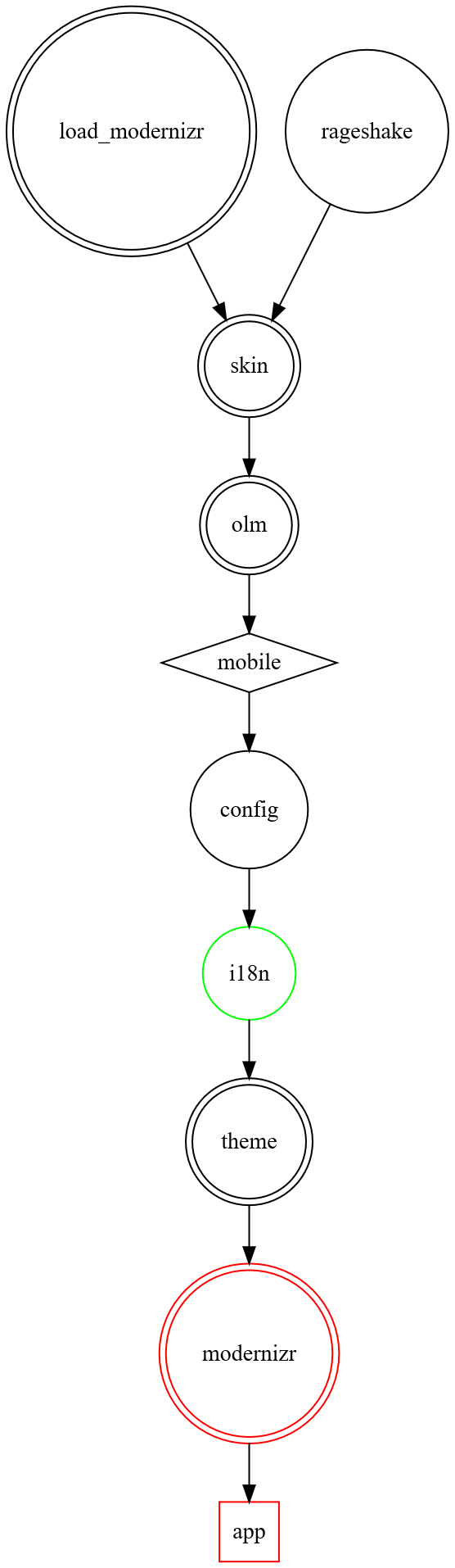
|
||||
|
||||
@@ -15,10 +12,10 @@ Current more parallel flow:
|
||||
digraph G {
|
||||
node [shape=box];
|
||||
|
||||
subgraph cluster_0 {
|
||||
color=orange;
|
||||
node [style=filled];
|
||||
label = "index.ts";
|
||||
subgraph cluster_0 {
|
||||
color=orange;
|
||||
node [style=filled];
|
||||
label = "index.ts";
|
||||
|
||||
entrypoint, s0, ready [shape=point];
|
||||
rageshake, config, i18n, theme, skin, olm [shape=parallelogram];
|
||||
@@ -52,38 +49,33 @@ label = "index.ts";
|
||||
skin -> ready [color=red];
|
||||
theme -> ready [color=red];
|
||||
i18n -> ready [color=red];
|
||||
}
|
||||
|
||||
}
|
||||
|
||||
subgraph cluster_1 {
|
||||
color = green;
|
||||
node [style=filled];
|
||||
label = "init.tsx";
|
||||
subgraph cluster_1 {
|
||||
color = green;
|
||||
node [style=filled];
|
||||
label = "init.tsx";
|
||||
|
||||
ready -> loadApp;
|
||||
loadApp -> matrixchat;
|
||||
|
||||
}
|
||||
}
|
||||
}
|
||||
</code></pre>
|
||||
|
||||
</p>
|
||||
</details>
|
||||
|
||||
Key:
|
||||
|
||||
- Parallelogram: async/await task
|
||||
- Box: sync task
|
||||
- Diamond: conditional branch
|
||||
- Egg: user interaction
|
||||
- Blue arrow: async task is allowed to settle but allowed to fail
|
||||
- Red arrow: async task success is asserted
|
||||
+ Parallelogram: async/await task
|
||||
+ Box: sync task
|
||||
+ Diamond: conditional branch
|
||||
+ Egg: user interaction
|
||||
+ Blue arrow: async task is allowed to settle but allowed to fail
|
||||
+ Red arrow: async task success is asserted
|
||||
|
||||
Notes:
|
||||
|
||||
- A task begins when all its dependencies (arrows going into it) are fulfilled.
|
||||
- The success of setting up rageshake is never asserted, element-web has a fallback path for running without IDB (and thus rageshake).
|
||||
- Everything is awaited to be settled before the Modernizr check, to allow it to make use of things like i18n if they are successful.
|
||||
+ A task begins when all its dependencies (arrows going into it) are fulfilled.
|
||||
+ The success of setting up rageshake is never asserted, element-web has a fallback path for running without IDB (and thus rageshake).
|
||||
+ Everything is awaited to be settled before the Modernizr check, to allow it to make use of things like i18n if they are successful.
|
||||
|
||||
Underlying dependencies:
|
||||

|
||||
|
||||
@@ -1,29 +0,0 @@
|
||||
# Beta features
|
||||
|
||||
Beta features are features that are not ready for production yet but the team
|
||||
wants more people to try the features and give feedback on them.
|
||||
|
||||
Before a feature gets into its beta phase, it is often a labs feature (see
|
||||
[Labs](https://github.com/vector-im/element-web/blob/develop/docs/labs.md)).
|
||||
|
||||
**Be warned! Beta features may not be completely finalised or stable!**
|
||||
|
||||
## Threaded Messaging (`feature_thread`)
|
||||
|
||||
Threading allows users to branch out a new conversation from the main timeline
|
||||
of a room. This is particularly useful in high traffic rooms where multiple
|
||||
conversations can happen in parallel or when a single discussion might stretch
|
||||
over a very long period of time.
|
||||
|
||||
Threads can be access by clicking their summary below the root event on the room
|
||||
timeline. Users can find a comprehensive list of threads by click the icon on
|
||||
the room header button.
|
||||
|
||||
This feature might work in degraded mode if the homeserver a user is connected
|
||||
to does not advertise support for the unstable feature `org.matrix.msc3440` when
|
||||
calling the `/versions` API endpoint.
|
||||
|
||||
## Video rooms (`feature_video_rooms`)
|
||||
|
||||
Enables support for creating and joining video rooms, which are persistent video
|
||||
chats that users can jump in and out of.
|
||||
@@ -1,81 +0,0 @@
|
||||
# Choosing an issue to work on
|
||||
|
||||
So you want to contribute to Element Web? That is awesome!
|
||||
|
||||
If you're not sure where to start, make sure you read
|
||||
[CONTRIBUTING.md](../CONTRIBUTING.md), and the
|
||||
[Development](../README.md#development) and
|
||||
[Setting up a dev environment](../README.md#setting-up-a-dev-environment)
|
||||
sections of the README.
|
||||
|
||||
Maybe you've got something specific you'd like to work on? If so, make sure you
|
||||
create an issue and
|
||||
[discuss it with the developers](https://matrix.to/#/#element-dev:matrix.org)
|
||||
before you put a lot of time into it.
|
||||
|
||||
If you're looking for inspiration on where to start, keep reading!
|
||||
|
||||
## Finding a good first issue
|
||||
|
||||
All the issues for Element Web live in the
|
||||
[element-web](https://github.com/vector-im/element-web) repository, including
|
||||
issues that actually need fixing in `matrix-react-sdk` or one of the related
|
||||
repos.
|
||||
|
||||
The first place to look is for
|
||||
[issues tagged with "good first issue"](https://github.com/vector-im/element-web/issues?q=is%3Aopen+is%3Aissue+label%3A%22good+first+issue%22).
|
||||
|
||||
Look through that list and find something that catches your interest. If there
|
||||
is nothing, there, try gently asking in
|
||||
[#element-dev:matrix.org](https://matrix.to/#/#element-dev:matrix.org) for
|
||||
someone to add something.
|
||||
|
||||
When you're looking through the list, here are some things that might make an
|
||||
issue a **GOOD** choice:
|
||||
|
||||
- It is a problem or feature you care about.
|
||||
- It concerns a type of code you know a little about.
|
||||
- You think you can understand what's needed.
|
||||
- It already has approval from Element Web's designers (look for comments from
|
||||
members of the
|
||||
[Product](https://github.com/orgs/vector-im/teams/product/members) or
|
||||
[Design](https://github.com/orgs/vector-im/teams/design/members) teams).
|
||||
|
||||
Here are some things that might make it a **BAD** choice:
|
||||
|
||||
- You don't understand it (maybe add a comment asking a clarifying question).
|
||||
- It sounds difficult, or is part of a larger change you don't know about.
|
||||
- **It is tagged with `X-Needs-Design` or `X-Needs-Product`.**
|
||||
|
||||
**Element Web's Design and Product teams tend to be very busy**, so if you make
|
||||
changes that require approval from one of those teams, you will probably have
|
||||
to wait a very long time. The kind of change affected by this is changing the
|
||||
way the product works, or how it looks in a specific area.
|
||||
|
||||
## Finding a good second issue
|
||||
|
||||
Once you've fixed a few small things, you can consider taking on something a
|
||||
little larger. This should mostly be driven by what you find interesting, but
|
||||
you may also find the
|
||||
[Help Wanted](https://github.com/vector-im/element-web/issues?q=is%3Aissue+is%3Aopen+sort%3Aupdated-desc+label%3A%22Help+Wanted%22)
|
||||
label useful.
|
||||
|
||||
Note that the same comment applies as in the previous section: if you want to
|
||||
work in areas that require Design or Product approval, you should look to join
|
||||
existing work that is already designed, as getting approval for your random
|
||||
change will take a very long time.
|
||||
|
||||
So you should **always avoid issues tagged with `X-Needs-Design` or
|
||||
`X-Needs-Product`**.
|
||||
|
||||
## Asking questions
|
||||
|
||||
Feel free to ask questions about the issues or how to choose them in the
|
||||
[#element-dev:matrix.org](https://matrix.to/#/#element-dev:matrix.org) Matrix
|
||||
room.
|
||||
|
||||
## Thank you
|
||||
|
||||
Thank you again for contributing to Element Web. We welcome your contributions
|
||||
and are grateful for your work. We find working on it great fun, and we hope
|
||||
you do too!
|
||||
52
docs/conferencing.md
Normal file
52
docs/conferencing.md
Normal file
@@ -0,0 +1,52 @@
|
||||
# VoIP Conferencing
|
||||
|
||||
This is a draft proposal for a naive voice/video conferencing implementation for
|
||||
Matrix clients. There are many possible conferencing architectures possible for
|
||||
Matrix (Multipoint Conferencing Unit (MCU); Stream Forwarding Unit (SFU); Peer-
|
||||
to-Peer mesh (P2P), etc; events shared in the group room; events shared 1:1;
|
||||
possibly even out-of-band signalling).
|
||||
|
||||
This is a starting point for a naive MCU implementation which could provide one
|
||||
possible Matrix-wide solution in future, which retains backwards compatibility
|
||||
with standard 1:1 calling.
|
||||
|
||||
* A client chooses to initiate a conference for a given room by starting a
|
||||
voice or video call with a 'conference focus' user. This is a virtual user
|
||||
(typically Application Service) which implements a conferencing bridge. It
|
||||
isn't defined how the client discovers or selects this user.
|
||||
|
||||
* The conference focus user MUST join the room in which the client has
|
||||
initiated the conference - this may require the client to invite the
|
||||
conference focus user to the room, depending on the room's `join_rules`. The
|
||||
conference focus user needs to be in the room to let the bridge eject users
|
||||
from the conference who have left the room in which it was initiated, and aid
|
||||
discovery of the conference by other users in the room. The bridge
|
||||
identifies the room to join based on the user ID by which it was invited.
|
||||
The format of this identifier is implementation dependent for now.
|
||||
|
||||
* If a client leaves the group chat room, they MUST be ejected from the
|
||||
conference. If a client leaves the 1:1 room with the conference focus user,
|
||||
they SHOULD be ejected from the conference.
|
||||
|
||||
* For now, rooms can contain multiple conference focus users - it's left to
|
||||
user or client implementation to select which to converge on. In future this
|
||||
could be mediated using a state event (e.g. `im.vector.call.mcu`), but we
|
||||
can't do that right now as by default normal users can't set arbitrary state
|
||||
events on a room.
|
||||
|
||||
* To participate in the conference, other clients initiates a standard 1:1
|
||||
voice or video call to the conference focus user.
|
||||
|
||||
* For best UX, clients SHOULD show the ongoing voice/video call in the UI
|
||||
context of the group room rather than 1:1 with the focus user. If a client
|
||||
recognises a conference user present in the room, it MAY chose to highlight
|
||||
this in the UI (e.g. with a "conference ongoing" notification, to aid
|
||||
discovery). Clients MAY hide the 1:1 room with the focus user (although in
|
||||
future this room could be used for floor control or other direct
|
||||
communication with the conference focus)
|
||||
|
||||
* When all users have left the conference, the 'conference focus' user SHOULD
|
||||
leave the room.
|
||||
|
||||
* If a conference focus user joins a room but does not receive a 1:1 voice or
|
||||
video call, it SHOULD time out after a period of time and leave the room.
|
||||
701
docs/config.md
701
docs/config.md
@@ -1,478 +1,143 @@
|
||||
# Configuration
|
||||
|
||||
You can configure the app by copying `config.sample.json` to `config.json` or `config.$domain.json` and customising it.
|
||||
Element will attempt to load first `config.$domain.json` and if it fails `config.json`. This mechanism allows different
|
||||
configuration options depending on if you're hitting e.g. `app1.example.com` or `app2.example.com`. Configs are not mixed
|
||||
in any way, it either entirely uses the domain config, or entirely uses `config.json`.
|
||||
|
||||
The possible configuration options are described here. If you run into issues, please visit
|
||||
[#element-web:matrix.org](https://matrix.to/#/#element-web:matrix.org) on Matrix.
|
||||
|
||||
For a good example of a production-tuned config, see https://app.element.io/config.json
|
||||
|
||||
For an example of a development/beta-tuned config, see https://develop.element.io/config.json
|
||||
|
||||
After changing the config, the app will need to be reloaded. For web browsers this is a simple page refresh, however
|
||||
for the desktop app the application will need to be exited fully (including via the task tray) and re-started.
|
||||
|
||||
## Homeserver configuration
|
||||
|
||||
In order for Element to even start you will need to tell it what homeserver to connect to _by default_. Users will be
|
||||
able to use a different homeserver if they like, though this can be disabled with `"disable_custom_urls": true` in your
|
||||
config.
|
||||
|
||||
One of the following options **must** be supplied:
|
||||
|
||||
1. `default_server_config`: The preferred method of setting the homeserver connection information. Simply copy/paste
|
||||
your [`/.well-known/matrix/client`](https://spec.matrix.org/latest/client-server-api/#getwell-knownmatrixclient)
|
||||
into this field. For example:
|
||||
```json
|
||||
{
|
||||
"default_server_config": {
|
||||
"m.homeserver": {
|
||||
"base_url": "https://matrix-client.matrix.org"
|
||||
},
|
||||
"m.identity_server": {
|
||||
"base_url": "https://vector.im"
|
||||
}
|
||||
}
|
||||
}
|
||||
```
|
||||
2. `default_server_name`: A different method of connecting to the homeserver by looking up the connection information
|
||||
using `.well-known`. When using this option, simply use your server's domain name (the part at the end of user IDs):
|
||||
`"default_server_name": "matrix.org"`
|
||||
3. <del>`default_hs_url` and (optionally) `default_is_url`</del>: A very deprecated method of defining the connection
|
||||
information. These are the same values seen as `base_url` in the `default_server_config` example, with `default_is_url`
|
||||
being optional.
|
||||
|
||||
If a combination of these three methods is used then Element will fail to load. This is because it is unclear which
|
||||
should be considered "first".
|
||||
|
||||
## Labs flags
|
||||
|
||||
Labs flags are optional, typically beta or in-development, features that can be turned on or off. The full range of
|
||||
labs flags and their development status are documented [here](./labs.md). If interested, the feature flag process is
|
||||
documented [here](./feature-flags.md).
|
||||
|
||||
To force a labs flag on or off, use the following:
|
||||
|
||||
```json
|
||||
{
|
||||
"features": {
|
||||
"feature_you_want_to_turn_on": true,
|
||||
"feature_you_want_to_keep_off": false
|
||||
}
|
||||
}
|
||||
```
|
||||
|
||||
If you'd like the user to be able to self-select which labs flags they can turn on, add `"show_labs_settings": true` to
|
||||
your config. This will turn on the tab in user settings.
|
||||
|
||||
**Note**: Feature support varies release-by-release. Check the [labs flag documentation](./labs.md) frequently if enabling
|
||||
the functionality.
|
||||
|
||||
## Default settings
|
||||
|
||||
Some settings additionally support being specified at the config level to affect the user experience of your Element Web
|
||||
instance. As of writing those settings are not fully documented, however a few are:
|
||||
|
||||
1. `default_federate`: When `true` (default), rooms will be marked as "federatable" during creation. Typically this setting
|
||||
shouldn't be used as the federation capabilities of a room **cannot** be changed after the room is created.
|
||||
2. `default_country_code`: An optional ISO 3166 alpha2 country code (eg: `GB`, the default) to use when showing phone number
|
||||
inputs.
|
||||
3. `room_directory`: Optionally defines how the room directory component behaves. Currently only a single property, `servers`
|
||||
is supported to add additional servers to the dropdown. For example:
|
||||
```json
|
||||
{
|
||||
"room_directory": {
|
||||
"servers": ["matrix.org", "example.org"]
|
||||
}
|
||||
}
|
||||
```
|
||||
4. `setting_defaults`: Optional configuration for settings which are not described by this document and support the `config`
|
||||
level. This list is incomplete. For example:
|
||||
```json
|
||||
{
|
||||
"setting_defaults": {
|
||||
"MessageComposerInput.showStickersButton": false,
|
||||
"MessageComposerInput.showPollsButton": false
|
||||
}
|
||||
}
|
||||
```
|
||||
These values will take priority over the hardcoded defaults for the settings. For a list of available settings, see
|
||||
[Settings.tsx](https://github.com/matrix-org/matrix-react-sdk/blob/develop/src/settings/Settings.tsx).
|
||||
|
||||
## Customisation & branding
|
||||
|
||||
<!-- Author's note: https://english.stackexchange.com/questions/570116/alternative-ways-of-saying-white-labeled -->
|
||||
|
||||
Element supports some customisation of the user experience through various branding and theme options. While it doesn't support
|
||||
complete re-branding/private labeling, a more personalised experience can be achieved for your users.
|
||||
|
||||
1. `default_theme`: Typically either `light` (the default) or `dark`, this is the optional name of the colour theme to use.
|
||||
If using custom themes, this can be a theme name from that as well.
|
||||
2. `default_device_display_name`: Optional public name for devices created by login and registration, instead of the default
|
||||
templated string. Note that this option does not support templating, currently.
|
||||
3. `brand`: Optional name for the app. Defaults to `Element`. This is used throughout the application in various strings/locations.
|
||||
4. `permalink_prefix`: An optional URL pointing to an Element Web deployment. For example, `https://app.element.io`. This will
|
||||
change all permalinks (via the "Share" menus) to point at the Element Web deployment rather than `matrix.to`.
|
||||
5. `desktop_builds`: Optional. Where the desktop builds for the application are, if available. This is explained in more detail
|
||||
down below.
|
||||
6. `mobile_builds`: Optional. Like `desktop_builds`, except for the mobile apps. Also described in more detail down below.
|
||||
7. `mobile_guide_toast`: When `true` (default), users accessing the Element Web instance from a mobile device will be prompted to
|
||||
download the app instead.
|
||||
8. `update_base_url`: For the desktop app only, the URL where to acquire update packages. If specified, must be a path to a directory
|
||||
containing `macos` and `win32` directories, with the update packages within. Defaults to `https://packages.element.io/desktop/update/`
|
||||
in production.
|
||||
9. `map_style_url`: Map tile server style URL for location sharing. e.g. `https://api.maptiler.com/maps/streets/style.json?key=YOUR_KEY_GOES_HERE`
|
||||
This setting is ignored if your homeserver provides `/.well-known/matrix/client` in its well-known location, and the JSON file
|
||||
at that location has a key `m.tile_server` (or the unstable version `org.matrix.msc3488.tile_server`). In this case, the
|
||||
configuration found in the well-known location is used instead.
|
||||
10. `welcome_user_id`: An optional user ID to start a DM with after creating an account. Defaults to nothing (no DM created).
|
||||
11. `custom_translations_url`: An optional URL to allow overriding of translatable strings. The JSON file must be in a format of
|
||||
`{"affected string": {"languageCode": "new string"}}`. See https://github.com/matrix-org/matrix-react-sdk/pull/7886 for details.
|
||||
12. `branding`: Options for configuring various assets used within the app. Described in more detail down below.
|
||||
13. `embedded_pages`: Further optional URLs for various assets used within the app. Described in more detail down below.
|
||||
14. `disable_3pid_login`: When `false` (default), **enables** the options to log in with email address or phone number. Set to
|
||||
`true` to hide these options.
|
||||
15. `disable_login_language_selector`: When `false` (default), **enables** the language selector on the login pages. Set to `true`
|
||||
to hide this dropdown.
|
||||
16. `disable_guests`: When `false` (default), **enable** guest-related functionality (peeking/previewing rooms, etc) for unregistered
|
||||
users. Set to `true` to disable this functionality.
|
||||
17. `user_notice`: Optional notice to show to the user, e.g. for sunsetting a deployment and pushing users to move in their own time.
|
||||
Takes a configuration object as below:
|
||||
1. `title`: Required. Title to show at the top of the notice.
|
||||
2. `description`: Required. The description to use for the notice.
|
||||
3. `show_once`: Optional. If true then the notice will only be shown once per device.
|
||||
|
||||
### `desktop_builds` and `mobile_builds`
|
||||
|
||||
These two options describe the various availability for the application. When the app needs to promote an alternative download,
|
||||
such as trying to get the user to use an Android app or the desktop app for encrypted search, the config options will be looked
|
||||
at to see if the link should be to somewhere else.
|
||||
|
||||
Starting with `desktop_builds`, the following subproperties are available:
|
||||
|
||||
1. `available`: Required. When `true`, the desktop app can be downloaded from somewhere.
|
||||
2. `logo`: Required. A URL to a logo (SVG), intended to be shown at 24x24 pixels.
|
||||
3. `url`: Required. The download URL for the app. This is used as a hyperlink.
|
||||
|
||||
When `desktop_builds` is not specified at all, the app will assume desktop downloads are available from https://element.io
|
||||
|
||||
For `mobile_builds`, the following subproperties are available:
|
||||
|
||||
1. `ios`: The URL for where to download the iOS app, such as an App Store link. When explicitly `null`, the app will assume the
|
||||
iOS app cannot be downloaded. When not provided, the default Element app will be assumed available.
|
||||
2. `android`: The same as `ios`, except for Android instead.
|
||||
3. `fdroid`: The same as `android`, except for FDroid instead.
|
||||
|
||||
Together, these two options might look like the following in your config:
|
||||
|
||||
```json
|
||||
{
|
||||
"desktop_builds": {
|
||||
"available": true,
|
||||
"logo": "https://example.org/assets/logo-small.svg",
|
||||
"url": "https://example.org/not_element/download"
|
||||
},
|
||||
"mobile_builds": {
|
||||
"ios": null,
|
||||
"android": "https://example.org/not_element/android",
|
||||
"fdroid": "https://example.org/not_element/fdroid"
|
||||
}
|
||||
}
|
||||
```
|
||||
|
||||
### `branding` and `embedded_pages`
|
||||
|
||||
These two options point at various URLs for changing different internal pages (like the welcome page) and logos within the
|
||||
application.
|
||||
|
||||
Starting with `branding`, the following subproperties are available:
|
||||
|
||||
1. `welcome_background_url`: When a string, the URL for the full-page image background of the login, registration, and welcome
|
||||
pages. This property can additionally be an array to have the app choose an image at random from the selections.
|
||||
2. `auth_header_logo_url`: A URL to the logo used on the login, registration, etc pages.
|
||||
3. `auth_footer_links`: A list of links to add to the footer during login, registration, etc. Each entry must have a `text` and
|
||||
`url` property.
|
||||
|
||||
`embedded_pages` can be configured as such:
|
||||
|
||||
1. `welcome_url`: A URL to an HTML page to show as a welcome page (landing on `#/welcome`). When not specified, the default
|
||||
`welcome.html` that ships with Element will be used instead.
|
||||
2. `home_url`: A URL to an HTML page to show within the app as the "home" page. When the app doesn't have a room/screen to
|
||||
show the user, it will use the home page instead. The home page is additionally accessible from the user menu. By default,
|
||||
no home page is set and therefore a hardcoded landing screen is used. More documentation and examples are [here](./custom-home.md).
|
||||
3. `login_for_welcome`: When `true` (default `false`), the app will use the login form as a welcome page instead of the welcome
|
||||
page itself. This disables use of `welcome_url` and all welcome page functionality.
|
||||
|
||||
Together, the options might look like this in your config:
|
||||
|
||||
```json
|
||||
{
|
||||
"branding": {
|
||||
"welcome_background_url": "https://example.org/assets/background.jpg",
|
||||
"auth_header_logo_url": "https://example.org/assets/logo.svg",
|
||||
"auth_footer_links": [
|
||||
{ "text": "FAQ", "url": "https://example.org/faq" },
|
||||
{ "text": "Donate", "url": "https://example.org/donate" }
|
||||
]
|
||||
},
|
||||
"embedded_pages": {
|
||||
"welcome_url": "https://example.org/assets/welcome.html",
|
||||
"home_url": "https://example.org/assets/home.html"
|
||||
}
|
||||
}
|
||||
```
|
||||
|
||||
Note that `index.html` also has an og:image meta tag that is set to an image hosted on element.io. This is the image used if
|
||||
links to your copy of Element appear in some websites like Facebook, and indeed Element itself. This has to be static in the HTML
|
||||
and an absolute URL (and HTTP rather than HTTPS), so it's not possible for this to be an option in config.json. If you'd like to
|
||||
change it, you can build Element, but run `RIOT_OG_IMAGE_URL="http://example.com/logo.png" yarn build`. Alternatively, you can edit
|
||||
the `og:image` meta tag in `index.html` directly each time you download a new version of Element.
|
||||
|
||||
## SSO setup
|
||||
|
||||
When Element is deployed alongside a homeserver with SSO-only login, some options to ease the user experience might want to be set:
|
||||
|
||||
1. `logout_redirect_url`: Optional URL to redirect the user to after they have logged out. Some SSO systems support a page that the
|
||||
user can be sent to in order to log them out of that system too, making logout symmetric between Element and the SSO system.
|
||||
2. `sso_redirect_options`: Options to define how to handle unauthenticated users. If the object contains `"immediate": true`, then
|
||||
all unauthenticated users will be automatically redirected to the SSO system to start their login. If instead you'd only like to
|
||||
have users which land on the welcome page to be redirected, use `"on_welcome_page": true`. As an example:
|
||||
```json
|
||||
{
|
||||
"sso_redirect_options": {
|
||||
"immediate": false,
|
||||
"on_welcome_page": true
|
||||
}
|
||||
}
|
||||
```
|
||||
It is most common to use the `immediate` flag instead of `on_welcome_page`.
|
||||
|
||||
## VoIP / Jitsi calls
|
||||
|
||||
Currently, Element uses Jitsi to offer conference calls in rooms, with an experimental Element Call implementation in the works.
|
||||
A set of defaults are applied, pointing at our Jitsi and Element Call instances, to ensure conference calling works, however you
|
||||
can point Element at your own if you prefer.
|
||||
|
||||
More information about the Jitsi setup can be found [here](./jitsi.md).
|
||||
|
||||
The VoIP and Jitsi options are:
|
||||
|
||||
1. `jitsi`: Optional configuration for how to start Jitsi conferences. Currently can only contain a single `preferred_domain`
|
||||
value which points at the domain of the Jitsi instance. Defaults to `meet.element.io`. This is _not_ used if the Jitsi widget
|
||||
was created by an integration manager, or if the homeserver provides Jitsi information in `/.well-known/matrix/client`. For
|
||||
example:
|
||||
```json
|
||||
{
|
||||
"jitsi": {
|
||||
"preferred_domain": "meet.jit.si"
|
||||
}
|
||||
}
|
||||
```
|
||||
2. `jitsi_widget`: Optional configuration for the built-in Jitsi widget. Currently can only contain a single `skip_built_in_welcome_screen`
|
||||
value, denoting whether the "Join Conference" button should be shown. When `true` (default `false`), Jitsi calls will skip to
|
||||
the call instead of having a screen with a single button on it. This is most useful if the Jitsi instance being used already
|
||||
has a landing page for users to test audio and video before joining the call, otherwise users will automatically join the call.
|
||||
For example:
|
||||
```json
|
||||
{
|
||||
"jitsi_widget": {
|
||||
"skip_built_in_welcome_screen": true
|
||||
}
|
||||
}
|
||||
```
|
||||
3. `voip`: Optional configuration for various VoIP features. Currently can only contain a single `obey_asserted_identity` value to
|
||||
send MSC3086-style asserted identity messages during VoIP calls in the room corresponding to the asserted identity. This _must_
|
||||
only be set in trusted environments. The option defaults to `false`. For example:
|
||||
```json
|
||||
{
|
||||
"voip": {
|
||||
"obey_asserted_identity": false
|
||||
}
|
||||
}
|
||||
```
|
||||
4. `widget_build_url`: Optional URL to have Element make a request to when a user presses the voice/video call buttons in the app,
|
||||
if a call would normally be started by the action. The URL will be called with a `roomId` query parameter to identify the room
|
||||
being called in. The URL must respond with a JSON object similar to the following:
|
||||
```json
|
||||
{
|
||||
"widget_id": "$arbitrary_string",
|
||||
"widget": {
|
||||
"creatorUserId": "@user:example.org",
|
||||
"id": "$the_same_widget_id",
|
||||
"type": "m.custom",
|
||||
"waitForIframeLoad": true,
|
||||
"name": "My Widget Name Here",
|
||||
"avatar_url": "mxc://example.org/abc123",
|
||||
"url": "https://example.org/widget.html",
|
||||
"data": {
|
||||
"title": "Subtitle goes here"
|
||||
}
|
||||
},
|
||||
"layout": {
|
||||
"container": "top",
|
||||
"index": 0,
|
||||
"width": 65,
|
||||
"height": 50
|
||||
}
|
||||
}
|
||||
```
|
||||
The `widget` is the `content` of a normal widget state event. The `layout` is the layout specifier for the widget being created,
|
||||
as defined by the `io.element.widgets.layout` state event.
|
||||
5. `audio_stream_url`: Optional URL to pass to Jitsi to enable live streaming. This option is considered experimental and may be removed
|
||||
at any time without notice.
|
||||
6. `element_call`: Optional configuration for native group calls using Element Call, with the following subkeys:
|
||||
- `url`: The URL of the Element Call instance to use for native group calls. This option is considered experimental
|
||||
and may be removed at any time without notice. Defaults to `https://call.element.io`.
|
||||
- `use_exclusively`: A boolean specifying whether Element Call should be used exclusively as the only VoIP stack in
|
||||
the app, removing the ability to start legacy 1:1 calls or Jitsi calls. Defaults to `false`.
|
||||
- `participant_limit`: The maximum number of users who can join a call; if
|
||||
this number is exceeded, the user will not be able to join a given call.
|
||||
- `brand`: Optional name for the app. Defaults to `Element Call`. This is
|
||||
used throughout the application in various strings/locations.
|
||||
|
||||
## Bug reporting
|
||||
|
||||
If you run your own rageshake server to collect bug reports, the following options may be of interest:
|
||||
|
||||
1. `bug_report_endpoint_url`: URL for where to submit rageshake logs to. Rageshakes include feedback submissions and bug reports. When
|
||||
not present in the config, the app will disable all rageshake functionality. Set to `https://element.io/bugreports/submit` to submit
|
||||
rageshakes to us, or use your own rageshake server.
|
||||
2. `uisi_autorageshake_app`: If a user has enabled the "automatically send debug logs on decryption errors" flag, this option will be sent
|
||||
alongside the rageshake so the rageshake server can filter them by app name. By default, this will be `element-web`, as with any other
|
||||
rageshake submitted by the app.
|
||||
|
||||
If you are using the element.io rageshake server, please set this to `element-auto-uisi` so we can better filter them.
|
||||
|
||||
If you would like to use [Sentry](https://sentry.io/) for rageshake data, add a `sentry` object to your config with the following values:
|
||||
|
||||
1. `dsn`: The Sentry [DSN](https://docs.sentry.io/product/sentry-basics/dsn-explainer/).
|
||||
2. `environment`: Optional [environment](https://docs.sentry.io/product/sentry-basics/environments/) to pass to Sentry.
|
||||
|
||||
For example:
|
||||
|
||||
```json
|
||||
{
|
||||
"sentry": {
|
||||
"dsn": "dsn-goes-here",
|
||||
"environment": "production"
|
||||
}
|
||||
}
|
||||
```
|
||||
|
||||
## Integration managers
|
||||
|
||||
Integration managers are embedded applications within Element to help the user configure bots, bridges, and widgets. An integration manager
|
||||
is a separate piece of software not typically available with your homeserver. To disable integrations, set the options defined here to `null`.
|
||||
|
||||
1. `integrations_ui_url`: The UI URL for the integration manager.
|
||||
2. `integrations_rest_url`: The REST interface URL for the integration manager.
|
||||
3. `integrations_widgets_urls`: A list of URLs the integration manager uses to host widgets.
|
||||
|
||||
If you would like to use Scalar, the integration manager maintained by Element, the following options would apply:
|
||||
|
||||
```json
|
||||
{
|
||||
"integrations_ui_url": "https://scalar.vector.im/",
|
||||
"integrations_rest_url": "https://scalar.vector.im/api",
|
||||
"integrations_widgets_urls": [
|
||||
"https://scalar.vector.im/_matrix/integrations/v1",
|
||||
"https://scalar.vector.im/api",
|
||||
"https://scalar-staging.vector.im/_matrix/integrations/v1",
|
||||
"https://scalar-staging.vector.im/api",
|
||||
"https://scalar-staging.riot.im/scalar/api"
|
||||
]
|
||||
}
|
||||
```
|
||||
|
||||
## Administrative options
|
||||
|
||||
If you would like to include a custom message when someone is reporting an event, set the following Markdown-capable field:
|
||||
|
||||
```json
|
||||
{
|
||||
"report_event": {
|
||||
"admin_message_md": "Please be sure to review our [terms of service](https://example.org/terms) before reporting a message."
|
||||
}
|
||||
}
|
||||
```
|
||||
|
||||
To add additional "terms and conditions" links throughout the app, use the following template:
|
||||
|
||||
```json
|
||||
{
|
||||
"terms_and_conditions_links": [{ "text": "Code of conduct", "url": "https://example.org/code-of-conduct" }]
|
||||
}
|
||||
```
|
||||
|
||||
## Analytics
|
||||
|
||||
To configure [Posthog](https://posthog.com/), add the following under `posthog` in your config:
|
||||
|
||||
1. `api_host`: The hostname of the posthog server.
|
||||
2. `project_api_key`: The API key from posthog.
|
||||
|
||||
When these configuration options are not present,
|
||||
analytics are deemed impossible and the user won't be asked to opt in to the system.
|
||||
|
||||
There are additional root-level options which can be specified:
|
||||
|
||||
1. `analytics_owner`: the company name used in dialogs talking about analytics - this defaults to `brand`,
|
||||
and is useful when the provider of analytics is different from the provider of the Element instance.
|
||||
2. `privacy_policy_url`: URL to the privacy policy including the analytics collection policy.
|
||||
|
||||
## Server hosting links
|
||||
|
||||
If you would like to encourage matrix.org users to sign up for a service like [Element Matrix Services](https://element.io/matrix-services/server-hosting),
|
||||
the following configuration options can be set. Note that if the options are missing from the configuration then the hosting prompts
|
||||
will not be shown to the user.
|
||||
|
||||
1. `hosting_signup_link`: Optional URL to link the user to when talking about "Upgrading your account". Will contain a query parameter
|
||||
of `utm_campaign` to denote which link the user clicked on within the app. Only ever applies to matrix.org users specifically.
|
||||
2. `host_signup`: Optional configuration for an account importer to your hosting platform. The API surface of this is not documented
|
||||
at the moment, but can be configured with the following subproperties:
|
||||
1. `brand`: The brand name to use.
|
||||
2. `url`: The iframe URL for the importer.
|
||||
3. `domains`: The homeserver domains to show the importer to.
|
||||
4. `cookie_policy_url`: The URL to the cookie policy for the importer.
|
||||
5. `privacy_policy_url`: The URL to the privacy policy for the importer.
|
||||
6. `terms_of_service_url`: The URL to the terms of service for the importer.
|
||||
|
||||
If you're looking to mirror a setup from our production/development environments, the following config should be used:
|
||||
|
||||
```json
|
||||
{
|
||||
"hosting_signup_link": "https://element.io/matrix-services?utm_source=element-web&utm_medium=web",
|
||||
"host_signup": {
|
||||
"brand": "Element Home",
|
||||
"domains": ["matrix.org"],
|
||||
"url": "https://ems.element.io/element-home/in-app-loader",
|
||||
"cookie_policy_url": "https://element.io/cookie-policy",
|
||||
"privacy_policy_url": "https://element.io/privacy",
|
||||
"terms_of_service_url": "https://element.io/terms-of-service"
|
||||
}
|
||||
}
|
||||
```
|
||||
|
||||
## Miscellaneous
|
||||
|
||||
Element supports other options which don't quite fit into other sections of this document.
|
||||
|
||||
To configure whether presence UI is shown for a given homeserver, set `enable_presence_by_hs_url`. It is recommended to
|
||||
set this value to the following at a minimum:
|
||||
|
||||
```json
|
||||
{
|
||||
"enable_presence_by_hs_url": {
|
||||
"https://matrix.org": false,
|
||||
"https://matrix-client.matrix.org": false
|
||||
}
|
||||
}
|
||||
```
|
||||
|
||||
## Identity servers
|
||||
Configuration
|
||||
=============
|
||||
|
||||
You can configure the app by copying `config.sample.json` to
|
||||
`config.json` and customising it:
|
||||
|
||||
For a good example, see https://develop.element.io/config.json.
|
||||
|
||||
1. `default_server_config` sets the default homeserver and identity server URL for
|
||||
Element to use. The object is the same as returned by [https://<server_name>/.well-known/matrix/client](https://matrix.org/docs/spec/client_server/latest.html#get-well-known-matrix-client),
|
||||
with added support for a `server_name` under the `m.homeserver` section to display
|
||||
a custom homeserver name. Alternatively, the config can contain a `default_server_name`
|
||||
instead which is where Element will go to get that same object, although this option is
|
||||
deprecated - see the `.well-known` link above for more information on using this option.
|
||||
Note that the `default_server_name` is used to get a complete server configuration
|
||||
whereas the `server_name` in the `default_server_config` is for display purposes only.
|
||||
* *Note*: The URLs can also be individually specified as `default_hs_url` and
|
||||
`default_is_url`, however these are deprecated. They are maintained for backwards
|
||||
compatibility with older configurations. `default_is_url` is respected only
|
||||
if `default_hs_url` is used.
|
||||
* Element will fail to load if a mix of `default_server_config`, `default_server_name`, or
|
||||
`default_hs_url` is specified. When multiple sources are specified, it is unclear
|
||||
which should take priority and therefore the application cannot continue.
|
||||
* As of Element 1.4.0, identity servers are optional. See [Identity servers](#identity-servers) below.
|
||||
1. `features`: Lookup of optional features that may be force-enabled (`true`) or force-disabled (`false`).
|
||||
When features are not listed here, their defaults will be used, and users can turn them on/off if `showLabsSettings`
|
||||
allows them to. The available optional experimental features vary from release to release and are
|
||||
[documented](labs.md). The feature flag process is [documented](feature-flags.md) as well.
|
||||
1. `showLabsSettings`: Shows the "labs" tab of user settings. Useful to allow users to turn on experimental features
|
||||
they might not otherwise have access to.
|
||||
1. `brand`: String to pass to your homeserver when configuring email notifications, to let the
|
||||
homeserver know what email template to use when talking to you.
|
||||
1. `branding`: Configures various branding and logo details, such as:
|
||||
1. `welcomeBackgroundUrl`: An image to use as a wallpaper outside the app
|
||||
during authentication flows. If an array is passed, an image is chosen randomly for each visit.
|
||||
1. `authHeaderLogoUrl`: An logo image that is shown in the header during
|
||||
authentication flows
|
||||
1. `authFooterLinks`: a list of links to show in the authentication page footer:
|
||||
`[{"text": "Link text", "url": "https://link.target"}, {"text": "Other link", ...}]`
|
||||
1. `reportEvent`: Configures the dialog for reporting content to the homeserver
|
||||
admin.
|
||||
1. `adminMessageMD`: An extra message to show on the reporting dialog to
|
||||
mention homeserver-specific policies. Accepts Markdown.
|
||||
1. `integrations_ui_url`: URL to the web interface for the integrations server. The integrations
|
||||
server is not Element and normally not your homeserver either. The integration server settings
|
||||
may be left blank to disable integrations.
|
||||
1. `integrations_rest_url`: URL to the REST interface for the integrations server.
|
||||
1. `integrations_widgets_urls`: list of URLs to the REST interface for the widget integrations server.
|
||||
1. `bug_report_endpoint_url`: endpoint to send bug reports to (must be running a
|
||||
https://github.com/matrix-org/rageshake server). Bug reports are sent when a user clicks
|
||||
"Send Logs" within the application. Bug reports can be disabled/hidden by leaving the
|
||||
`bug_report_endpoint_url` out of your config file.
|
||||
1. `roomDirectory`: config for the public room directory. This section is optional.
|
||||
1. `roomDirectory.servers`: List of other homeservers' directories to include in the drop
|
||||
down list. Optional.
|
||||
1. `default_theme`: name of theme to use by default (e.g. 'light')
|
||||
1. `update_base_url` (electron app only): HTTPS URL to a web server to download
|
||||
updates from. This should be the path to the directory containing `macos`
|
||||
and `win32` (for update packages, not installer packages).
|
||||
1. `piwik`: Analytics can be disabled by setting `piwik: false` or by leaving the piwik config
|
||||
option out of your config file. If you want to enable analytics, set `piwik` to be an object
|
||||
containing the following properties:
|
||||
1. `url`: The URL of the Piwik instance to use for collecting analytics
|
||||
1. `whitelistedHSUrls`: a list of HS URLs to not redact from the analytics
|
||||
1. `whitelistedISUrls`: a list of IS URLs to not redact from the analytics
|
||||
1. `siteId`: The Piwik Site ID to use when sending analytics to the Piwik server configured above
|
||||
1. `welcomeUserId`: the user ID of a bot to invite whenever users register that can give them a tour
|
||||
1. `embeddedPages`: Configures the pages displayed in portions of Element that
|
||||
embed static files, such as:
|
||||
1. `welcomeUrl`: Initial content shown on the outside of the app when not
|
||||
logged in. Defaults to `welcome.html` supplied with Element.
|
||||
1. `homeUrl`: Content shown on the inside of the app when a specific room is
|
||||
not selected. By default, no home page is configured. If one is set, a
|
||||
button to access it will be shown in the top left menu.
|
||||
1. `defaultCountryCode`: The ISO 3166 alpha2 country code to use when showing
|
||||
country selectors, like the phone number input on the registration page.
|
||||
Defaults to `GB` if the given code is unknown or not provided.
|
||||
1. `settingDefaults`: Defaults for settings that support the `config` level,
|
||||
as an object mapping setting name to value (note that the "theme" setting
|
||||
is special cased to the `default_theme` in the config file).
|
||||
1. `disable_custom_urls`: disallow the user to change the
|
||||
default homeserver when signing up or logging in.
|
||||
1. `permalinkPrefix`: Used to change the URL that Element generates permalinks with.
|
||||
By default, this is "https://matrix.to" to generate matrix.to (spec) permalinks.
|
||||
Set this to your Element instance URL if you run an unfederated server (eg:
|
||||
"https://element.example.org").
|
||||
1. `jitsi`: Used to change the default conference options. Learn more about the
|
||||
Jitsi options at [jitsi.md](./jitsi.md).
|
||||
1. `preferredDomain`: The domain name of the preferred Jitsi instance. Defaults
|
||||
to `jitsi.riot.im`. This is used whenever a user clicks on the voice/video
|
||||
call buttons - integration managers may use a different domain.
|
||||
1. `enable_presence_by_hs_url`: The property key should be the URL of the homeserver
|
||||
and its value defines whether to enable/disable the presence status display
|
||||
from that homeserver. If no options are configured, presence is shown for all
|
||||
homeservers.
|
||||
1. `disable_guests`: Disables guest access tokens and auto-guest registrations.
|
||||
Defaults to false (guests are allowed).
|
||||
1. `disable_login_language_selector`: Disables the login language selector. Defaults
|
||||
to false (language selector is shown).
|
||||
1. `disable_3pid_login`: Disables 3rd party identity options on login and registration form
|
||||
Defaults to false (3rd party identity options are shown).
|
||||
1. `default_federate`: Default option for room federation when creating a room
|
||||
Defaults to true (room federation enabled).
|
||||
1. `desktopBuilds`: Used to alter promotional links to the desktop app. By default
|
||||
the builds are considered available and accessible from https://element.io. This
|
||||
config option is typically used in the context of encouraging encrypted message
|
||||
search capabilities (Seshat). All the options listed below are required if this
|
||||
option is specified.
|
||||
1. `available`: When false, the desktop app will not be promoted to the user.
|
||||
1. `logo`: An HTTP URL to the avatar for the desktop build. Should be 24x24, ideally
|
||||
an SVG.
|
||||
1. `url`: An HTTP URL for where to send the user to download the desktop build.
|
||||
1. `voip_mxid_translate_pattern`: Used to route VoIP calls to different Matrix IDs.
|
||||
Any VoIP calls placed will instead be placed to the translated Matrix ID from the
|
||||
pattern string but still appear to be with the original Matrix ID. Correspondingly,
|
||||
incoming VoIP calls will be made to appear as if they came from a different Matrix ID.
|
||||
The value is a template string with substitution `$(mxid)` which is the complete
|
||||
URL-encoded native Matrix ID, using '=' instead of '%'. For example, a value of
|
||||
`@_myappservice_$(mxid):example.org` would cause any VoIP call to `@bob:foo.example`
|
||||
to be redirected to `@_myappservice_=40bob=3Afoo.example:example.org` and calls
|
||||
from the latter to appear as if they were from the former.
|
||||
This option is experimental and may be removed at any time without notice. It's
|
||||
also strongly advised not to set this option unless you're absolutly certain you
|
||||
know what you're doing.
|
||||
1. `mobileGuideToast`: Whether to show a toast a startup which nudges users on
|
||||
iOS and Android towards the native mobile apps. The toast redirects to the
|
||||
mobile guide if they accept. Defaults to false.
|
||||
|
||||
Note that `index.html` also has an og:image meta tag that is set to an image
|
||||
hosted on riot.im. This is the image used if links to your copy of Element
|
||||
appear in some websites like Facebook, and indeed Element itself. This has to be
|
||||
static in the HTML and an absolute URL (and HTTP rather than HTTPS), so it's
|
||||
not possible for this to be an option in config.json. If you'd like to change
|
||||
it, you can build Element, but run
|
||||
`RIOT_OG_IMAGE_URL="http://example.com/logo.png" yarn build`.
|
||||
Alternatively, you can edit the `og:image` meta tag in `index.html` directly
|
||||
each time you download a new version of Element.
|
||||
|
||||
Identity servers
|
||||
================
|
||||
|
||||
The identity server is used for inviting other users to a room via third party
|
||||
identifiers like emails and phone numbers. It is not used to store your password
|
||||
@@ -485,8 +150,8 @@ Element will check multiple sources when looking for an identity server to use i
|
||||
the following order of preference:
|
||||
|
||||
1. The identity server set in the user's account data
|
||||
- For a new user, no value is present in their account data. It is only set
|
||||
if the user visits Settings and manually changes their identity server.
|
||||
* For a new user, no value is present in their account data. It is only set
|
||||
if the user visits Settings and manually changes their identity server.
|
||||
2. The identity server provided by the `.well-known` lookup that occurred at
|
||||
login
|
||||
3. The identity server provided by the Riot config file
|
||||
@@ -499,60 +164,48 @@ Currently, the only two public identity servers are https://vector.im and
|
||||
https://matrix.org, however in the future identity servers will be
|
||||
decentralised.
|
||||
|
||||
## Desktop app configuration
|
||||
Desktop app configuration
|
||||
=========================
|
||||
|
||||
See https://github.com/vector-im/element-desktop#user-specified-configjson
|
||||
|
||||
## UI Features
|
||||
UI Features
|
||||
===========
|
||||
|
||||
Parts of the UI can be disabled using UI features. These are settings which appear
|
||||
under `setting_defaults` and can only be `true` (default) or `false`. When `false`,
|
||||
under `settingDefaults` and can only be `true` (default) or `false`. When `false`,
|
||||
parts of the UI relating to that feature will be disabled regardless of the user's
|
||||
preferences.
|
||||
|
||||
Currently, the following UI feature flags are supported:
|
||||
|
||||
- `UIFeature.urlPreviews` - Whether URL previews are enabled across the entire application.
|
||||
- `UIFeature.feedback` - Whether prompts to supply feedback are shown.
|
||||
- `UIFeature.voip` - Whether or not VoIP is shown readily to the user. When disabled,
|
||||
Jitsi widgets will still work though they cannot easily be added.
|
||||
- `UIFeature.widgets` - Whether or not widgets will be shown.
|
||||
- `UIFeature.flair` - Whether or not community flair is shown in rooms.
|
||||
- `UIFeature.communities` - Whether or not to show any UI related to communities. Implicitly
|
||||
disables `UIFeature.flair` when disabled.
|
||||
- `UIFeature.advancedSettings` - Whether or not sections titled "advanced" in room and
|
||||
user settings are shown to the user.
|
||||
- `UIFeature.shareQrCode` - Whether or not the QR code on the share room/event dialog
|
||||
is shown.
|
||||
- `UIFeature.shareSocial` - Whether or not the social icons on the share room/event dialog
|
||||
are shown.
|
||||
- `UIFeature.identityServer` - Whether or not functionality requiring an identity server
|
||||
is shown. When disabled, the user will not be able to interact with the identity
|
||||
server (sharing email addresses, 3PID invites, etc).
|
||||
- `UIFeature.thirdPartyId` - Whether or not UI relating to third party identifiers (3PIDs)
|
||||
is shown. Typically this is considered "contact information" on the homeserver, and is
|
||||
not directly related to the identity server.
|
||||
- `UIFeature.registration` - Whether or not the registration page is accessible. Typically
|
||||
useful if accounts are managed externally.
|
||||
- `UIFeature.passwordReset` - Whether or not the password reset page is accessible. Typically
|
||||
useful if accounts are managed externally.
|
||||
- `UIFeature.deactivate` - Whether or not the deactivate account button is accessible. Typically
|
||||
useful if accounts are managed externally.
|
||||
- `UIFeature.advancedEncryption` - Whether or not advanced encryption options are shown to the
|
||||
user.
|
||||
- `UIFeature.roomHistorySettings` - Whether or not the room history settings are shown to the user.
|
||||
This should only be used if the room history visibility options are managed by the server.
|
||||
- `UIFeature.TimelineEnableRelativeDates` - Display relative date separators (eg: 'Today', 'Yesterday') in the
|
||||
timeline for recent messages. When false day dates will be used.
|
||||
- `UIFeature.BulkUnverifiedSessionsReminder` - Display popup reminders to verify or remove unverified sessions. Defaults
|
||||
to true.
|
||||
|
||||
## Undocumented / developer options
|
||||
|
||||
The following are undocumented or intended for developer use only.
|
||||
|
||||
1. `fallback_hs_url`
|
||||
2. `sync_timeline_limit`
|
||||
3. `dangerously_allow_unsafe_and_insecure_passwords`
|
||||
4. `latex_maths_delims`: An optional setting to override the default delimiters used for maths parsing. See https://github.com/matrix-org/matrix-react-sdk/pull/5939 for details. Only used when `feature_latex_maths` is enabled.
|
||||
5. `voice_broadcast.chunk_length`: Target chunk length in seconds for the Voice Broadcast feature currently under development.
|
||||
* `UIFeature.urlPreviews` - Whether URL previews are enabled across the entire application.
|
||||
* `UIFeature.feedback` - Whether prompts to supply feedback are shown.
|
||||
* `UIFeature.voip` - Whether or not VoIP is shown readily to the user. When disabled,
|
||||
Jitsi widgets will still work though they cannot easily be added.
|
||||
* `UIFeature.widgets` - Whether or not widgets will be shown.
|
||||
* `UIFeature.flair` - Whether or not community flair is shown in rooms.
|
||||
* `UIFeature.communities` - Whether or not to show any UI related to communities. Implicitly
|
||||
disables `UIFeature.flair` when disabled.
|
||||
* `UIFeature.advancedSettings` - Whether or not sections titled "advanced" in room and
|
||||
user settings are shown to the user.
|
||||
* `UIFeature.shareQrCode` - Whether or not the QR code on the share room/event dialog
|
||||
is shown.
|
||||
* `UIFeature.shareSocial` - Whether or not the social icons on the share room/event dialog
|
||||
are shown.
|
||||
* `UIFeature.identityServer` - Whether or not functionality requiring an identity server
|
||||
is shown. When disabled, the user will not be able to interact with the identity
|
||||
server (sharing email addresses, 3PID invites, etc).
|
||||
* `UIFeature.thirdPartyId` - Whether or not UI relating to third party identifiers (3PIDs)
|
||||
is shown. Typically this is considered "contact information" on the homeserver, and is
|
||||
not directly related to the identity server.
|
||||
* `UIFeature.registration` - Whether or not the registration page is accessible. Typically
|
||||
useful if accounts are managed externally.
|
||||
* `UIFeature.passwordReset` - Whether or not the password reset page is accessible. Typically
|
||||
useful if accounts are managed externally.
|
||||
* `UIFeature.deactivate` - Whether or not the deactivate account button is accessible. Typically
|
||||
useful if accounts are managed externally.
|
||||
* `UIFeature.advancedEncryption` - Whether or not advanced encryption options are shown to the
|
||||
user.
|
||||
* `UIFeature.roomHistorySettings` - Whether or not the room history settings are shown to the user.
|
||||
This should only be used if the room history visibility options are managed by the server.
|
||||
|
||||
@@ -1,63 +0,0 @@
|
||||
# Custom Home Page
|
||||
|
||||
The home page is shown whenever the user is logged in, but no room is selected.
|
||||
A custom `home.html` replacing the default home page can be configured either in `.well-known/matrix/client` or `config.json`.
|
||||
Such a custom home page can be used to communicate helpful information and important rules to the users.
|
||||
|
||||
## Configuration
|
||||
|
||||
To provide a custom home page for all element-web/desktop users of a homeserver, include the following in `.well-known/matrix/client`:
|
||||
|
||||
```
|
||||
{
|
||||
"io.element.embedded_pages": {
|
||||
"home_url": "https://example.org/home.html"
|
||||
}
|
||||
}
|
||||
```
|
||||
|
||||
The home page can be overridden in `config.json` to provide all users of an element-web installation with the same experience:
|
||||
|
||||
```
|
||||
{
|
||||
"embeddedPages": {
|
||||
"homeUrl": "https://example.org/home.html"
|
||||
}
|
||||
}
|
||||
```
|
||||
|
||||
## `home.html` Example
|
||||
|
||||
The following is a simple example for a custom `home.html`:
|
||||
|
||||
```
|
||||
<style type="text/css">
|
||||
.tos {
|
||||
width: auto;
|
||||
color: black;
|
||||
background : #ffcccb;
|
||||
font-weight: bold;
|
||||
}
|
||||
</style>
|
||||
|
||||
<h1>The example.org Matrix Server</h1>
|
||||
|
||||
<div class="tos">
|
||||
<p>Behave appropriately.</p>
|
||||
</div>
|
||||
|
||||
<h2>Start Chatting</h2>
|
||||
<ul>
|
||||
<li><a href="#/dm">Send a Direct Message</a></li>
|
||||
<li><a href="#/directory">Explore Public Rooms</a></li>
|
||||
<li><a href="#/new">Create a Group Chat</a></li>
|
||||
</ul>
|
||||
```
|
||||
|
||||
When choosing colors, be aware that the home page may be displayed in either light or dark mode.
|
||||
|
||||
It may be needed to set CORS headers for the `home.html` to enable element-desktop to fetch it, with e.g., the following nginx config:
|
||||
|
||||
```
|
||||
add_header Access-Control-Allow-Origin *;
|
||||
```
|
||||
@@ -16,56 +16,19 @@ the React SDK, you can still override it from the Element Web layer:
|
||||
`element-web/src/customisations/YourNameSecurity.ts`
|
||||
2. Edit customisations points and make sure export the ones you actually want to
|
||||
activate
|
||||
3. Create/add an entry to `customisations.json` next to the webpack config:
|
||||
3. Tweak the Element build process to use the customised module instead of the
|
||||
default by adding this to end of the `plugins` array in `webpack.config.js`:
|
||||
|
||||
```json
|
||||
{
|
||||
"src/customisations/Security.ts": "src/customisations/YourNameSecurity.ts"
|
||||
}
|
||||
```js
|
||||
new webpack.NormalModuleReplacementPlugin(
|
||||
/src\/customisations\/Security.ts/,
|
||||
path.resolve(__dirname, 'src/customisations/YourNameSecurity.ts'),
|
||||
),
|
||||
```
|
||||
|
||||
If we add more customisation modules in the future, we'll likely improve these
|
||||
steps to remove the need for build changes like the above.
|
||||
|
||||
By isolating customisations to their own module, this approach should remove the
|
||||
chance of merge conflicts when updating your fork, and thus simplify ongoing
|
||||
maintenance.
|
||||
|
||||
**Note**: The project deliberately does not exclude `customisations.json` from Git.
|
||||
This is to ensure that in shared projects it's possible to have a common config. By
|
||||
default, Element Web does _not_ ship with this file to prevent conflicts.
|
||||
|
||||
### Custom components
|
||||
|
||||
Maintainers can use the above system to override components if they wish. Maintenance and API surface compatibility are
|
||||
left as a responsibility for the project - the layering in Element Web (including the react-sdk) do not make guarantees
|
||||
that properties/state machines won't change.
|
||||
|
||||
### Component visibility customisation
|
||||
|
||||
UI for some actions can be hidden via the ComponentVisibility customisation:
|
||||
|
||||
- inviting users to rooms and spaces,
|
||||
- creating rooms,
|
||||
- creating spaces,
|
||||
|
||||
To customise visibility create a customisation module from [ComponentVisibility](https://github.com/matrix-org/matrix-react-sdk/blob/master/src/customisations/ComponentVisibility.ts) following the instructions above.
|
||||
|
||||
`shouldShowComponent` determines whether the active MatrixClient user should be able to use
|
||||
the given UI component. When `shouldShowComponent` returns falsy all UI components for that feature will be hidden.
|
||||
If shown, the user might still not be able to use the
|
||||
component depending on their contextual permissions. For example, invite options
|
||||
might be shown to the user, but they won't have permission to invite users to
|
||||
the current room: the button will appear disabled.
|
||||
|
||||
For example, to only allow users who meet a certain condition to create spaces:
|
||||
|
||||
```typescript
|
||||
function shouldShowComponent(component: UIComponent): boolean {
|
||||
if (component === UIComponent.CreateSpaces) {
|
||||
// customConditionCheck() is a function of your own creation
|
||||
const userMeetsCondition = customConditionCheck(MatrixClientPeg.get().getUserId());
|
||||
return userMeetsCondition;
|
||||
}
|
||||
return true;
|
||||
}
|
||||
```
|
||||
|
||||
In this example, all UI related to creating a space will be hidden unless the users meets the custom condition.
|
||||
|
||||
18
docs/e2ee.md
18
docs/e2ee.md
@@ -10,9 +10,9 @@ Set the following on your homeserver's
|
||||
|
||||
```json
|
||||
{
|
||||
"io.element.e2ee": {
|
||||
"default": false
|
||||
}
|
||||
"io.element.e2ee": {
|
||||
"default": false
|
||||
}
|
||||
}
|
||||
```
|
||||
|
||||
@@ -29,9 +29,9 @@ following on your homeserver's `/.well-known/matrix/client` config:
|
||||
|
||||
```json
|
||||
{
|
||||
"io.element.e2ee": {
|
||||
"secure_backup_required": true
|
||||
}
|
||||
"io.element.e2ee": {
|
||||
"secure_backup_required": true
|
||||
}
|
||||
}
|
||||
```
|
||||
|
||||
@@ -44,9 +44,9 @@ only offer one of these, you can signal this via the
|
||||
|
||||
```json
|
||||
{
|
||||
"io.element.e2ee": {
|
||||
"secure_backup_setup_methods": ["passphrase"]
|
||||
}
|
||||
"io.element.e2ee": {
|
||||
"secure_backup_setup_methods": ["passphrase"]
|
||||
}
|
||||
}
|
||||
```
|
||||
|
||||
|
||||
@@ -5,10 +5,10 @@ flexibility and control over when and where those features are enabled.
|
||||
|
||||
For example, flags make the following things possible:
|
||||
|
||||
- Extended testing of a feature via labs on develop
|
||||
- Enabling features when ready instead of the first moment the code is released
|
||||
- Testing a feature with a specific set of users (by enabling only on a specific
|
||||
Element instance)
|
||||
* Extended testing of a feature via labs on develop
|
||||
* Enabling features when ready instead of the first moment the code is released
|
||||
* Testing a feature with a specific set of users (by enabling only on a specific
|
||||
Element instance)
|
||||
|
||||
The size of the feature controlled by a feature flag may vary widely: it could
|
||||
be a large project like reactions or a smaller change to an existing algorithm.
|
||||
@@ -35,9 +35,8 @@ clients commit to doing the associated clean up work once a feature stabilises.
|
||||
When starting work on a feature, we should create a matching feature flag:
|
||||
|
||||
1. Add a new
|
||||
[setting](https://github.com/matrix-org/matrix-react-sdk/blob/develop/src/settings/Settings.tsx)
|
||||
[setting](https://github.com/matrix-org/matrix-react-sdk/blob/develop/src/settings/Settings.ts)
|
||||
of the form:
|
||||
|
||||
```js
|
||||
"feature_cats": {
|
||||
isFeature: true,
|
||||
@@ -46,13 +45,10 @@ When starting work on a feature, we should create a matching feature flag:
|
||||
default: false,
|
||||
},
|
||||
```
|
||||
|
||||
2. Check whether the feature is enabled as appropriate:
|
||||
|
||||
```js
|
||||
SettingsStore.getValue("feature_cats");
|
||||
SettingsStore.getValue("feature_cats")
|
||||
```
|
||||
|
||||
3. Document the feature in the [labs documentation](https://github.com/vector-im/element-web/blob/develop/docs/labs.md)
|
||||
|
||||
With these steps completed, the feature is disabled by default, but can be
|
||||
@@ -85,21 +81,19 @@ configs.
|
||||
|
||||
**Note:** The above will only enable the feature for https://app.element.io and official Element
|
||||
Desktop builds. It will not be enabled for self-hosted installed, custom desktop builds, etc. To
|
||||
cover these cases, change the setting's `default` in `Settings.tsx` to `true`.
|
||||
cover these cases, change the setting's `default` in `Settings.ts` to `true`.
|
||||
|
||||
## Feature deployed successfully
|
||||
|
||||
Once we're confident that a feature is working well, we should remove or convert the flag.
|
||||
|
||||
If the feature is meant to be turned off/on by the user:
|
||||
|
||||
1. Remove `isFeature` from the [setting](https://github.com/matrix-org/matrix-react-sdk/blob/develop/src/settings/Settings.ts)
|
||||
2. Change the `default` to `true` (if desired).
|
||||
3. Remove the feature from the [labs documentation](https://github.com/vector-im/element-web/blob/develop/docs/labs.md)
|
||||
4. Celebrate! 🥳
|
||||
|
||||
If the feature is meant to be forced on (non-configurable):
|
||||
|
||||
1. Remove the [setting](https://github.com/matrix-org/matrix-react-sdk/blob/develop/src/settings/Settings.ts)
|
||||
2. Remove all `getValue` lines that test for the feature.
|
||||
3. Remove the feature from the [labs documentation](https://github.com/vector-im/element-web/blob/develop/docs/labs.md)
|
||||
|
||||
@@ -1,7 +1,7 @@
|
||||
# Jitsi wrapper developer docs
|
||||
|
||||
_If you're looking for information on how to set up Jitsi in your Element, see
|
||||
[jitsi.md](./jitsi.md) instead._
|
||||
*If you're looking for information on how to set up Jitsi in your Element, see
|
||||
[jitsi.md](./jitsi.md) instead.*
|
||||
|
||||
These docs are for developers wondering how the different conference buttons work
|
||||
within Element. If you're not a developer, you're probably looking for [jitsi.md](./jitsi.md).
|
||||
@@ -46,24 +46,24 @@ end up creating a widget with a URL like `https://integrations.example.org?widge
|
||||
The integration manager's wrapper will typically have another iframe to isolate the
|
||||
widget from the client by yet another layer. The wrapper often provides other functionality
|
||||
which might not be available on the embedded site, such as a fullscreen button or the
|
||||
communication layer with the client (all widgets _should_ be talking to the client
|
||||
communication layer with the client (all widgets *should* be talking to the client
|
||||
over `postMessage`, even if they aren't going to be using the widget APIs).
|
||||
|
||||
Widgets added with the `/addwidget` command will _not_ be wrapped as they are not going
|
||||
through an integration manager. The widgets themselves _should_ also work outside of
|
||||
Widgets added with the `/addwidget` command will *not* be wrapped as they are not going
|
||||
through an integration manager. The widgets themselves *should* also work outside of
|
||||
Element. Widgets currently have a "pop out" button which opens them in a new tab and
|
||||
therefore have no connection back to Riot.
|
||||
|
||||
## Jitsi widgets from integration managers
|
||||
|
||||
Integration managers will create an entire widget event and send it over `postMessage`
|
||||
for the client to add to the room. This means that the integration manager gets to
|
||||
for the client to add to the room. This means that the integration manager gets to
|
||||
decide the conference domain, conference name, and other aspects of the widget. As
|
||||
a result, users can end up with a Jitsi widget that does not use the same conference
|
||||
server they specified in their config.json - this is expected.
|
||||
|
||||
Some integration managers allow the user to change the conference name while others
|
||||
will generate one for the user.
|
||||
will generate one for the user.
|
||||
|
||||
## Jitsi widgets generated by Element itself
|
||||
|
||||
@@ -79,7 +79,7 @@ The Jitsi widget created by Element uses a local `jitsi.html` wrapper (or one ho
|
||||
required `postMessage` calls are fulfilled.
|
||||
|
||||
**Note**: Per [jitsi.md](./jitsi.md) the `preferredDomain` can also come from the server's
|
||||
client .well-known data.
|
||||
client .well-known data.
|
||||
|
||||
## The Jitsi wrapper in Element
|
||||
|
||||
@@ -92,9 +92,9 @@ and less risky to load. The local wrapper URL is populated with the conference i
|
||||
from the original widget (which could be a v1 or v2 widget) so the user joins the right
|
||||
call.
|
||||
|
||||
Critically, when the widget URL is reconstructed it does _not_ take into account the
|
||||
Critically, when the widget URL is reconstructed it does *not* take into account the
|
||||
config.json's `preferredDomain` for Jitsi. If it did this, users would end up on different
|
||||
conference servers and therefore different calls entirely.
|
||||
conference servers and therefore different calls entirely.
|
||||
|
||||
**Note**: Per [jitsi.md](./jitsi.md) the `preferredDomain` can also come from the server's
|
||||
client .well-known data.
|
||||
|
||||
@@ -4,10 +4,10 @@ Element uses [Jitsi](https://jitsi.org/) for conference calls, which provides op
|
||||
self-hosting your own server and supports most major platforms.
|
||||
|
||||
1:1 calls, or calls between you and one other person, do not use Jitsi. Instead, those
|
||||
calls work directly between clients or via TURN servers configured on the respective
|
||||
calls work directly between clients or via TURN servers configured on the respective
|
||||
homeservers.
|
||||
|
||||
There's a number of ways to start a Jitsi call: the easiest way is to click on the
|
||||
There's a number of ways to start a Jitsi call: the easiest way is to click on the
|
||||
voice or video buttons near the message composer in a room with more than 2 people. This
|
||||
will add a Jitsi widget which allows anyone in the room to join.
|
||||
|
||||
@@ -16,43 +16,37 @@ provide their own approaches for adding Jitsi widgets.
|
||||
|
||||
## Configuring Element to use your self-hosted Jitsi server
|
||||
|
||||
You can host your own Jitsi server to use with Element. It's usually advisable to use a recent
|
||||
version of Jitsi. In particular, versions older than around 6826 will cause problems with
|
||||
Element 1.9.10 or newer.
|
||||
|
||||
Element will use the Jitsi server that is embedded in the widget, even if it is not the
|
||||
one you configured. This is because conference calls must be held on a single Jitsi
|
||||
server and cannot be split over multiple servers.
|
||||
|
||||
However, you can configure Element to _start_ a conference with your Jitsi server by adding
|
||||
However, you can configure Element to *start* a conference with your Jitsi server by adding
|
||||
to your [config](./config.md) the following:
|
||||
|
||||
```json
|
||||
{
|
||||
"jitsi": {
|
||||
"preferredDomain": "your.jitsi.example.org"
|
||||
}
|
||||
"jitsi": {
|
||||
"preferredDomain": "your.jitsi.example.org"
|
||||
}
|
||||
}
|
||||
```
|
||||
|
||||
Element's default is `meet.element.io` (a free service offered by Element). `meet.jit.si`
|
||||
is an instance hosted by Jitsi themselves and is also free to use.
|
||||
The default is `jitsi.riot.im` (a free service offered by Element), and the demo site for
|
||||
Jitsi uses `meet.jit.si` (also free).
|
||||
|
||||
Once you've applied the config change, refresh Element and press the call button. This
|
||||
should start a new conference on your Jitsi server.
|
||||
should start a new conference on your Jitsi server.
|
||||
|
||||
**Note**: The widget URL will point to a `jitsi.html` page hosted by Element. The Jitsi
|
||||
domain will appear later in the URL as a configuration parameter.
|
||||
|
||||
**Hint**: If you want everyone on your homeserver to use the same Jitsi server by
|
||||
default, and you are using element-web 1.6 or newer, set the following on your homeserver's
|
||||
default, and you are using element-web 1.6 or newer, set the following on your homeserver's
|
||||
`/.well-known/matrix/client` config:
|
||||
|
||||
```json
|
||||
{
|
||||
"im.vector.riot.jitsi": {
|
||||
"preferredDomain": "your.jitsi.example.org"
|
||||
}
|
||||
"im.vector.riot.jitsi": {
|
||||
"preferredDomain": "your.jitsi.example.org"
|
||||
}
|
||||
}
|
||||
```
|
||||
|
||||
@@ -61,12 +55,19 @@ default, and you are using element-web 1.6 or newer, set the following on your h
|
||||
Element Android (1.0.5+) supports custom Jitsi domains, similar to Element Web above.
|
||||
|
||||
1:1 calls, or calls between you and one other person, do not use Jitsi. Instead, those
|
||||
calls work directly between clients or via TURN servers configured on the respective
|
||||
calls work directly between clients or via TURN servers configured on the respective
|
||||
homeservers.
|
||||
|
||||
For rooms with more than 2 joined members, when creating a Jitsi conference via call/video buttons of the toolbar (not via integration manager), Element Android will create a widget using the [wrapper](https://github.com/vector-im/element-web/blob/develop/docs/jitsi-dev.md) hosted on `app.element.io`.
|
||||
The domain used is the one specified by the `/.well-known/matrix/client` endpoint, and if not present it uses the fallback defined in `config.json` (meet.element.io)
|
||||
The domain used is the one specified by the `/.well-known/matrix/client` endpoint, and if not present it uses the fallback defined in `config.xml` (jitsi.riot.im)
|
||||
|
||||
For active Jitsi widgets in the room, a native Jitsi widget UI is created and points to the instance specified in the `domain` key of the widget content data.
|
||||
|
||||
Element Android manages allowed native widgets permissions a bit differently than web widgets (as the data shared are different and never shared with the widget URL). For Jitsi widgets, permissions are requested only once per domain (consent saved in account data).
|
||||
|
||||
## Element iOS
|
||||
|
||||
Currently the Element mobile apps do not support custom Jitsi servers and will instead
|
||||
use the default `jitsi.riot.im` server. When users on the mobile apps join the call,
|
||||
they will be joining a different conference which has the same name, but not the same
|
||||
participants. This is a known bug and which needs to be fixed.
|
||||
|
||||
@@ -1,179 +0,0 @@
|
||||
# Running in Kubernetes
|
||||
|
||||
In case you would like to deploy element-web in a kubernetes cluster you can use
|
||||
the provided Kubernetes example below as a starting point. Note that this example assumes the
|
||||
Nginx ingress to be installed.
|
||||
|
||||
Note that the content of the required `config.json` is defined inside this yaml because it needs
|
||||
to be put in your Kubernetes cluster as a `ConfigMap`.
|
||||
|
||||
So to use it you must create a file with this content as a starting point and modify it so it meets
|
||||
the requirements of your environment.
|
||||
|
||||
Then you can deploy it to your cluster with something like `kubectl apply -f my-element-web.yaml`.
|
||||
|
||||
# This is an example of a POSSIBLE config for deploying a single element-web instance in Kubernetes
|
||||
|
||||
# Use the element-web namespace to put it all in.
|
||||
|
||||
apiVersion: v1
|
||||
kind: Namespace
|
||||
metadata:
|
||||
name: element-web
|
||||
|
||||
---
|
||||
|
||||
# The config.json file is to be put into Kubernetes as a config file in such a way that
|
||||
# the element web instance can read it.
|
||||
# The code below shows how this can be done with the config.sample.json content.
|
||||
|
||||
apiVersion: v1
|
||||
kind: ConfigMap
|
||||
metadata:
|
||||
name: element-config
|
||||
namespace: element-web
|
||||
data:
|
||||
config.json: |
|
||||
{
|
||||
"default_server_config": {
|
||||
"m.homeserver": {
|
||||
"base_url": "https://matrix-client.matrix.org",
|
||||
"server_name": "matrix.org"
|
||||
},
|
||||
"m.identity_server": {
|
||||
"base_url": "https://vector.im"
|
||||
}
|
||||
},
|
||||
"disable_custom_urls": false,
|
||||
"disable_guests": false,
|
||||
"disable_login_language_selector": false,
|
||||
"disable_3pid_login": false,
|
||||
"brand": "Element",
|
||||
"integrations_ui_url": "https://scalar.vector.im/",
|
||||
"integrations_rest_url": "https://scalar.vector.im/api",
|
||||
"integrations_widgets_urls": [
|
||||
"https://scalar.vector.im/_matrix/integrations/v1",
|
||||
"https://scalar.vector.im/api",
|
||||
"https://scalar-staging.vector.im/_matrix/integrations/v1",
|
||||
"https://scalar-staging.vector.im/api",
|
||||
"https://scalar-staging.riot.im/scalar/api"
|
||||
],
|
||||
"bug_report_endpoint_url": "https://element.io/bugreports/submit",
|
||||
"defaultCountryCode": "GB",
|
||||
"show_labs_settings": false,
|
||||
"features": { },
|
||||
"default_federate": true,
|
||||
"default_theme": "light",
|
||||
"room_directory": {
|
||||
"servers": [
|
||||
"matrix.org"
|
||||
]
|
||||
},
|
||||
"enable_presence_by_hs_url": {
|
||||
"https://matrix.org": false,
|
||||
"https://matrix-client.matrix.org": false
|
||||
},
|
||||
"setting_defaults": {
|
||||
"breadcrumbs": true
|
||||
},
|
||||
"jitsi": {
|
||||
"preferred_domain": "meet.element.io"
|
||||
}
|
||||
}
|
||||
|
||||
|
||||
---
|
||||
|
||||
# A deployment of the element-web for a single instance
|
||||
|
||||
apiVersion: apps/v1
|
||||
kind: Deployment
|
||||
metadata:
|
||||
name: element
|
||||
namespace: element-web
|
||||
spec:
|
||||
selector:
|
||||
matchLabels:
|
||||
app: element
|
||||
replicas: 1
|
||||
template:
|
||||
metadata:
|
||||
labels:
|
||||
app: element
|
||||
spec:
|
||||
containers:
|
||||
- name: element
|
||||
image: vectorim/element-web:latest
|
||||
volumeMounts:
|
||||
- name: config-volume
|
||||
mountPath: /app/config.json
|
||||
subPath: config.json
|
||||
ports:
|
||||
- containerPort: 80
|
||||
name: element
|
||||
protocol: TCP
|
||||
readinessProbe:
|
||||
httpGet:
|
||||
path: /
|
||||
port: element
|
||||
initialDelaySeconds: 2
|
||||
periodSeconds: 3
|
||||
livenessProbe:
|
||||
httpGet:
|
||||
path: /
|
||||
port: element
|
||||
initialDelaySeconds: 10
|
||||
periodSeconds: 10
|
||||
volumes:
|
||||
- name: config-volume
|
||||
configMap:
|
||||
name: element-config
|
||||
|
||||
---
|
||||
|
||||
# Wrap it all in a Service
|
||||
|
||||
apiVersion: v1
|
||||
kind: Service
|
||||
metadata:
|
||||
name: element
|
||||
namespace: element-web
|
||||
spec:
|
||||
selector:
|
||||
app: element
|
||||
ports:
|
||||
- name: default
|
||||
protocol: TCP
|
||||
port: 80
|
||||
targetPort: 80
|
||||
|
||||
---
|
||||
|
||||
# An ingress definition to expose the service via a hostname
|
||||
|
||||
apiVersion: networking.k8s.io/v1
|
||||
kind: Ingress
|
||||
metadata:
|
||||
name: element
|
||||
namespace: element-web
|
||||
annotations:
|
||||
kubernetes.io/ingress.class: nginx
|
||||
nginx.ingress.kubernetes.io/configuration-snippet: |
|
||||
add_header X-Frame-Options SAMEORIGIN;
|
||||
add_header X-Content-Type-Options nosniff;
|
||||
add_header X-XSS-Protection "1; mode=block";
|
||||
add_header Content-Security-Policy "frame-ancestors 'none'";
|
||||
spec:
|
||||
rules:
|
||||
- host: element.example.nl
|
||||
http:
|
||||
paths:
|
||||
- pathType: Prefix
|
||||
path: /
|
||||
backend:
|
||||
service:
|
||||
name: element
|
||||
port:
|
||||
number: 80
|
||||
|
||||
---
|
||||
122
docs/labs.md
122
docs/labs.md
@@ -4,38 +4,33 @@ If Labs is enabled in the [Element config](config.md), you can enable some of th
|
||||
to `Settings->Labs`. This list is non-exhaustive and subject to change, chat in
|
||||
[#element-web:matrix.org](https://matrix.to/#/#element-web:matrix.org) for more information.
|
||||
|
||||
If a labs features gets more stable, it _may_ be promoted to a beta feature
|
||||
(see [Betas](https://github.com/vector-im/element-web/blob/develop/docs/betas.md)).
|
||||
|
||||
**Be warned! Labs features are not finalised, they may be fragile, they may change, they may be
|
||||
dropped. Ask in the room if you are unclear about any details here.**
|
||||
|
||||
## Submit Abuse Report to Moderators [MSC3215](https://github.com/matrix-org/matrix-doc/pull/3215) support (`feature_report_to_moderators`)
|
||||
|
||||
A new version of the "Report" dialog that lets users send abuse reports directly to room moderators,
|
||||
if the room supports it.
|
||||
|
||||
## Render LaTeX maths in messages (`feature_latex_maths`)
|
||||
|
||||
Enables rendering of LaTeX maths in messages using [KaTeX](https://katex.org/). LaTeX between single dollar-signs is interpreted as inline maths and double dollar-signs as display maths (i.e. centred on its own line).
|
||||
|
||||
## New spinner design (`feature_new_spinner`)
|
||||
|
||||
Replaces the old spinner image with a new, svg-based one featuring a sleeker design.
|
||||
|
||||
## Message pinning (`feature_pinning`)
|
||||
|
||||
Allows you to pin messages in the room. To pin a message, use the 3 dots to the right of the message
|
||||
and select "Pin".
|
||||
|
||||
## Jump to date (`feature_jump_to_date`)
|
||||
## Custom status (`feature_custom_status`)
|
||||
|
||||
Note: This labs feature is only visible when your homeserver has MSC3030 enabled
|
||||
(in Synapse, add `experimental_features` -> `msc3030_enabled` to your
|
||||
`homeserver.yaml`) which means `GET /_matrix/client/versions` responds with
|
||||
`org.matrix.msc3030` under the `unstable_features` key.
|
||||
An experimental approach for supporting custom status messages across DMs. To set a status, click on
|
||||
your avatar next to the message composer.
|
||||
|
||||
Adds a dropdown menu to the date separator headers in the timeline which allows
|
||||
you to jump to last week, last month, the beginning of the room, or choose a
|
||||
date from the calendar.
|
||||
## Custom tags (`feature_custom_tags`)
|
||||
|
||||
Also adds the `/jumptodate 2022-01-31` slash command.
|
||||
An experimental approach for dealing with custom tags. Custom tags will appear in the bottom portion
|
||||
of the community filter panel.
|
||||
|
||||
Setting custom tags is not supported by Element.
|
||||
|
||||
## Render simple counters in room header (`feature_state_counters`)
|
||||
|
||||
@@ -60,6 +55,10 @@ Once enabled, send a custom state event to a room to set values:
|
||||
|
||||
That's it. Now should see your new counter under the header.
|
||||
|
||||
## Multiple integration managers (`feature_many_integration_managers`)
|
||||
|
||||
Exposes a way to access all the integration managers known to Element. This is an implementation of [MSC1957](https://github.com/matrix-org/matrix-doc/pull/1957).
|
||||
|
||||
## New ways to ignore people (`feature_mjolnir`)
|
||||
|
||||
When enabled, a new settings tab appears for users to be able to manage their ban lists.
|
||||
@@ -102,90 +101,17 @@ For some sample themes, check out [aaronraimist/element-themes](https://github.c
|
||||
|
||||
## Message preview tweaks
|
||||
|
||||
To enable message previews in the left panel for reactions in all rooms, enable `feature_roomlist_preview_reactions_all`.
|
||||
To enable message previews for reactions in all rooms, enable `feature_roomlist_preview_reactions_all`.
|
||||
To enable message previews for reactions in DMs, enable `feature_roomlist_preview_reactions_dms`, ignored when it is enabled for all rooms.
|
||||
|
||||
To enable message previews for reactions in DMs only, enable `feature_roomlist_preview_reactions_dms`. This is ignored when it is enabled for all rooms.
|
||||
## Communities v2 prototyping (`feature_communities_v2_prototypes`) [In Development]
|
||||
|
||||
**This is a highly experimental implementation for parts of the communities v2 experience.** It does not
|
||||
represent what communities v2 will look/feel like and can/will change without notice. Due to the early
|
||||
stages this feature is in and the requirement for a compatible homeserver, we will not be accepting issues
|
||||
or feedback for this functionality at this time.
|
||||
|
||||
## Dehydrated devices (`feature_dehydration`)
|
||||
|
||||
Allows users to receive encrypted messages by creating a device that is stored
|
||||
encrypted on the server, as described in [MSC2697](https://github.com/matrix-org/matrix-doc/pull/2697).
|
||||
|
||||
## Breadcrumbs v2 (`feature_breadcrumbs_v2`)
|
||||
|
||||
Instead of showing the horizontal list of breadcrumbs under the filter field, the new UX is an interactive context menu
|
||||
triggered by the button to the right of the filter field.
|
||||
|
||||
## Spotlight search (`feature_spotlight`) [In Development]
|
||||
|
||||
Switches to a new room search experience.
|
||||
|
||||
## Extensible events rendering (`feature_extensible_events`) [In Development]
|
||||
|
||||
_Intended for developer use only at the moment._
|
||||
|
||||
Extensible Events are a [new event format](https://github.com/matrix-org/matrix-doc/pull/1767) which
|
||||
supports graceful fallback in unknown event types. Instead of rendering nothing or a blank space, events
|
||||
can define a series of other events which represent the event's information but in different ways. The
|
||||
base of these fallbacks being text.
|
||||
|
||||
Turning this flag on indicates that, when possible, the extensible events structure should be parsed on
|
||||
supported event types. This should lead to zero perceptual change in the timeline except in cases where
|
||||
the sender is using unknown/unrecognised event types.
|
||||
|
||||
Sending events with extensible events structure is always enabled - this should not affect any downstream
|
||||
client.
|
||||
|
||||
## Right panel stays open (`feature_right_panel_default_open`)
|
||||
|
||||
This is an experimental default open right panel mode as a quick fix for those
|
||||
who prefer to have the right panel open consistently across rooms.
|
||||
|
||||
If no right panel state is known for the room or it was closed on the last room
|
||||
visit, it will default to the room member list. Otherwise, the saved card last
|
||||
used in that room is shown.
|
||||
|
||||
## Pin drop location sharing (`feature_location_share_pin_drop`) [In Development]
|
||||
|
||||
Enables sharing a pin drop location to the timeline.
|
||||
|
||||
## Live location sharing (`feature_location_share_live`) [In Development]
|
||||
|
||||
Enables sharing your current location to the timeline, with live updates.
|
||||
|
||||
## Threaded Messaging (`feature_thread`)
|
||||
|
||||
Threading allows users to branch out a new conversation from the main timeline of a room. This is particularly useful in high traffic rooms where multiple conversations can happen in parallel or when a single discussion might stretch over a very long period of time.
|
||||
|
||||
Threads can be access by clicking their summary below the root event on the room timeline. Users can find a comprehensive list of threads by click the icon on the room header button.
|
||||
|
||||
This feature might work in degraded mode if the homeserver a user is connected to does not advertise support for the unstable feature `org.matrix.msc3440` when calling the `/versions` API endpoint.
|
||||
|
||||
## Video rooms (`feature_video_rooms`)
|
||||
|
||||
Enables support for creating and joining video rooms, which are persistent video chats that users can jump in and out of.
|
||||
|
||||
## Element Call video rooms (`feature_element_call_video_rooms`) [In Development]
|
||||
|
||||
Enables support for video rooms that use Element Call rather than Jitsi, and causes the 'New video room' option to create Element Call video rooms rather than Jitsi ones.
|
||||
|
||||
This flag will not have any effect unless `feature_video_rooms` is also enabled.
|
||||
|
||||
## New group call experience (`feature_group_calls`) [In Development]
|
||||
|
||||
This feature allows users to place and join native [MSC3401](https://github.com/matrix-org/matrix-spec-proposals/pull/3401) group calls in compatible rooms, using Element Call.
|
||||
|
||||
If you're enabling this at the deployment level, you may also want to reference the docs for the `element_call` config section.
|
||||
|
||||
## Rich text in room topics (`feature_html_topic`) [In Development]
|
||||
|
||||
Enables rendering of MD / HTML in room topics.
|
||||
|
||||
## Exploring public spaces (`feature_exploring_public_spaces`)
|
||||
|
||||
Enables exploring public spaces in the new search dialog. Requires the server to
|
||||
have [MSC3827](https://github.com/matrix-org/matrix-spec-proposals/pull/3827) enabled.
|
||||
|
||||
## Favourite Messages (`feature_favourite_messages`) [In Development]
|
||||
|
||||
Enables users to bookmark a message or content for a later reference.
|
||||
|
||||
@@ -1,11 +1,11 @@
|
||||
## Memory leaks
|
||||
|
||||
Element usually emits slow behaviour just before it is about to crash. Getting a
|
||||
Element usually emits slow behaviour just before it is about to crash. Getting a
|
||||
memory snapshot (below) just before that happens is ideal in figuring out what
|
||||
is going wrong.
|
||||
|
||||
Common symptoms are clicking on a room and it feels like the tab froze and scrolling
|
||||
becoming jumpy/staggered.
|
||||
becoming jumpy/staggered.
|
||||
|
||||
If you receive a white screen (electron) or the chrome crash page, it is likely
|
||||
run out of memory and it is too late for a memory profile. Please do report when
|
||||
@@ -22,8 +22,8 @@ and anything newer is still in the warmup stages of the app.
|
||||
|
||||
**Memory profiles can contain sensitive information.** If you are submitting a memory
|
||||
profile to us for debugging purposes, please pick the appropriate Element developer and
|
||||
send them over an encrypted private message. _Do not share your memory profile in
|
||||
public channels or with people you do not trust._
|
||||
send them over an encrypted private message. *Do not share your memory profile in
|
||||
public channels or with people you do not trust.*
|
||||
|
||||
### Taking a memory profile (Firefox)
|
||||
|
||||
|
||||
@@ -1,49 +0,0 @@
|
||||
# Module system
|
||||
|
||||
The module system in Element Web is a way to add or modify functionality of Element Web itself, bundled at compile time
|
||||
for the app. This means that modules are loaded as part of the `yarn build` process but have an effect on user experience
|
||||
at runtime.
|
||||
|
||||
## Installing modules
|
||||
|
||||
If you already have a module you want to install, such as our [ILAG Module](https://github.com/vector-im/element-web-ilag-module),
|
||||
then copy `build_config.sample.yaml` to `build_config.yaml` in the same directory. In your new `build_config.yaml` simply
|
||||
add the reference to the module as described by the sample file, using the same syntax you would for `yarn add`:
|
||||
|
||||
```yaml
|
||||
modules:
|
||||
# Our module happens to be published on NPM, so we use that syntax to reference it.
|
||||
- "@vector-im/element-web-ilag-module@latest"
|
||||
```
|
||||
|
||||
Then build the app as you normally would: `yarn build` or `yarn dist` (if compatible on your platform). If you are building
|
||||
the Docker image then ensure your `build_config.yaml` ends up in the build directory. Usually this works fine if you use
|
||||
the current directory as the build context (the `.` in `docker build -t my-element-web .`).
|
||||
|
||||
## Writing modules
|
||||
|
||||
While writing modules is meant to be easy, not everything is possible yet. For modules which want to do something we haven't
|
||||
exposed in the module API, the module API will need to be updated. This means a PR to both the
|
||||
[`matrix-react-sdk`](https://github.com/matrix-org/matrix-react-sdk) and [`matrix-react-sdk-module-api`](https://github.com/matrix-org/matrix-react-sdk-module-api).
|
||||
|
||||
Once your change to the module API is accepted, the `@matrix-org/react-sdk-module-api` dependency gets updated at the
|
||||
`matrix-react-sdk` and `element-web` layers (usually by us, the maintainers) to ensure your module can operate.
|
||||
|
||||
If you're not adding anything to the module API, or your change was accepted per above, then start off with a clone of
|
||||
our [ILAG module](https://github.com/vector-im/element-web-ilag-module) which will give you a general idea for what the
|
||||
structure of a module is and how it works.
|
||||
|
||||
The following requirements are key for any module:
|
||||
|
||||
1. The module must depend on `@matrix-org/react-sdk-module-api` (usually as a dev dependency).
|
||||
2. The module's `main` entrypoint must have a `default` export for the `RuntimeModule` instance, supporting a constructor
|
||||
which takes a single parameter: a `ModuleApi` instance. This instance is passed to `super()`.
|
||||
3. The module must be deployed in a way where `yarn add` can access it, as that is how the build system will try to
|
||||
install it. Note that while this is often NPM, it can also be a GitHub/GitLab repo or private NPM registry.
|
||||
|
||||
... and that's pretty much it. As with any code, please be responsible and call things in line with the documentation.
|
||||
Both `RuntimeModule` and `ModuleApi` have extensive documentation to describe what is proper usage and how to set things
|
||||
up.
|
||||
|
||||
If you have any questions then please visit [#element-dev:matrix.org](https://matrix.to/#/#element-dev:matrix.org) on
|
||||
Matrix and we'll help as best we can.
|
||||
@@ -1,3 +1,60 @@
|
||||
# Native Node Modules
|
||||
|
||||
This documentation moved to the [`element-desktop`](https://github.com/vector-im/element-desktop/blob/develop/docs/native-node-modules.md) repository.
|
||||
For some features, the desktop version of Element can make use of native Node
|
||||
modules. These allow Riot to integrate with the desktop in ways that a browser
|
||||
cannot.
|
||||
|
||||
While native modules enable powerful new features, they must be complied for
|
||||
each operating system. For official Element releases, we will always build these
|
||||
modules from source to ensure we can trust the compiled output. In the future,
|
||||
we may offer a pre-compiled path for those who want to use these features in a
|
||||
custom build of Element without installing the various build tools required.
|
||||
|
||||
Do note that compiling a module for a particular operating system
|
||||
(Linux/macOS/Windows) will need to be done on that operating system.
|
||||
Cross-compiling from a host OS for a different target OS may be possible, but
|
||||
we don't support this flow with Element dependencies at this time.
|
||||
|
||||
At the moment, we need to make some changes to the Element release process before
|
||||
we can support native Node modules at release time, so these features are
|
||||
currently disabled by default until that is resolved. The following sections
|
||||
explain the manual steps you can use with a custom build of Element to enable
|
||||
these features if you'd like to try them out.
|
||||
|
||||
## Adding Seshat for search in E2E encrypted rooms
|
||||
|
||||
Seshat is a native Node module that adds support for local event indexing and
|
||||
full text search in E2E encrypted rooms.
|
||||
|
||||
Since Seshat is written in Rust, the Rust compiler and related tools need to be
|
||||
installed before installing Seshat itself. To install Rust please consult the
|
||||
official Rust [documentation](https://www.rust-lang.org/tools/install).
|
||||
|
||||
Seshat also depends on the SQLCipher library to store its data in encrypted form
|
||||
on disk. You'll need to install it via your OS package manager.
|
||||
|
||||
After installing the Rust compiler and SQLCipher, Seshat support can be added
|
||||
using yarn inside the `electron_app/` directory:
|
||||
|
||||
yarn add matrix-seshat
|
||||
|
||||
You will have to rebuild the native libraries against electron's version of
|
||||
of node rather than your system node, using the `electron-build-env` tool.
|
||||
This is also needed to when pulling in changes to Seshat using `yarn link`.
|
||||
Again from the `electron_app/` directory:
|
||||
|
||||
yarn add electron-build-env
|
||||
|
||||
Recompiling Seshat itself can be done like so:
|
||||
|
||||
yarn run electron-build-env -- --electron 6.1.1 -- neon build matrix-seshat --release
|
||||
|
||||
Please make sure to include all the `--` as well as the `--release` command line
|
||||
switch at the end. Modify your electron version accordingly depending on the
|
||||
version that is installed on your system.
|
||||
|
||||
After this is done the Electron version of Element can be run from the main folder
|
||||
as usual using:
|
||||
|
||||
yarn electron
|
||||
|
||||
|
||||
@@ -5,7 +5,10 @@ automatically set up a preview site with a full deployment of Element with the
|
||||
changes from the pull request added in so that anyone can easily test and review
|
||||
them. This is especially useful for checking visual and interactive changes.
|
||||
|
||||
To access the preview site, click the link in the description of the PR.
|
||||
To access the preview site, scroll down to the bottom of the PR where the
|
||||
various CI results are displayed:
|
||||
|
||||

|
||||
|
||||
The checks section could be collapsed at first, so you may need to click "Show
|
||||
all checks" to reveal them. Look for an entry that mentions `deploy-preview`. It
|
||||
|
||||
125
docs/review.md
125
docs/review.md
@@ -10,90 +10,53 @@ When reviewing code, here are some things we look for and also things we avoid:
|
||||
|
||||
### We review for
|
||||
|
||||
- Correctness
|
||||
- Performance
|
||||
- Accessibility
|
||||
- Security
|
||||
- Quality via automated and manual testing
|
||||
- Comments and documentation where needed
|
||||
- Sharing knowledge of different areas among the team
|
||||
- Ensuring it's something we're comfortable maintaining for the long term
|
||||
- Progress indicators and local echo where appropriate with network activity
|
||||
* Correctness
|
||||
* Performance
|
||||
* Accessibility
|
||||
* Security
|
||||
* Quality via automated and manual testing
|
||||
* Comments and documentation where needed
|
||||
* Sharing knowledge of different areas among the team
|
||||
* Ensuring it's something we're comfortable maintaining for the long term
|
||||
* Progress indicators and local echo where appropriate with network activity
|
||||
|
||||
### We should avoid
|
||||
|
||||
- Style nits that are already handled by the linter
|
||||
- Dramatically increasing scope
|
||||
* Style nits that are already handled by the linter
|
||||
* Dramatically increasing scope
|
||||
|
||||
### Good practices
|
||||
|
||||
- Use empathetic language
|
||||
- See also [Mindful Communication in Code
|
||||
Reviews](https://kickstarter.engineering/a-guide-to-mindful-communication-in-code-reviews-48aab5282e5e)
|
||||
and [How to Do Code Reviews Like a Human](https://mtlynch.io/human-code-reviews-1/)
|
||||
- Authors should prefer smaller commits for easier reviewing and bisection
|
||||
- Reviewers should be explicit about required versus optional changes
|
||||
- Reviews are conversations and the PR author should feel comfortable
|
||||
discussing and pushing back on changes before making them
|
||||
- Reviewers are encouraged to ask for tests where they believe it is reasonable
|
||||
- Core team should lead by example through their tone and language
|
||||
- Take the time to thank and point out good code changes
|
||||
- Using softer language like "please" and "what do you think?" goes a long way
|
||||
towards making others feel like colleagues working towards a common goal
|
||||
* Use empathetic language
|
||||
* See also [Mindful Communication in Code
|
||||
Reviews](https://kickstarter.engineering/a-guide-to-mindful-communication-in-code-reviews-48aab5282e5e)
|
||||
and [How to Do Code Reviews Like a Human](https://mtlynch.io/human-code-reviews-1/)
|
||||
* Authors should prefer smaller commits for easier reviewing and bisection
|
||||
* Reviewers should be explicit about required versus optional changes
|
||||
* Reviews are conversations and the PR author should feel comfortable
|
||||
discussing and pushing back on changes before making them
|
||||
* Reviewers are encouraged to ask for tests where they believe it is reasonable
|
||||
* Core team should lead by example through their tone and language
|
||||
* Take the time to thank and point out good code changes
|
||||
* Using softer language like "please" and "what do you think?" goes a long way
|
||||
towards making others feel like colleagues working towards a common goal
|
||||
|
||||
### Workflow
|
||||
|
||||
- Authors should request review from the element-web team by default (if someone on
|
||||
the team is clearly the expert in an area, a direct review request to them may
|
||||
be more appropriate)
|
||||
- Reviewers should remove the team review request and request review from
|
||||
themselves when starting a review to avoid double review
|
||||
- If there are multiple related PRs authors should reference each of the PRs in
|
||||
the others before requesting review. Reviewers might start reviewing from
|
||||
different places and could miss other required PRs.
|
||||
- Avoid force pushing to a PR after the first round of review
|
||||
- Use the GitHub default of merge commits when landing (avoid alternate options
|
||||
like squash or rebase)
|
||||
- PR author merges after review (assuming they have write access)
|
||||
- Assign issues only when in progress to indicate to others what can be picked
|
||||
up
|
||||
|
||||
## Code Quality
|
||||
|
||||
In the past, we have occasionally written different kinds of tests for
|
||||
Element and the SDKs, but it hasn't been a consistent focus. Going forward, we'd
|
||||
like to change that.
|
||||
|
||||
- For new features, code reviewers will expect some form of automated testing to
|
||||
be included by default
|
||||
- For bug fixes, regression tests are of course great to have, but we don't want
|
||||
to block fixes on this, so we won't require them at this time
|
||||
|
||||
The above policy is not a strict rule, but instead it's meant to be a
|
||||
conversation between the author and reviewer. As an author, try to think about
|
||||
writing a test when making your next change. As a reviewer, try to think about
|
||||
how you might test the area of code you are reviewing. If the reviewer agrees
|
||||
it would be quite difficult to test some new feature, then it's okay for them to
|
||||
accept the change without tests for now, but we'd eventually like to be more
|
||||
strict about this further down the road.
|
||||
|
||||
If you do spot areas that are quite hard to test today, please let us know in
|
||||
[#element-dev:matrix.org](https://matrix.to/#/#element-dev:matrix.org). We can
|
||||
work on improving the app architecture and testing helpers so that future tests
|
||||
are easier for everyone to write, but we won't know which parts are difficult
|
||||
unless people shout when stumbling through them.
|
||||
|
||||
We recognise that this testing policy will slow things down a bit, but overall
|
||||
it should encourage better long-term health of the app and give everyone more
|
||||
confidence when making changes as coverage increases over time.
|
||||
|
||||
For changes guarded by a feature flag, we currently lean towards prioritising
|
||||
our ability to evolve quickly using such flags and thus we will not currently
|
||||
require tests to appear at the same time as the initial landing of features
|
||||
guarded by flags, as long as (for new flagged features going forward) the
|
||||
feature author understands that they are effectively deferring part of their
|
||||
work (adding tests) until later and tests are expected to appear before the
|
||||
feature can be enabled by default.
|
||||
* Authors should request review from the element-web team by default (if someone on
|
||||
the team is clearly the expert in an area, a direct review request to them may
|
||||
be more appropriate)
|
||||
* Reviewers should remove the team review request and request review from
|
||||
themselves when starting a review to avoid double review
|
||||
* If there are multiple related PRs authors should reference each of the PRs in
|
||||
the others before requesting review. Reviewers might start reviewing from
|
||||
different places and could miss other required PRs.
|
||||
* Avoid force pushing to a PR after the first round of review
|
||||
* Use the GitHub default of merge commits when landing (avoid alternate options
|
||||
like squash or rebase)
|
||||
* PR author merges after review (assuming they have write access)
|
||||
* Assign issues only when in progress to indicate to others what can be picked
|
||||
up
|
||||
|
||||
## Design and Product Review
|
||||
|
||||
@@ -104,10 +67,10 @@ perspective.
|
||||
In more detail, our usual process for changes that affect the UI or alter user
|
||||
functionality is:
|
||||
|
||||
- For changes that will go live when merged, always flag Design and Product
|
||||
teams as appropriate
|
||||
- For changes guarded by a feature flag, Design and Product review is not
|
||||
required (though may still be useful) since we can continue tweaking
|
||||
* For changes that will go live when merged, always flag Design and Product
|
||||
teams as appropriate
|
||||
* For changes guarded by a feature flag, Design and Product review is not
|
||||
required (though may still be useful) since we can continue tweaking
|
||||
|
||||
As it can be difficult to review design work from looking at just the changed
|
||||
files in a PR, a [preview site](./pr-previews.md) that includes your changes
|
||||
@@ -116,5 +79,5 @@ easily.
|
||||
|
||||
Before starting work on a feature, it's best to ensure your plan aligns well
|
||||
with our vision for Element. Please chat with the team in
|
||||
[#element-dev:matrix.org](https://matrix.to/#/#element-dev:matrix.org) before
|
||||
you start so we can ensure it's something we'd be willing to merge.
|
||||
[#element-dev:matrix.org](https://matrix.to/#/#element-dev:matrix.org) before you
|
||||
start so we can ensure it's something we'd be willing to merge.
|
||||
|
||||
68
docs/skinning thoughts.md
Normal file
68
docs/skinning thoughts.md
Normal file
@@ -0,0 +1,68 @@
|
||||
== Skinning refactor ==
|
||||
|
||||
matrix-react-sdk
|
||||
- base images
|
||||
- base CSS
|
||||
- all the components needed to build a workable app (including the top layer)
|
||||
|
||||
element-web: the Element skin
|
||||
- Element-specific classes (e.g. login header/footer)
|
||||
- Element-specific themes
|
||||
- light
|
||||
- dark
|
||||
|
||||
i.e. the only things which should go into element-web are bits which apply vector-specific skinning
|
||||
specifically "Stuff that any other brand would not want to use. (e.g. Element logos, links, T&Cs)"
|
||||
- Questions:
|
||||
- Electron app? (should probably be a separate repo in its own right? but might as well go here for now)
|
||||
- index.html & index.js? (should be in matrix-react-sdk, given the SDK is useless without them?)
|
||||
|
||||
ideally matrix-react-sdk itself should ship with a default skin which actually works built in.
|
||||
|
||||
status skin (can go in the same app for now)
|
||||
- has status theme
|
||||
- which inherits from Element light theme
|
||||
- how do we share graphics between skins?
|
||||
- shove them into react-sdk, or...
|
||||
- guess we do ../../vector/img
|
||||
- this means keeping the skin name in the images (unless /img is a shortcut to the right skin's images)
|
||||
|
||||
out of scope:
|
||||
- making the components more independent, so they can be used in isolation.
|
||||
- that said, the bits which should probably be used by being embeded into a different app:
|
||||
- login/reg
|
||||
- RoomView + RoomSettings
|
||||
- MessageComposer
|
||||
- RoomList
|
||||
- MemberList
|
||||
- MemberInfo
|
||||
- Voip UI
|
||||
- UserSettings
|
||||
- sharing different js-sdks between the different isolated modules
|
||||
|
||||
other changes:
|
||||
- how do we handle i18n?
|
||||
- each skin should really be its own i18n project. As long as all the commonality stuff is in matrix-react-sdk this shouldn't be too bad.
|
||||
- ability to associate components with a given skin
|
||||
- skins/vector/src <-- components
|
||||
- skins/vector/css
|
||||
- skins/vector/img
|
||||
- skins/vector/fonts
|
||||
- gather together themes (per skin) into a single place too
|
||||
- skins/vector/themes/foo/css
|
||||
- skins/vector/themes/foo/img
|
||||
- skins/vector/themes/foo/fonts
|
||||
- ideally element-web would contain almost nothing but skins/vector directory.
|
||||
- ability to entirely replace CSS rather than override it for a given theme
|
||||
- e.g. if we replace `Login.js` with `StatusLogin.js`, then we should similarly be able to replace `_Login.scss` with `_StatusLogin.scss`.
|
||||
|
||||
random thoughts;
|
||||
- should we be able to change the entire skin at runtime (more like wordpress) - to the extent of replacing entire components?
|
||||
- might pose security issues if a theme can be swapped out to replace MatrixChat or other fundamental functionality at runtime
|
||||
- if so, perhaps skins & themes should converge...
|
||||
|
||||
-----------------
|
||||
|
||||
Immediate plan for Status:
|
||||
* Implement it as a theme for the Element skin
|
||||
* Ideally move skins to a sensible level (possibly even including src?)
|
||||
@@ -1,29 +1,31 @@
|
||||
# Theming Element
|
||||
Theming Element
|
||||
============
|
||||
|
||||
Themes are a very basic way of providing simple alternative look & feels to the
|
||||
Element app via CSS & custom imagery.
|
||||
|
||||
They are _NOT_ co be confused with 'skins', which describe apps which sit on top
|
||||
They are *NOT* co be confused with 'skins', which describe apps which sit on top
|
||||
of matrix-react-sdk - e.g. in theory Element itself is a react-sdk skin.
|
||||
As of March 2022, skins are not fully supported; Element is the only available skin.
|
||||
As of Jan 2017, skins are not fully supported; Element is the only available skin.
|
||||
|
||||
To define a theme for Element:
|
||||
|
||||
1. Pick a name, e.g. `teal`. at time of writing we have `light` and `dark`.
|
||||
2. Fork `src/skins/vector/css/themes/dark.pcss` to be `teal.pcss`
|
||||
3. Fork `src/skins/vector/css/themes/_base.pcss` to be `_teal.pcss`
|
||||
4. Override variables in `_teal.pcss` as desired. You may wish to delete ones
|
||||
which don't differ from `_base.pcss`, to make it clear which are being
|
||||
overridden. If every single colour is being changed (as per `_dark.pcss`)
|
||||
1. Pick a name, e.g. `teal`. at time of writing we have `light` and `dark`.
|
||||
2. Fork `src/skins/vector/css/themes/dark.scss` to be `teal.scss`
|
||||
3. Fork `src/skins/vector/css/themes/_base.scss` to be `_teal.scss`
|
||||
4. Override variables in `_teal.scss` as desired. You may wish to delete ones
|
||||
which don't differ from `_base.scss`, to make it clear which are being
|
||||
overridden. If every single colour is being changed (as per `_dark.scss`)
|
||||
then you might as well keep them all.
|
||||
5. Add the theme to the list of entrypoints in webpack.config.js
|
||||
6. Add the theme to the list of themes in matrix-react-sdk's UserSettings.js
|
||||
7. Sit back and admire your handywork.
|
||||
5. Add the theme to the list of entrypoints in webpack.config.js
|
||||
6. Add the theme to the list of themes in matrix-react-sdk's UserSettings.js
|
||||
7. Sit back and admire your handywork.
|
||||
|
||||
In future, the assets for a theme will probably be gathered together into a
|
||||
single directory tree.
|
||||
|
||||
# Custom Themes
|
||||
Custom Themes
|
||||
=============
|
||||
|
||||
Themes derived from the built in themes may also be defined in settings.
|
||||
|
||||
@@ -34,7 +36,7 @@ default theme, you would use `default_theme: "custom-Electric Blue"`.
|
||||
eg. in config.json:
|
||||
|
||||
```
|
||||
"setting_defaults": {
|
||||
"settingDefaults": {
|
||||
"custom_themes": [
|
||||
{
|
||||
"name": "Electric Blue",
|
||||
|
||||
@@ -2,11 +2,11 @@
|
||||
|
||||
## Requirements
|
||||
|
||||
- A working [Development Setup](../README.md#setting-up-a-dev-environment)
|
||||
- Including up-to-date versions of matrix-react-sdk and matrix-js-sdk
|
||||
- Latest LTS version of Node.js installed
|
||||
- Be able to understand English
|
||||
- Be able to understand the language you want to translate Element into
|
||||
- A working [Development Setup](../../#setting-up-a-dev-environment)
|
||||
- Including up-to-date versions of matrix-react-sdk and matrix-js-sdk
|
||||
- Latest LTS version of Node.js installed
|
||||
- Be able to understand English
|
||||
- Be able to understand the language you want to translate Element into
|
||||
|
||||
## Translating strings vs. marking strings for translation
|
||||
|
||||
@@ -15,7 +15,6 @@ Translating strings are done with the `_t()` function found in matrix-react-sdk/
|
||||
Basically, whenever a translatable string is introduced, you should call either `_t()` immediately OR `_td()` and later `_t()`.
|
||||
|
||||
Example:
|
||||
|
||||
```
|
||||
// Module-level constant
|
||||
const COLORS = {
|
||||
@@ -31,10 +30,10 @@ function getColorName(hex) {
|
||||
|
||||
## Adding new strings
|
||||
|
||||
1. Check if the import `import { _t } from 'matrix-react-sdk/src/languageHandler';` is present. If not add it to the other import statements. Also import `_td` if needed.
|
||||
1. Add `_t()` to your string. (Don't forget curly braces when you assign an expression to JSX attributes in the render method). If the string is introduced at a point before the translation system has not yet been initialized, use `_td()` instead, and call `_t()` at the appropriate time.
|
||||
1. Run `yarn i18n` to update `src/i18n/strings/en_EN.json`
|
||||
1. If you added a string with a plural, you can add other English plural variants to `src/i18n/strings/en_EN.json` (remeber to edit the one in the same project as the source file containing your new translation).
|
||||
1. Check if the import ``import { _t } from 'matrix-react-sdk/lib/languageHandler';`` is present. If not add it to the other import statements. Also import `_td` if needed.
|
||||
1. Add ``_t()`` to your string. (Don't forget curly braces when you assign an expression to JSX attributes in the render method). If the string is introduced at a point before the translation system has not yet been initialized, use `_td()` instead, and call `_t()` at the appropriate time.
|
||||
1. Run `yarn i18n` to update ``src/i18n/strings/en_EN.json``
|
||||
1. If you added a string with a plural, you can add other English plural variants to ``src/i18n/strings/en_EN.json`` (remeber to edit the one in the same project as the source file containing your new translation).
|
||||
|
||||
## Editing existing strings
|
||||
|
||||
@@ -44,21 +43,21 @@ function getColorName(hex) {
|
||||
|
||||
## Adding variables inside a string.
|
||||
|
||||
1. Extend your `_t()` call. Instead of `_t(STRING)` use `_t(STRING, {})`
|
||||
1. Extend your ``_t()`` call. Instead of ``_t(STRING)`` use ``_t(STRING, {})``
|
||||
1. Decide how to name it. Please think about if the person who has to translate it can understand what it does. E.g. using the name 'recipient' is bad, because a translator does not know if it is the name of a person, an email address, a user ID, etc. Rather use e.g. recipientEmailAddress.
|
||||
1. Add it to the array in `_t` for example `_t(STRING, {variable: this.variable})`
|
||||
1. Add the variable inside the string. The syntax for variables is `%(variable)s`. Please note the _s_ at the end. The name of the variable has to match the previous used name.
|
||||
1. Add it to the array in ``_t`` for example ``_t(STRING, {variable: this.variable})``
|
||||
1. Add the variable inside the string. The syntax for variables is ``%(variable)s``. Please note the _s_ at the end. The name of the variable has to match the previous used name.
|
||||
|
||||
- You can use the special `count` variable to choose between multiple versions of the same string, in order to get the correct pluralization. E.g. `_t('You have %(count)s new messages', { count: 2 })` would show 'You have 2 new messages', while `_t('You have %(count)s new messages', { count: 1 })` would show 'You have one new message' (assuming a singular version of the string has been added to the translation file. See above). Passing in `count` is much prefered over having an if-statement choose the correct string to use, because some languages have much more complicated plural rules than english (e.g. they might need a completely different form if there are three things rather than two).
|
||||
- If you want to translate text that includes e.g. hyperlinks or other HTML you have to also use tag substitution, e.g. `_t('<a>Click here!</a>', {}, { 'a': (sub) => <a>{sub}</a> })`. If you don't do the tag substitution you will end up showing literally '<a>' rather than making a hyperlink.
|
||||
- You can also use React components with normal variable substitution if you want to insert HTML markup, e.g. `_t('Your email address is %(emailAddress)s', { emailAddress: <i>{userEmailAddress}</i> })`.
|
||||
- You can use the special ``count`` variable to choose between multiple versions of the same string, in order to get the correct pluralization. E.g. ``_t('You have %(count)s new messages', { count: 2 })`` would show 'You have 2 new messages', while ``_t('You have %(count)s new messages', { count: 1 })`` would show 'You have one new message' (assuming a singular version of the string has been added to the translation file. See above). Passing in ``count`` is much prefered over having an if-statement choose the correct string to use, because some languages have much more complicated plural rules than english (e.g. they might need a completely different form if there are three things rather than two).
|
||||
- If you want to translate text that includes e.g. hyperlinks or other HTML you have to also use tag substitution, e.g. ``_t('<a>Click here!</a>', {}, { 'a': (sub) => <a>{sub}</a> })``. If you don't do the tag substitution you will end up showing literally '<a>' rather than making a hyperlink.
|
||||
- You can also use React components with normal variable substitution if you want to insert HTML markup, e.g. ``_t('Your email address is %(emailAddress)s', { emailAddress: <i>{userEmailAddress}</i> })``.
|
||||
|
||||
## Things to know/Style Guides
|
||||
|
||||
- Do not use `_t()` inside `getDefaultProps`: the translations aren't loaded when `getDefaultProps` is called, leading to missing translations. Use `_td()` to indicate that `_t()` will be called on the string later.
|
||||
- If using translated strings as constants, translated strings can't be in constants loaded at class-load time since the translations won't be loaded. Mark the strings using `_td()` instead and perform the actual translation later.
|
||||
- If a string is presented in the UI with punctuation like a full stop, include this in the translation strings, since punctuation varies between languages too.
|
||||
- Avoid "translation in parts", i.e. concatenating translated strings or using translated strings in variable substitutions. Context is important for translations, and translating partial strings this way is simply not always possible.
|
||||
- Concatenating strings often also introduces an implicit assumption about word order (e.g. that the subject of the sentence comes first), which is incorrect for many languages.
|
||||
- Translation 'smell test': If you have a string that does not begin with a capital letter (is not the start of a sentence) or it ends with e.g. ':' or a preposition (e.g. 'to') you should recheck that you are not trying to translate a partial sentence.
|
||||
- If you have multiple strings, that are almost identical, except some part (e.g. a word or two) it is still better to translate the full sentence multiple times. It may seem like inefficient repetion, but unlike programming where you try to minimize repetition, translation is much faster if you have many, full, clear, sentences to work with, rather than fewer, but incomplete sentence fragments.
|
||||
- Do not use `_t()` inside ``getDefaultProps``: the translations aren't loaded when `getDefaultProps` is called, leading to missing translations. Use `_td()` to indicate that `_t()` will be called on the string later.
|
||||
- If using translated strings as constants, translated strings can't be in constants loaded at class-load time since the translations won't be loaded. Mark the strings using `_td()` instead and perform the actual translation later.
|
||||
- If a string is presented in the UI with punctuation like a full stop, include this in the translation strings, since punctuation varies between languages too.
|
||||
- Avoid "translation in parts", i.e. concatenating translated strings or using translated strings in variable substitutions. Context is important for translations, and translating partial strings this way is simply not always possible.
|
||||
- Concatenating strings often also introduces an implicit assumption about word order (e.g. that the subject of the sentence comes first), which is incorrect for many languages.
|
||||
- Translation 'smell test': If you have a string that does not begin with a capital letter (is not the start of a sentence) or it ends with e.g. ':' or a preposition (e.g. 'to') you should recheck that you are not trying to translate a partial sentence.
|
||||
- If you have multiple strings, that are almost identical, except some part (e.g. a word or two) it is still better to translate the full sentence multiple times. It may seem like inefficient repetion, but unlike programming where you try to minimize repetition, translation is much faster if you have many, full, clear, sentences to work with, rather than fewer, but incomplete sentence fragments.
|
||||
|
||||
@@ -2,15 +2,14 @@
|
||||
|
||||
## Requirements
|
||||
|
||||
- Web Browser
|
||||
- Be able to understand English
|
||||
- Be able to understand the language you want to translate Element into
|
||||
- Web Browser
|
||||
- Be able to understand English
|
||||
- Be able to understand the language you want to translate Element into
|
||||
|
||||
## Step 0: Join #element-translations:matrix.org
|
||||
|
||||
1. Come and join https://matrix.to/#/#element-translations:matrix.org for general discussion
|
||||
2. Join https://matrix.to/#/#element-translators:matrix.org for language-specific rooms
|
||||
3. Read scrollback and/or ask if anyone else is working on your language, and co-ordinate if needed. In general little-or-no coordination is needed though :)
|
||||
1. Come and join https://matrix.to/#/#element-translations:matrix.org
|
||||
2. Read scrollback and/or ask if anyone else is working on your language, and co-ordinate if needed. In general little-or-no coordination is needed though :)
|
||||
|
||||
## Step 1: Preparing your Weblate Profile
|
||||
|
||||
@@ -18,6 +17,7 @@
|
||||
2. After registering check if you got an email to verify your account and click the link (if there is none head to step 1.4)
|
||||
3. Log into weblate
|
||||
4. Head to https://translate.element.io/accounts/profile/ and select the languages you know and maybe another language you know too.
|
||||
6. Head to https://translate.element.io/accounts/profile/#subscriptions and select Element Web as Project
|
||||
|
||||
## How to check if your language already is being translated
|
||||
|
||||
@@ -27,7 +27,7 @@ If your language is listed go to Step 2a and if not go to Step 2b
|
||||
## Step 2a: Helping on existing languages.
|
||||
|
||||
1. Head to one of the projects listed https://translate.element.io/projects/element-web/
|
||||
2. Click on the `translate` button on the right side of your language
|
||||
2. Click on the ``translate`` button on the right side of your language
|
||||
3. Fill in the translations in the writeable field. You will see the original English string and the string of your second language above.
|
||||
|
||||
Head to the explanations under Steb 2b
|
||||
@@ -35,7 +35,7 @@ Head to the explanations under Steb 2b
|
||||
## Step 2b: Adding a new language
|
||||
|
||||
1. Go to one of the projects listed https://translate.element.io/projects/element-web/
|
||||
2. Click the `Start new translation` button at the bottom
|
||||
2. Click the ``Start new translation`` button at the bottom
|
||||
3. Select a language
|
||||
4. Start translating like in 2a.3
|
||||
5. Repeat these steps for the other projects which are listed at the link of step 2b.1
|
||||
@@ -52,12 +52,13 @@ The yellow button has to be used if you are unsure about the translation but you
|
||||
|
||||
These things are variables that are expanded when displayed by Element. They can be room names, usernames or similar. If you find one, you can move to the right place for your language, but not delete it as the variable will be missing if you do.
|
||||
|
||||
A special case is `%(urlStart)s` and `%(urlEnd)s` which are used to mark the beginning of a hyperlink (i.e. `<a href="/somewhere">` and `</a>`. You must keep these markers surrounding the equivalent string in your language that needs to be hyperlinked.
|
||||
A special case is `%(urlStart)s` and `%(urlEnd)s` which are used to mark the beginning of a hyperlink (i.e. `<a href="/somewhere">` and `</a>`. You must keep these markers surrounding the equivalent string in your language that needs to be hyperlinked.
|
||||
|
||||
### "I want to come back to this string. How?"
|
||||
|
||||
You can use inside the translation field "Review needed" checkbox. It will be shown as Strings that need to be reviewed.
|
||||
|
||||
|
||||
### Further reading
|
||||
|
||||
The official Weblate doc provides some more in-depth explanation on how to do translations and talks about do and don'ts. You can find it at: https://docs.weblate.org/en/latest/user/translating.html
|
||||
The official Weblate doc provides some more in-deepth explanation on how to do translations and talks about do and don'ts. You can find it at: https://docs.weblate.org/en/latest/user/translating.html
|
||||
|
||||
@@ -12,10 +12,17 @@
|
||||
],
|
||||
"hosting_signup_link": "https://element.io/matrix-services?utm_source=element-web&utm_medium=web",
|
||||
"bug_report_endpoint_url": "https://element.io/bugreports/submit",
|
||||
"uisi_autorageshake_app": "element-auto-uisi",
|
||||
"showLabsSettings": false,
|
||||
"piwik": {
|
||||
"url": "https://piwik.riot.im/",
|
||||
"siteId": 1,
|
||||
"policyUrl": "https://element.io/cookie-policy"
|
||||
},
|
||||
"roomDirectory": {
|
||||
"servers": ["matrix.org", "gitter.im", "libera.chat"]
|
||||
"servers": [
|
||||
"matrix.org",
|
||||
"gitter.im"
|
||||
]
|
||||
},
|
||||
"enable_presence_by_hs_url": {
|
||||
"https://matrix.org": false,
|
||||
@@ -30,19 +37,5 @@
|
||||
"url": "https://element.io/cookie-policy",
|
||||
"text": "Cookie Policy"
|
||||
}
|
||||
],
|
||||
"hostSignup": {
|
||||
"brand": "Element Home",
|
||||
"cookiePolicyUrl": "https://element.io/cookie-policy",
|
||||
"domains": ["matrix.org"],
|
||||
"privacyPolicyUrl": "https://element.io/privacy",
|
||||
"termsOfServiceUrl": "https://element.io/terms-of-service",
|
||||
"url": "https://ems.element.io/element-home/in-app-loader"
|
||||
},
|
||||
"posthog": {
|
||||
"projectApiKey": "phc_Jzsm6DTm6V2705zeU5dcNvQDlonOR68XvX2sh1sEOHO",
|
||||
"apiHost": "https://posthog.element.io"
|
||||
},
|
||||
"privacy_policy_url": "https://element.io/cookie-policy",
|
||||
"map_style_url": "https://api.maptiler.com/maps/streets/style.json?key=fU3vlMsMn4Jb6dnEIFsx"
|
||||
]
|
||||
}
|
||||
|
||||
191
element.io/app/deploy.py
Executable file
191
element.io/app/deploy.py
Executable file
@@ -0,0 +1,191 @@
|
||||
#!/usr/bin/env python
|
||||
#
|
||||
# download and unpack a element-web tarball.
|
||||
#
|
||||
# Allows `bundles` to be extracted to a common directory, and a link to
|
||||
# config.json to be added.
|
||||
|
||||
from __future__ import print_function
|
||||
|
||||
import argparse
|
||||
import os
|
||||
import os.path
|
||||
import subprocess
|
||||
import sys
|
||||
import tarfile
|
||||
import shutil
|
||||
import glob
|
||||
|
||||
try:
|
||||
# python3
|
||||
from urllib.request import urlretrieve
|
||||
except ImportError:
|
||||
# python2
|
||||
from urllib import urlretrieve
|
||||
|
||||
class DeployException(Exception):
|
||||
pass
|
||||
|
||||
def create_relative_symlink(linkname, target):
|
||||
relpath = os.path.relpath(target, os.path.dirname(linkname))
|
||||
print ("Symlink %s -> %s" % (linkname, relpath))
|
||||
os.symlink(relpath, linkname)
|
||||
|
||||
|
||||
def move_bundles(source, dest):
|
||||
"""Move the contents of the 'bundles' directory to a common dir
|
||||
|
||||
We check that we will not be overwriting anything before we proceed.
|
||||
|
||||
Args:
|
||||
source (str): path to 'bundles' within the extracted tarball
|
||||
dest (str): target common directory
|
||||
"""
|
||||
|
||||
if not os.path.isdir(dest):
|
||||
os.mkdir(dest)
|
||||
|
||||
# build a map from source to destination, checking for non-existence as we go.
|
||||
renames = {}
|
||||
for f in os.listdir(source):
|
||||
dst = os.path.join(dest, f)
|
||||
if os.path.exists(dst):
|
||||
print (
|
||||
"Skipping bundle. The bundle includes '%s' which we have previously deployed."
|
||||
% f
|
||||
)
|
||||
else:
|
||||
renames[os.path.join(source, f)] = dst
|
||||
|
||||
for (src, dst) in renames.iteritems():
|
||||
print ("Move %s -> %s" % (src, dst))
|
||||
os.rename(src, dst)
|
||||
|
||||
class Deployer:
|
||||
def __init__(self):
|
||||
self.packages_path = "."
|
||||
self.bundles_path = None
|
||||
self.should_clean = False
|
||||
# filename -> symlink path e.g 'config.localhost.json' => '../localhost/config.json'
|
||||
self.symlink_paths = {}
|
||||
self.verify_signature = True
|
||||
|
||||
def deploy(self, tarball, extract_path):
|
||||
"""Download a tarball if necessary, and unpack it
|
||||
|
||||
Returns:
|
||||
(str) the path to the unpacked deployment
|
||||
"""
|
||||
print("Deploying %s to %s" % (tarball, extract_path))
|
||||
|
||||
name_str = os.path.basename(tarball).replace(".tar.gz", "")
|
||||
extracted_dir = os.path.join(extract_path, name_str)
|
||||
if os.path.exists(extracted_dir):
|
||||
raise DeployException('Cannot unpack %s: %s already exists' % (
|
||||
tarball, extracted_dir))
|
||||
|
||||
downloaded = False
|
||||
if tarball.startswith("http://") or tarball.startswith("https://"):
|
||||
tarball = self.download_and_verify(tarball)
|
||||
print("Downloaded file: %s" % tarball)
|
||||
downloaded = True
|
||||
|
||||
try:
|
||||
with tarfile.open(tarball) as tar:
|
||||
tar.extractall(extract_path)
|
||||
finally:
|
||||
if self.should_clean and downloaded:
|
||||
os.remove(tarball)
|
||||
|
||||
print ("Extracted into: %s" % extracted_dir)
|
||||
|
||||
if self.symlink_paths:
|
||||
for link_path, file_path in self.symlink_paths.iteritems():
|
||||
create_relative_symlink(
|
||||
target=file_path,
|
||||
linkname=os.path.join(extracted_dir, link_path)
|
||||
)
|
||||
|
||||
if self.bundles_path:
|
||||
extracted_bundles = os.path.join(extracted_dir, 'bundles')
|
||||
move_bundles(source=extracted_bundles, dest=self.bundles_path)
|
||||
|
||||
# replace the extracted_bundles dir (which may not be empty if some
|
||||
# bundles were skipped) with a symlink to the common dir.
|
||||
shutil.rmtree(extracted_bundles)
|
||||
create_relative_symlink(
|
||||
target=self.bundles_path,
|
||||
linkname=extracted_bundles,
|
||||
)
|
||||
return extracted_dir
|
||||
|
||||
def download_and_verify(self, url):
|
||||
tarball = self.download_file(url)
|
||||
|
||||
if self.verify_signature:
|
||||
sigfile = self.download_file(url + ".asc")
|
||||
subprocess.check_call(["gpg", "--verify", sigfile, tarball])
|
||||
|
||||
return tarball
|
||||
|
||||
def download_file(self, url):
|
||||
if not os.path.isdir(self.packages_path):
|
||||
os.mkdir(self.packages_path)
|
||||
local_filename = os.path.join(self.packages_path,
|
||||
url.split('/')[-1])
|
||||
sys.stdout.write("Downloading %s -> %s..." % (url, local_filename))
|
||||
sys.stdout.flush()
|
||||
urlretrieve(url, local_filename)
|
||||
print ("Done")
|
||||
return local_filename
|
||||
|
||||
if __name__ == "__main__":
|
||||
parser = argparse.ArgumentParser("Deploy a Riot build on a web server.")
|
||||
parser.add_argument(
|
||||
"-p", "--packages-dir", default="./packages", help=(
|
||||
"The directory to download the tarball into. (Default: '%(default)s')"
|
||||
)
|
||||
)
|
||||
parser.add_argument(
|
||||
"-e", "--extract-path", default="./deploys", help=(
|
||||
"The location to extract .tar.gz files to. (Default: '%(default)s')"
|
||||
)
|
||||
)
|
||||
parser.add_argument(
|
||||
"-b", "--bundles-dir", nargs='?', default="./bundles", help=(
|
||||
"A directory to move the contents of the 'bundles' directory to. A \
|
||||
symlink to the bundles directory will also be written inside the \
|
||||
extracted tarball. Example: './bundles'. \
|
||||
(Default: '%(default)s')"
|
||||
)
|
||||
)
|
||||
parser.add_argument(
|
||||
"-c", "--clean", action="store_true", default=False, help=(
|
||||
"Remove .tar.gz files after they have been downloaded and extracted. \
|
||||
(Default: %(default)s)"
|
||||
)
|
||||
)
|
||||
parser.add_argument(
|
||||
"--include", nargs='*', default=['./config*.json'], help=(
|
||||
"Symlink these files into the root of the deployed tarball. \
|
||||
Useful for config files and home pages. Supports glob syntax. \
|
||||
(Default: '%(default)s')"
|
||||
)
|
||||
)
|
||||
parser.add_argument(
|
||||
"tarball", help=(
|
||||
"filename of tarball, or URL to download."
|
||||
),
|
||||
)
|
||||
|
||||
args = parser.parse_args()
|
||||
|
||||
deployer = Deployer()
|
||||
deployer.packages_path = args.packages_dir
|
||||
deployer.bundles_path = args.bundles_dir
|
||||
deployer.should_clean = args.clean
|
||||
|
||||
for include in args.include:
|
||||
deployer.symlink_paths.update({ os.path.basename(pth): pth for pth in glob.iglob(include) })
|
||||
|
||||
deployer.deploy(args.tarball, args.extract_path)
|
||||
@@ -1,8 +1,8 @@
|
||||
{
|
||||
"default_server_name": "matrix.org",
|
||||
"brand": "Element",
|
||||
"integrations_ui_url": "https://scalar.vector.im/",
|
||||
"integrations_rest_url": "https://scalar.vector.im/api",
|
||||
"integrations_ui_url": "https://scalar-staging.vector.im/",
|
||||
"integrations_rest_url": "https://scalar-staging.vector.im/api",
|
||||
"integrations_widgets_urls": [
|
||||
"https://scalar.vector.im/_matrix/integrations/v1",
|
||||
"https://scalar.vector.im/api",
|
||||
@@ -12,10 +12,17 @@
|
||||
],
|
||||
"hosting_signup_link": "https://element.io/matrix-services?utm_source=element-web&utm_medium=web",
|
||||
"bug_report_endpoint_url": "https://element.io/bugreports/submit",
|
||||
"uisi_autorageshake_app": "element-auto-uisi",
|
||||
"showLabsSettings": true,
|
||||
"piwik": {
|
||||
"url": "https://piwik.riot.im/",
|
||||
"siteId": 1,
|
||||
"policyUrl": "https://element.io/cookie-policy"
|
||||
},
|
||||
"roomDirectory": {
|
||||
"servers": ["matrix.org", "gitter.im", "libera.chat"]
|
||||
"servers": [
|
||||
"matrix.org",
|
||||
"gitter.im"
|
||||
]
|
||||
},
|
||||
"enable_presence_by_hs_url": {
|
||||
"https://matrix.org": false,
|
||||
@@ -30,30 +37,5 @@
|
||||
"url": "https://element.io/cookie-policy",
|
||||
"text": "Cookie Policy"
|
||||
}
|
||||
],
|
||||
"hostSignup": {
|
||||
"brand": "Element Home",
|
||||
"cookiePolicyUrl": "https://element.io/cookie-policy",
|
||||
"domains": ["matrix.org"],
|
||||
"privacyPolicyUrl": "https://element.io/privacy",
|
||||
"termsOfServiceUrl": "https://element.io/terms-of-service",
|
||||
"url": "https://ems.element.io/element-home/in-app-loader"
|
||||
},
|
||||
"sentry": {
|
||||
"dsn": "https://029a0eb289f942508ae0fb17935bd8c5@sentry.matrix.org/6",
|
||||
"environment": "develop"
|
||||
},
|
||||
"posthog": {
|
||||
"projectApiKey": "phc_Jzsm6DTm6V2705zeU5dcNvQDlonOR68XvX2sh1sEOHO",
|
||||
"apiHost": "https://posthog.element.io"
|
||||
},
|
||||
"privacy_policy_url": "https://element.io/cookie-policy",
|
||||
"features": {
|
||||
"feature_spotlight": true,
|
||||
"feature_video_rooms": true
|
||||
},
|
||||
"element_call": {
|
||||
"url": "https://element-call.netlify.app"
|
||||
},
|
||||
"map_style_url": "https://api.maptiler.com/maps/streets/style.json?key=fU3vlMsMn4Jb6dnEIFsx"
|
||||
]
|
||||
}
|
||||
|
||||
@@ -1,33 +0,0 @@
|
||||
/*
|
||||
Copyright 2022 New Vector Ltd.
|
||||
|
||||
Licensed under the Apache License, Version 2.0 (the "License");
|
||||
you may not use this file except in compliance with the License.
|
||||
You may obtain a copy of the License at
|
||||
|
||||
http://www.apache.org/licenses/LICENSE-2.0
|
||||
|
||||
Unless required by applicable law or agreed to in writing, software
|
||||
distributed under the License is distributed on an "AS IS" BASIS,
|
||||
WITHOUT WARRANTIES OR CONDITIONS OF ANY KIND, either express or implied.
|
||||
See the License for the specific language governing permissions and
|
||||
limitations under the License.
|
||||
*/
|
||||
|
||||
import * as YAML from "yaml";
|
||||
import * as fs from "fs";
|
||||
|
||||
export type BuildConfig = {
|
||||
// Dev note: make everything here optional for user safety. Invalid
|
||||
// configs are very possible.
|
||||
|
||||
// The module references to include in the build.
|
||||
modules?: string[];
|
||||
};
|
||||
|
||||
export function readBuildConfig(): BuildConfig {
|
||||
if (fs.existsSync("./build_config.yaml")) {
|
||||
return YAML.parse(fs.readFileSync("./build_config.yaml", "utf-8"));
|
||||
}
|
||||
return {}; // no config
|
||||
}
|
||||
@@ -1,195 +0,0 @@
|
||||
/*
|
||||
Copyright 2022 New Vector Ltd.
|
||||
|
||||
Licensed under the Apache License, Version 2.0 (the "License");
|
||||
you may not use this file except in compliance with the License.
|
||||
You may obtain a copy of the License at
|
||||
|
||||
http://www.apache.org/licenses/LICENSE-2.0
|
||||
|
||||
Unless required by applicable law or agreed to in writing, software
|
||||
distributed under the License is distributed on an "AS IS" BASIS,
|
||||
WITHOUT WARRANTIES OR CONDITIONS OF ANY KIND, either express or implied.
|
||||
See the License for the specific language governing permissions and
|
||||
limitations under the License.
|
||||
*/
|
||||
|
||||
import * as fs from "fs";
|
||||
import * as childProcess from "child_process";
|
||||
import * as semver from "semver";
|
||||
|
||||
import { BuildConfig } from "./BuildConfig";
|
||||
|
||||
// This expects to be run from ./scripts/install.ts
|
||||
|
||||
const moduleApiDepName = "@matrix-org/react-sdk-module-api";
|
||||
|
||||
const MODULES_TS_HEADER = `
|
||||
/*
|
||||
* THIS FILE IS AUTO-GENERATED
|
||||
* You can edit it you like, but your changes will be overwritten,
|
||||
* so you'd just be trying to swim upstream like a salmon.
|
||||
* You are not a salmon.
|
||||
*/
|
||||
|
||||
import { RuntimeModule } from "@matrix-org/react-sdk-module-api/lib/RuntimeModule";
|
||||
`;
|
||||
const MODULES_TS_DEFINITIONS = `
|
||||
export const INSTALLED_MODULES: RuntimeModule[] = [];
|
||||
`;
|
||||
|
||||
export function installer(config: BuildConfig): void {
|
||||
if (!config.modules?.length) {
|
||||
// nothing to do
|
||||
writeModulesTs(MODULES_TS_HEADER + MODULES_TS_DEFINITIONS);
|
||||
return;
|
||||
}
|
||||
|
||||
let exitCode = 0;
|
||||
|
||||
// We cheat a bit and store the current package.json and lockfile so we can safely
|
||||
// run `yarn add` without creating extra committed files for people. We restore
|
||||
// these files by simply overwriting them when we're done.
|
||||
const packageDeps = readCurrentPackageDetails();
|
||||
|
||||
// Record which optional dependencies there are currently, if any, so we can exclude
|
||||
// them from our "must be a module" assumption later on.
|
||||
const currentOptDeps = getOptionalDepNames(packageDeps.packageJson);
|
||||
|
||||
try {
|
||||
// Install the modules with yarn
|
||||
const yarnAddRef = config.modules.join(" ");
|
||||
callYarnAdd(yarnAddRef); // install them all at once
|
||||
|
||||
// Grab the optional dependencies again and exclude what was there already. Everything
|
||||
// else must be a module, we assume.
|
||||
const pkgJsonStr = fs.readFileSync("./package.json", "utf-8");
|
||||
const optionalDepNames = getOptionalDepNames(pkgJsonStr);
|
||||
const installedModules = optionalDepNames.filter((d) => !currentOptDeps.includes(d));
|
||||
|
||||
// Ensure all the modules are compatible. We check them all and report at the end to
|
||||
// try and save the user some time debugging this sort of failure.
|
||||
const ourApiVersion = getTopLevelDependencyVersion(moduleApiDepName);
|
||||
const incompatibleNames: string[] = [];
|
||||
for (const moduleName of installedModules) {
|
||||
const modApiVersion = getModuleApiVersionFor(moduleName);
|
||||
if (!isModuleVersionCompatible(ourApiVersion, modApiVersion)) {
|
||||
incompatibleNames.push(moduleName);
|
||||
}
|
||||
}
|
||||
if (incompatibleNames.length > 0) {
|
||||
console.error(
|
||||
"The following modules are not compatible with this version of element-web. Please update the module " +
|
||||
"references and try again.",
|
||||
JSON.stringify(incompatibleNames, null, 4), // stringify to get prettier/complete output
|
||||
);
|
||||
exitCode = 1;
|
||||
return; // hit the finally{} block before exiting
|
||||
}
|
||||
|
||||
// If we reach here, everything seems fine. Write modules.ts and log some output
|
||||
// Note: we compile modules.ts in two parts for developer friendliness if they
|
||||
// happen to look at it.
|
||||
console.log("The following modules have been installed: ", installedModules);
|
||||
let modulesTsHeader = MODULES_TS_HEADER;
|
||||
let modulesTsDefs = MODULES_TS_DEFINITIONS;
|
||||
let index = 0;
|
||||
for (const moduleName of installedModules) {
|
||||
const importName = `Module${++index}`;
|
||||
modulesTsHeader += `import ${importName} from "${moduleName}";\n`;
|
||||
modulesTsDefs += `INSTALLED_MODULES.push(${importName});\n`;
|
||||
}
|
||||
writeModulesTs(modulesTsHeader + modulesTsDefs);
|
||||
console.log("Done installing modules");
|
||||
} finally {
|
||||
// Always restore package details (or at least try to)
|
||||
writePackageDetails(packageDeps);
|
||||
|
||||
if (exitCode > 0) {
|
||||
process.exit(exitCode);
|
||||
}
|
||||
}
|
||||
}
|
||||
|
||||
type RawDependencies = {
|
||||
lockfile: string;
|
||||
packageJson: string;
|
||||
};
|
||||
|
||||
function readCurrentPackageDetails(): RawDependencies {
|
||||
return {
|
||||
lockfile: fs.readFileSync("./yarn.lock", "utf-8"),
|
||||
packageJson: fs.readFileSync("./package.json", "utf-8"),
|
||||
};
|
||||
}
|
||||
|
||||
function writePackageDetails(deps: RawDependencies): void {
|
||||
fs.writeFileSync("./yarn.lock", deps.lockfile, "utf-8");
|
||||
fs.writeFileSync("./package.json", deps.packageJson, "utf-8");
|
||||
}
|
||||
|
||||
function callYarnAdd(dep: string): void {
|
||||
// Add the module to the optional dependencies section just in case something
|
||||
// goes wrong in restoring the original package details.
|
||||
childProcess.execSync(`yarn add -O ${dep}`, {
|
||||
env: process.env,
|
||||
stdio: ["inherit", "inherit", "inherit"],
|
||||
});
|
||||
}
|
||||
|
||||
function getOptionalDepNames(pkgJsonStr: string): string[] {
|
||||
return Object.keys(JSON.parse(pkgJsonStr)?.["optionalDependencies"] ?? {});
|
||||
}
|
||||
|
||||
function findDepVersionInPackageJson(dep: string, pkgJsonStr: string): string {
|
||||
const pkgJson = JSON.parse(pkgJsonStr);
|
||||
const packages = {
|
||||
...(pkgJson["optionalDependencies"] ?? {}),
|
||||
...(pkgJson["devDependencies"] ?? {}),
|
||||
...(pkgJson["dependencies"] ?? {}),
|
||||
};
|
||||
return packages[dep];
|
||||
}
|
||||
|
||||
function getTopLevelDependencyVersion(dep: string): string {
|
||||
const dependencyTree = JSON.parse(
|
||||
childProcess
|
||||
.execSync(`npm list ${dep} --depth=0 --json`, {
|
||||
env: process.env,
|
||||
stdio: ["inherit", "pipe", "pipe"],
|
||||
})
|
||||
.toString("utf-8"),
|
||||
);
|
||||
|
||||
/*
|
||||
What a dependency tree looks like:
|
||||
{
|
||||
"version": "1.10.13",
|
||||
"name": "element-web",
|
||||
"dependencies": {
|
||||
"@matrix-org/react-sdk-module-api": {
|
||||
"version": "0.0.1",
|
||||
"resolved": "file:../../../matrix-react-sdk-module-api"
|
||||
}
|
||||
}
|
||||
}
|
||||
*/
|
||||
|
||||
return dependencyTree["dependencies"][dep]["version"];
|
||||
}
|
||||
|
||||
function getModuleApiVersionFor(moduleName: string): string {
|
||||
// We'll just pretend that this isn't highly problematic...
|
||||
// Yarn is fairly stable in putting modules in a flat hierarchy, at least.
|
||||
const pkgJsonStr = fs.readFileSync(`./node_modules/${moduleName}/package.json`, "utf-8");
|
||||
return findDepVersionInPackageJson(moduleApiDepName, pkgJsonStr);
|
||||
}
|
||||
|
||||
function isModuleVersionCompatible(ourApiVersion: string, moduleApiVersion: string): boolean {
|
||||
if (!moduleApiVersion) return false;
|
||||
return semver.satisfies(ourApiVersion, moduleApiVersion);
|
||||
}
|
||||
|
||||
function writeModulesTs(content: string): void {
|
||||
fs.writeFileSync("./src/modules.ts", content, "utf-8");
|
||||
}
|
||||
@@ -1,27 +0,0 @@
|
||||
server {
|
||||
listen 80;
|
||||
listen [::]:80;
|
||||
server_name localhost;
|
||||
|
||||
root /usr/share/nginx/html;
|
||||
index index.html;
|
||||
|
||||
# Set no-cache for the version, config and index.html
|
||||
# so that browsers always check for a new copy of Element Web.
|
||||
# NB http://your-domain/ and http://your-domain/? are also covered by this
|
||||
|
||||
location = /index.html {
|
||||
add_header Cache-Control "no-cache";
|
||||
}
|
||||
location = /version {
|
||||
add_header Cache-Control "no-cache";
|
||||
}
|
||||
# covers config.json and config.hostname.json requests as it is prefix.
|
||||
location /config {
|
||||
add_header Cache-Control "no-cache";
|
||||
}
|
||||
# redirect server error pages to the static page /50x.html
|
||||
#
|
||||
error_page 500 502 503 504 /50x.html;
|
||||
}
|
||||
|
||||
387
package.json
387
package.json
@@ -1,220 +1,175 @@
|
||||
{
|
||||
"name": "element-web",
|
||||
"version": "1.11.17",
|
||||
"description": "A feature-rich client for Matrix.org",
|
||||
"author": "New Vector Ltd.",
|
||||
"repository": {
|
||||
"type": "git",
|
||||
"url": "https://github.com/vector-im/element-web"
|
||||
},
|
||||
"license": "Apache-2.0",
|
||||
"files": [
|
||||
"lib",
|
||||
"res",
|
||||
"src",
|
||||
"webpack.config.js",
|
||||
"scripts",
|
||||
"docs",
|
||||
"release.sh",
|
||||
"deploy",
|
||||
"CHANGELOG.md",
|
||||
"CONTRIBUTING.rst",
|
||||
"LICENSE",
|
||||
"README.md",
|
||||
"AUTHORS.rst",
|
||||
"package.json",
|
||||
"contribute.json"
|
||||
"name": "element-web",
|
||||
"version": "1.7.20",
|
||||
"description": "A feature-rich client for Matrix.org",
|
||||
"author": "New Vector Ltd.",
|
||||
"repository": {
|
||||
"type": "git",
|
||||
"url": "https://github.com/vector-im/element-web"
|
||||
},
|
||||
"license": "Apache-2.0",
|
||||
"files": [
|
||||
"lib",
|
||||
"res",
|
||||
"src",
|
||||
"webpack.config.js",
|
||||
"scripts",
|
||||
"docs",
|
||||
"release.sh",
|
||||
"deploy",
|
||||
"CHANGELOG.md",
|
||||
"CONTRIBUTING.rst",
|
||||
"LICENSE",
|
||||
"README.md",
|
||||
"AUTHORS.rst",
|
||||
"package.json",
|
||||
"contribute.json"
|
||||
],
|
||||
"style": "bundle.css",
|
||||
"scripts": {
|
||||
"i18n": "matrix-gen-i18n",
|
||||
"prunei18n": "matrix-prune-i18n",
|
||||
"diff-i18n": "cp src/i18n/strings/en_EN.json src/i18n/strings/en_EN_orig.json && yarn i18n && node scripts/compare-file.js src/i18n/strings/en_EN_orig.json src/i18n/strings/en_EN.json",
|
||||
"reskindex": "reskindex -h src/header",
|
||||
"reskindex:watch": "reskindex -h src/header -w",
|
||||
"reskindex:watch-react": "node scripts/yarn-sub.js matrix-react-sdk reskindex:watch",
|
||||
"clean": "rimraf lib webapp",
|
||||
"build": "yarn clean && yarn build:genfiles && yarn build:bundle",
|
||||
"build-stats": "yarn clean && yarn build:genfiles && yarn build:bundle-stats",
|
||||
"build:jitsi": "node scripts/build-jitsi.js",
|
||||
"build:res": "node scripts/copy-res.js",
|
||||
"build:genfiles": "yarn reskindex && yarn build:res && yarn build:jitsi",
|
||||
"build:modernizr": "modernizr -c .modernizr.json -d src/vector/modernizr.js",
|
||||
"build:bundle": "webpack --progress --bail --mode production",
|
||||
"build:bundle-stats": "webpack --progress --bail --mode production --json > webpack-stats.json",
|
||||
"dist": "scripts/package.sh",
|
||||
"start": "concurrently --kill-others-on-fail --prefix \"{time} [{name}]\" -n reskindex,reskindex-react,res,element-js \"yarn reskindex:watch\" \"yarn reskindex:watch-react\" \"yarn start:res\" \"yarn start:js\"",
|
||||
"start:res": "yarn build:jitsi && node scripts/copy-res.js -w",
|
||||
"start:js": "webpack-dev-server --host=0.0.0.0 --output-filename=bundles/_dev_/[name].js --output-chunk-filename=bundles/_dev_/[name].js -w --progress --mode development",
|
||||
"lint": "yarn lint:types && yarn lint:js && yarn lint:style",
|
||||
"lint:js": "eslint src",
|
||||
"lint:types": "tsc --noEmit --jsx react",
|
||||
"lint:style": "stylelint 'res/css/**/*.scss'",
|
||||
"test": "jest"
|
||||
},
|
||||
"dependencies": {
|
||||
"browser-request": "^0.3.3",
|
||||
"gfm.css": "^1.1.2",
|
||||
"highlight.js": "^10.5.0",
|
||||
"jsrsasign": "^10.1.5",
|
||||
"katex": "^0.12.0",
|
||||
"matrix-js-sdk": "github:matrix-org/matrix-js-sdk#develop",
|
||||
"matrix-react-sdk": "github:matrix-org/matrix-react-sdk#develop",
|
||||
"matrix-widget-api": "^0.1.0-beta.13",
|
||||
"olm": "https://packages.matrix.org/npm/olm/olm-3.2.1.tgz",
|
||||
"prop-types": "^15.7.2",
|
||||
"react": "^16.14.0",
|
||||
"react-dom": "^16.14.0",
|
||||
"sanitize-html": "github:apostrophecms/sanitize-html#3c7f93f2058f696f5359e3e58d464161647226db",
|
||||
"ua-parser-js": "^0.7.23"
|
||||
},
|
||||
"devDependencies": {
|
||||
"@babel/core": "^7.12.10",
|
||||
"@babel/plugin-proposal-class-properties": "^7.12.1",
|
||||
"@babel/plugin-proposal-decorators": "^7.12.12",
|
||||
"@babel/plugin-proposal-export-default-from": "^7.12.1",
|
||||
"@babel/plugin-proposal-nullish-coalescing-operator": "^7.12.1",
|
||||
"@babel/plugin-proposal-numeric-separator": "^7.12.7",
|
||||
"@babel/plugin-proposal-object-rest-spread": "^7.12.1",
|
||||
"@babel/plugin-proposal-optional-chaining": "^7.12.7",
|
||||
"@babel/plugin-syntax-dynamic-import": "^7.8.3",
|
||||
"@babel/plugin-transform-flow-comments": "^7.12.1",
|
||||
"@babel/plugin-transform-runtime": "^7.12.10",
|
||||
"@babel/preset-env": "^7.12.11",
|
||||
"@babel/preset-flow": "^7.12.1",
|
||||
"@babel/preset-react": "^7.12.10",
|
||||
"@babel/preset-typescript": "^7.12.7",
|
||||
"@babel/register": "^7.12.10",
|
||||
"@babel/runtime": "^7.12.5",
|
||||
"@types/flux": "^3.1.9",
|
||||
"@types/modernizr": "^3.5.3",
|
||||
"@types/node": "^14.14.22",
|
||||
"@types/react": "^16.9",
|
||||
"@types/react-dom": "^16.9.10",
|
||||
"@types/sanitize-html": "^1.27.1",
|
||||
"autoprefixer": "^9.8.6",
|
||||
"babel-eslint": "^10.1.0",
|
||||
"babel-jest": "^26.6.3",
|
||||
"babel-loader": "^8.2.2",
|
||||
"canvas": "^2.6.1",
|
||||
"chokidar": "^3.5.1",
|
||||
"concurrently": "^5.3.0",
|
||||
"cpx": "^1.5.0",
|
||||
"css-loader": "^3.6.0",
|
||||
"eslint": "7.18.0",
|
||||
"eslint-config-matrix-org": "^0.2.0",
|
||||
"eslint-plugin-babel": "^5.3.1",
|
||||
"eslint-plugin-flowtype": "^5.2.0",
|
||||
"eslint-plugin-react": "^7.22.0",
|
||||
"eslint-plugin-react-hooks": "^4.2.0",
|
||||
"extract-text-webpack-plugin": "^4.0.0-beta.0",
|
||||
"fake-indexeddb": "^3.1.2",
|
||||
"file-loader": "^5.1.0",
|
||||
"fs-extra": "^0.30.0",
|
||||
"html-webpack-plugin": "^3.2.0",
|
||||
"jest": "^26.6.3",
|
||||
"jest-environment-jsdom-sixteen": "^1.0.3",
|
||||
"json-loader": "^0.5.7",
|
||||
"loader-utils": "^1.4.0",
|
||||
"matrix-mock-request": "^1.2.3",
|
||||
"matrix-react-test-utils": "^0.2.2",
|
||||
"mini-css-extract-plugin": "^0.12.0",
|
||||
"minimist": "^1.2.5",
|
||||
"mkdirp": "^1.0.4",
|
||||
"modernizr": "^3.11.4",
|
||||
"node-fetch": "^2.6.1",
|
||||
"optimize-css-assets-webpack-plugin": "^5.0.4",
|
||||
"postcss-calc": "^7.0.5",
|
||||
"postcss-easings": "^2.0.0",
|
||||
"postcss-extend": "^1.0.5",
|
||||
"postcss-hexrgba": "^2.0.1",
|
||||
"postcss-import": "^12.0.1",
|
||||
"postcss-loader": "^3.0.0",
|
||||
"postcss-mixins": "^6.2.3",
|
||||
"postcss-nested": "^4.2.3",
|
||||
"postcss-preset-env": "^6.7.0",
|
||||
"postcss-scss": "^2.1.1",
|
||||
"postcss-simple-vars": "^5.0.2",
|
||||
"postcss-strip-inline-comments": "^0.1.5",
|
||||
"rimraf": "^3.0.2",
|
||||
"shell-escape": "^0.2.0",
|
||||
"simple-proxy-agent": "^1.1.0",
|
||||
"stylelint": "^13.9.0",
|
||||
"terser-webpack-plugin": "^2.3.8",
|
||||
"typescript": "^4.1.3",
|
||||
"webpack": "^4.46.0",
|
||||
"webpack-cli": "^3.3.12",
|
||||
"webpack-dev-server": "^3.11.2"
|
||||
},
|
||||
"resolutions": {
|
||||
"**/@types/react": "^16.14"
|
||||
},
|
||||
"jest": {
|
||||
"testEnvironment": "jest-environment-jsdom-sixteen",
|
||||
"testMatch": [
|
||||
"<rootDir>/test/**/*-test.js"
|
||||
],
|
||||
"style": "bundle.css",
|
||||
"scripts": {
|
||||
"i18n": "matrix-gen-i18n",
|
||||
"prunei18n": "matrix-prune-i18n",
|
||||
"diff-i18n": "cp src/i18n/strings/en_EN.json src/i18n/strings/en_EN_orig.json && matrix-gen-i18n && matrix-compare-i18n-files src/i18n/strings/en_EN_orig.json src/i18n/strings/en_EN.json",
|
||||
"clean": "rimraf lib webapp",
|
||||
"build": "yarn clean && yarn build:genfiles && yarn build:bundle",
|
||||
"build-stats": "yarn clean && yarn build:genfiles && yarn build:bundle-stats",
|
||||
"build:jitsi": "node scripts/build-jitsi.js",
|
||||
"build:res": "node scripts/copy-res.js",
|
||||
"build:genfiles": "yarn build:res && yarn build:jitsi && yarn build:module_system",
|
||||
"build:modernizr": "modernizr -c .modernizr.json -d src/vector/modernizr.js",
|
||||
"build:bundle": "webpack --progress --bail --mode production",
|
||||
"build:bundle-stats": "webpack --progress --bail --mode production --json > webpack-stats.json",
|
||||
"build:module_system": "tsc --project ./tsconfig.module_system.json && node ./lib/module_system/scripts/install.js",
|
||||
"dist": "scripts/package.sh",
|
||||
"start": "yarn build:module_system && concurrently --kill-others-on-fail --prefix \"{time} [{name}]\" -n res,element-js \"yarn start:res\" \"yarn start:js\"",
|
||||
"start:https": "concurrently --kill-others-on-fail --prefix \"{time} [{name}]\" -n res,element-js \"yarn start:res\" \"yarn start:js --https\"",
|
||||
"start:res": "yarn build:jitsi && node scripts/copy-res.js -w",
|
||||
"start:js": "webpack-dev-server --host=0.0.0.0 --output-filename=bundles/_dev_/[name].js --output-chunk-filename=bundles/_dev_/[name].js -w --mode development --disable-host-check --hot",
|
||||
"lint": "yarn lint:types && yarn lint:js && yarn lint:style",
|
||||
"lint:js": "eslint --max-warnings 0 src module_system test && prettier --check .",
|
||||
"lint:js-fix": "prettier --write . && eslint --fix src module_system test",
|
||||
"lint:types": "tsc --noEmit --jsx react && tsc --noEmit --project ./tsconfig.module_system.json",
|
||||
"lint:style": "stylelint \"res/css/**/*.pcss\"",
|
||||
"test": "jest",
|
||||
"coverage": "yarn test --coverage",
|
||||
"analyse:unused-exports": "node ./scripts/analyse_unused_exports.js"
|
||||
"setupFilesAfterEnv": [
|
||||
"<rootDir>/node_modules/matrix-react-sdk/test/setupTests.js"
|
||||
],
|
||||
"moduleNameMapper": {
|
||||
"\\.(css|scss)$": "<rootDir>/__mocks__/cssMock.js",
|
||||
"\\.(gif|png|svg|ttf|woff2)$": "<rootDir>/node_modules/matrix-react-sdk/__mocks__/imageMock.js",
|
||||
"\\$webapp/i18n/languages.json": "<rootDir>/node_modules/matrix-react-sdk/__mocks__/languages.json",
|
||||
"^browser-request$": "<rootDir>/node_modules/matrix-react-sdk/__mocks__/browser-request.js",
|
||||
"^react$": "<rootDir>/node_modules/react",
|
||||
"^react-dom$": "<rootDir>/node_modules/react-dom",
|
||||
"^matrix-js-sdk$": "<rootDir>/node_modules/matrix-js-sdk/src",
|
||||
"^matrix-react-sdk$": "<rootDir>/node_modules/matrix-react-sdk/src"
|
||||
},
|
||||
"dependencies": {
|
||||
"@matrix-org/olm": "https://gitlab.matrix.org/api/v4/projects/27/packages/npm/@matrix-org/olm/-/@matrix-org/olm-3.2.12.tgz",
|
||||
"@matrix-org/react-sdk-module-api": "^0.0.3",
|
||||
"gfm.css": "^1.1.2",
|
||||
"jsrsasign": "^10.5.25",
|
||||
"katex": "^0.16.0",
|
||||
"matrix-js-sdk": "23.0.0",
|
||||
"matrix-react-sdk": "3.63.0",
|
||||
"matrix-widget-api": "^1.1.1",
|
||||
"react": "17.0.2",
|
||||
"react-dom": "17.0.2",
|
||||
"sanitize-html": "^2.3.2",
|
||||
"ua-parser-js": "^1.0.0"
|
||||
},
|
||||
"devDependencies": {
|
||||
"@babel/core": "^7.12.10",
|
||||
"@babel/eslint-parser": "^7.12.10",
|
||||
"@babel/eslint-plugin": "^7.12.10",
|
||||
"@babel/plugin-proposal-class-properties": "^7.12.1",
|
||||
"@babel/plugin-proposal-export-default-from": "^7.12.1",
|
||||
"@babel/plugin-proposal-nullish-coalescing-operator": "^7.12.1",
|
||||
"@babel/plugin-proposal-numeric-separator": "^7.12.7",
|
||||
"@babel/plugin-proposal-object-rest-spread": "^7.12.1",
|
||||
"@babel/plugin-proposal-optional-chaining": "^7.12.7",
|
||||
"@babel/plugin-syntax-dynamic-import": "^7.8.3",
|
||||
"@babel/plugin-transform-runtime": "^7.12.10",
|
||||
"@babel/preset-env": "^7.12.11",
|
||||
"@babel/preset-react": "^7.12.10",
|
||||
"@babel/preset-typescript": "^7.12.7",
|
||||
"@babel/register": "^7.12.10",
|
||||
"@babel/runtime": "^7.12.5",
|
||||
"@casualbot/jest-sonar-reporter": "^2.2.5",
|
||||
"@principalstudio/html-webpack-inject-preload": "^1.2.7",
|
||||
"@sentry/webpack-plugin": "^1.18.1",
|
||||
"@svgr/webpack": "^5.5.0",
|
||||
"@testing-library/react": "^12.1.5",
|
||||
"@types/flux": "^3.1.9",
|
||||
"@types/jest": "^29.0.0",
|
||||
"@types/jsrsasign": "^10.5.4",
|
||||
"@types/modernizr": "^3.5.3",
|
||||
"@types/node": "^16",
|
||||
"@types/react": "17.0.49",
|
||||
"@types/react-dom": "17.0.17",
|
||||
"@types/sanitize-html": "^2.3.1",
|
||||
"@types/ua-parser-js": "^0.7.36",
|
||||
"@typescript-eslint/eslint-plugin": "^5.6.0",
|
||||
"@typescript-eslint/parser": "^5.6.0",
|
||||
"allchange": "^1.0.6",
|
||||
"babel-jest": "^29.0.0",
|
||||
"babel-loader": "^8.2.2",
|
||||
"chokidar": "^3.5.1",
|
||||
"concurrently": "^7.0.0",
|
||||
"cpx": "^1.5.0",
|
||||
"css-loader": "^4",
|
||||
"dotenv": "^16.0.2",
|
||||
"eslint": "8.28.0",
|
||||
"eslint-config-google": "^0.14.0",
|
||||
"eslint-config-prettier": "^8.5.0",
|
||||
"eslint-plugin-deprecate": "^0.7.0",
|
||||
"eslint-plugin-import": "^2.25.4",
|
||||
"eslint-plugin-matrix-org": "^0.9.0",
|
||||
"eslint-plugin-react": "^7.28.0",
|
||||
"eslint-plugin-react-hooks": "^4.3.0",
|
||||
"eslint-plugin-unicorn": "^45.0.0",
|
||||
"extract-text-webpack-plugin": "^4.0.0-beta.0",
|
||||
"fake-indexeddb": "^4.0.0",
|
||||
"fetch-mock-jest": "^1.5.1",
|
||||
"file-loader": "^6.0.0",
|
||||
"fs-extra": "^11.0.0",
|
||||
"html-webpack-plugin": "^4.5.2",
|
||||
"jest": "^29.0.0",
|
||||
"jest-canvas-mock": "^2.3.0",
|
||||
"jest-environment-jsdom": "^29.0.0",
|
||||
"jest-mock": "^29.0.0",
|
||||
"jest-raw-loader": "^1.0.1",
|
||||
"json-loader": "^0.5.7",
|
||||
"loader-utils": "^3.0.0",
|
||||
"matrix-mock-request": "^2.5.0",
|
||||
"matrix-web-i18n": "^1.3.0",
|
||||
"mini-css-extract-plugin": "^1",
|
||||
"minimist": "^1.2.6",
|
||||
"mkdirp": "^1.0.4",
|
||||
"modernizr": "^3.12.0",
|
||||
"node-fetch": "^2.6.7",
|
||||
"optimize-css-assets-webpack-plugin": "^5.0.4",
|
||||
"postcss": "^8.4.16",
|
||||
"postcss-easings": "^2.0.0",
|
||||
"postcss-hexrgba": "2.0.1",
|
||||
"postcss-import": "^12.0.1",
|
||||
"postcss-loader": "^3.0.0",
|
||||
"postcss-mixins": "^6.2.3",
|
||||
"postcss-nested": "^4.2.3",
|
||||
"postcss-preset-env": "^6.7.0",
|
||||
"postcss-scss": "^4.0.4",
|
||||
"postcss-simple-vars": "^5.0.2",
|
||||
"prettier": "2.8.0",
|
||||
"raw-loader": "^4.0.2",
|
||||
"rimraf": "^3.0.2",
|
||||
"semver": "^7.3.7",
|
||||
"simple-proxy-agent": "^1.1.0",
|
||||
"string-replace-loader": "3",
|
||||
"style-loader": "2",
|
||||
"stylelint": "^14.9.1",
|
||||
"stylelint-config-prettier": "^9.0.4",
|
||||
"stylelint-config-standard": "^29.0.0",
|
||||
"stylelint-scss": "^4.2.0",
|
||||
"terser-webpack-plugin": "^4.0.0",
|
||||
"ts-prune": "^0.10.3",
|
||||
"typescript": "4.9.3",
|
||||
"webpack": "^4.46.0",
|
||||
"webpack-cli": "^3.3.12",
|
||||
"webpack-dev-server": "^3.11.2",
|
||||
"worker-loader": "^2.0.0",
|
||||
"worklet-loader": "^2.0.0",
|
||||
"yaml": "^2.0.1"
|
||||
},
|
||||
"jest": {
|
||||
"testEnvironment": "jsdom",
|
||||
"testEnvironmentOptions": {
|
||||
"url": "http://localhost/"
|
||||
},
|
||||
"testMatch": [
|
||||
"<rootDir>/test/**/*-test.[tj]s?(x)"
|
||||
],
|
||||
"setupFiles": [
|
||||
"jest-canvas-mock"
|
||||
],
|
||||
"setupFilesAfterEnv": [
|
||||
"<rootDir>/node_modules/matrix-react-sdk/test/setupTests.js"
|
||||
],
|
||||
"moduleNameMapper": {
|
||||
"\\.(css|scss|pcss)$": "<rootDir>/__mocks__/cssMock.js",
|
||||
"\\.(gif|png|ttf|woff2)$": "<rootDir>/node_modules/matrix-react-sdk/__mocks__/imageMock.js",
|
||||
"\\.svg$": "<rootDir>/node_modules/matrix-react-sdk/__mocks__/svg.js",
|
||||
"\\$webapp/i18n/languages.json": "<rootDir>/node_modules/matrix-react-sdk/__mocks__/languages.json",
|
||||
"^react$": "<rootDir>/node_modules/react",
|
||||
"^react-dom$": "<rootDir>/node_modules/react-dom",
|
||||
"^matrix-js-sdk$": "<rootDir>/node_modules/matrix-js-sdk/src",
|
||||
"^matrix-react-sdk$": "<rootDir>/node_modules/matrix-react-sdk/src",
|
||||
"decoderWorker\\.min\\.js": "<rootDir>/node_modules/matrix-react-sdk/__mocks__/empty.js",
|
||||
"decoderWorker\\.min\\.wasm": "<rootDir>/node_modules/matrix-react-sdk/__mocks__/empty.js",
|
||||
"waveWorker\\.min\\.js": "<rootDir>/node_modules/matrix-react-sdk/__mocks__/empty.js",
|
||||
"context-filter-polyfill": "<rootDir>/node_modules/matrix-react-sdk/__mocks__/empty.js",
|
||||
"FontManager.ts": "<rootDir>/node_modules/matrix-react-sdk/__mocks__/FontManager.js",
|
||||
"workers/(.+)\\.worker\\.ts": "<rootDir>/node_modules/matrix-react-sdk/__mocks__/workerMock.js",
|
||||
"^!!raw-loader!.*": "jest-raw-loader",
|
||||
"RecorderWorklet": "<rootDir>/node_modules/matrix-react-sdk/__mocks__/empty.js"
|
||||
},
|
||||
"transformIgnorePatterns": [
|
||||
"/node_modules/(?!matrix-js-sdk).+$",
|
||||
"/node_modules/(?!matrix-react-sdk).+$"
|
||||
],
|
||||
"coverageReporters": [
|
||||
"text-summary",
|
||||
"lcov"
|
||||
],
|
||||
"testResultsProcessor": "@casualbot/jest-sonar-reporter"
|
||||
},
|
||||
"@casualbot/jest-sonar-reporter": {
|
||||
"outputDirectory": "coverage",
|
||||
"outputName": "jest-sonar-report.xml",
|
||||
"relativePaths": true
|
||||
}
|
||||
"transformIgnorePatterns": [
|
||||
"/node_modules/(?!matrix-js-sdk).+$",
|
||||
"/node_modules/(?!matrix-react-sdk).+$"
|
||||
]
|
||||
}
|
||||
}
|
||||
|
||||
65
release.sh
65
release.sh
@@ -1,9 +1,68 @@
|
||||
#!/usr/bin/env bash
|
||||
#!/bin/bash
|
||||
#
|
||||
# Script to perform a release of element-web.
|
||||
#
|
||||
# Requires github-changelog-generator; to install, do
|
||||
# pip install git+https://github.com/matrix-org/github-changelog-generator.git
|
||||
|
||||
set -e
|
||||
|
||||
cd "$(dirname "$0")"
|
||||
orig_args=$@
|
||||
|
||||
./node_modules/matrix-js-sdk/release.sh "$@"
|
||||
# chomp any args starting with '-' as these need to go
|
||||
# through to the release script and otherwise we'll get
|
||||
# confused about what the version arg is.
|
||||
while [[ "$1" == -* ]]; do
|
||||
shift
|
||||
done
|
||||
|
||||
cd `dirname $0`
|
||||
|
||||
for i in matrix-js-sdk matrix-react-sdk
|
||||
do
|
||||
echo "Checking version of $i..."
|
||||
depver=`cat package.json | jq -r .dependencies[\"$i\"]`
|
||||
latestver=`yarn info -s $i dist-tags.next`
|
||||
if [ "$depver" != "$latestver" ]
|
||||
then
|
||||
echo "The latest version of $i is $latestver but package.json depends on $depver."
|
||||
echo -n "Type 'u' to auto-upgrade, 'c' to continue anyway, or 'a' to abort:"
|
||||
read resp
|
||||
if [ "$resp" != "u" ] && [ "$resp" != "c" ]
|
||||
then
|
||||
echo "Aborting."
|
||||
exit 1
|
||||
fi
|
||||
if [ "$resp" == "u" ]
|
||||
then
|
||||
echo "Upgrading $i to $latestver..."
|
||||
yarn add -E $i@$latestver
|
||||
git add -u
|
||||
git commit -m "Upgrade $i to $latestver"
|
||||
fi
|
||||
fi
|
||||
done
|
||||
|
||||
./node_modules/matrix-js-sdk/release.sh -n -z "$orig_args"
|
||||
|
||||
release="${1#v}"
|
||||
tag="v${release}"
|
||||
prerelease=0
|
||||
# We check if this build is a prerelease by looking to
|
||||
# see if the version has a hyphen in it. Crude,
|
||||
# but semver doesn't support postreleases so anything
|
||||
# with a hyphen is a prerelease.
|
||||
echo $release | grep -q '-' && prerelease=1
|
||||
|
||||
if [ $prerelease -eq 0 ]
|
||||
then
|
||||
# For a release, reset SDK deps back to the `develop` branch.
|
||||
for i in matrix-js-sdk matrix-react-sdk
|
||||
do
|
||||
echo "Resetting $i to develop branch..."
|
||||
yarn add github:matrix-org/$i#develop
|
||||
git add -u
|
||||
git commit -m "Reset $i back to develop branch"
|
||||
done
|
||||
git push origin develop
|
||||
fi
|
||||
|
||||
@@ -1,6 +1 @@
|
||||
signing_id: releases@riot.im
|
||||
subprojects:
|
||||
matrix-react-sdk:
|
||||
includeByDefault: true
|
||||
matrix-js-sdk:
|
||||
includeByDefault: false
|
||||
|
||||
@@ -1,18 +0,0 @@
|
||||
{
|
||||
"applinks": {
|
||||
"apps": [],
|
||||
"details": [
|
||||
{
|
||||
"appID": "7J4U792NQT.im.vector.app",
|
||||
"paths": [
|
||||
"*"
|
||||
]
|
||||
}
|
||||
]
|
||||
},
|
||||
"webcredentials": {
|
||||
"apps": [
|
||||
"7J4U792NQT.im.vector.app"
|
||||
]
|
||||
}
|
||||
}
|
||||
@@ -14,25 +14,20 @@ See the License for the specific language governing permissions and
|
||||
limitations under the License.
|
||||
*/
|
||||
|
||||
// import font-size variables manually,
|
||||
// ideally this file would get loaded by the theme which has all variables in context
|
||||
@import "../../../node_modules/matrix-react-sdk/res/css/_font-sizes.pcss";
|
||||
// import font-size variables manually, ideally this scss would get loaded by the theme which has all variables in context
|
||||
@import "../../../node_modules/matrix-react-sdk/res/css/_font-sizes.scss";
|
||||
|
||||
.mx_ErrorView {
|
||||
background: #c5e0f7;
|
||||
background: -moz-linear-gradient(top, #c5e0f7 0%, #ffffff 100%);
|
||||
background: -webkit-linear-gradient(top, #c5e0f7 0%, #ffffff 100%);
|
||||
background: linear-gradient(to bottom, #c5e0f7 0%, #ffffff 100%);
|
||||
/* stylelint-disable-next-line function-no-unknown */
|
||||
filter: progid:dximagetransform.microsoft.gradient(startColorstr='#c5e0f7', endColorstr='#ffffff', GradientType=0);
|
||||
font-family: -apple-system, BlinkMacSystemFont, "Segoe UI", Roboto, Helvetica, Arial, sans-serif,
|
||||
"Apple Color Emoji", "Segoe UI Emoji", "Segoe UI Symbol";
|
||||
color: #000;
|
||||
filter: progid:DXImageTransform.Microsoft.gradient( startColorstr='#c5e0f7', endColorstr='#ffffff',GradientType=0 );
|
||||
font-family: -apple-system, BlinkMacSystemFont, "Segoe UI", Roboto, Helvetica, Arial, sans-serif, "Apple Color Emoji", "Segoe UI Emoji", "Segoe UI Symbol";
|
||||
width: 100%;
|
||||
height: 100%;
|
||||
overflow: auto;
|
||||
padding: 0 20px;
|
||||
box-sizing: border-box;
|
||||
min-height: 100%;
|
||||
height: auto;
|
||||
color: #000;
|
||||
|
||||
.mx_ErrorView_container {
|
||||
max-width: 680px;
|
||||
@@ -46,7 +41,7 @@ limitations under the License.
|
||||
margin-left: 4px;
|
||||
margin-right: 4px;
|
||||
min-width: 80px;
|
||||
background-color: #03b381;
|
||||
background-color: #03B381;
|
||||
color: #fff;
|
||||
cursor: pointer;
|
||||
padding: 12px 22px;
|
||||
@@ -59,7 +54,7 @@ limitations under the License.
|
||||
}
|
||||
|
||||
.mx_HomePage_header {
|
||||
color: #2e2f32;
|
||||
color: #2E2F32;
|
||||
display: flex;
|
||||
align-items: center;
|
||||
justify-content: center;
|
||||
@@ -90,8 +85,7 @@ limitations under the License.
|
||||
margin: auto 20px auto 0;
|
||||
}
|
||||
|
||||
h1,
|
||||
h2 {
|
||||
h1, h2 {
|
||||
font-weight: 600;
|
||||
margin-bottom: 32px;
|
||||
}
|
||||
@@ -101,7 +95,7 @@ limitations under the License.
|
||||
}
|
||||
|
||||
.mx_FooterLink {
|
||||
color: #368bd6;
|
||||
color: #368BD6;
|
||||
text-decoration: none;
|
||||
}
|
||||
}
|
||||
@@ -18,9 +18,10 @@
|
||||
* ```
|
||||
*/
|
||||
|
||||
|
||||
class Optional {
|
||||
static from(value) {
|
||||
return (value && Some.of(value)) || None;
|
||||
return value && Some.of(value) || None;
|
||||
}
|
||||
map(f) {
|
||||
return this;
|
||||
|
||||
@@ -10,11 +10,11 @@ async function getBundleName(baseUrl) {
|
||||
throw new StartupError(`Couldn't fetch index.html to prefill bundle; ${res.status} ${res.statusText}`);
|
||||
}
|
||||
const index = await res.text();
|
||||
return index
|
||||
.split("\n")
|
||||
.map((line) => line.match(/<script src="bundles\/([^/]+)\/bundle.js"/))
|
||||
.filter((result) => result)
|
||||
.map((result) => result[1])[0];
|
||||
return index.split("\n").map((line) =>
|
||||
line.match(/<script src="bundles\/([^/]+)\/bundle.js"/),
|
||||
)
|
||||
.filter((result) => result)
|
||||
.map((result) => result[1])[0];
|
||||
}
|
||||
|
||||
function validateBundle(value) {
|
||||
@@ -69,7 +69,7 @@ function observeReadableStream(readableStream, pendingContext = {}) {
|
||||
return;
|
||||
}
|
||||
bytesReceived += value.length;
|
||||
pendingSubject.next(Pending.of({ ...pendingContext, bytesReceived }));
|
||||
pendingSubject.next(Pending.of({...pendingContext, bytesReceived }));
|
||||
/* string concatenation is apparently the most performant way to do this */
|
||||
buffer += utf8Decoder.decode(value);
|
||||
readNextChunk();
|
||||
@@ -102,7 +102,7 @@ function fetchAsSubject(endpoint) {
|
||||
const contentLength = res.headers.get("content-length");
|
||||
const context = contentLength ? { length: parseInt(contentLength) } : {};
|
||||
|
||||
const streamer = observeReadableStream(res.body, context);
|
||||
const streamer = observeReadableStream(res.body, context, endpoint);
|
||||
streamer.subscribe((value) => {
|
||||
fetcher.next(value);
|
||||
});
|
||||
@@ -120,27 +120,25 @@ const e = React.createElement;
|
||||
* Provides user feedback given a FetchStatus object.
|
||||
*/
|
||||
function ProgressBar({ fetchStatus }) {
|
||||
return e(
|
||||
"span",
|
||||
{ className: "progress " },
|
||||
return e('span', { className: "progress "},
|
||||
fetchStatus.fold({
|
||||
pending: ({ bytesReceived, length }) => {
|
||||
if (!bytesReceived) {
|
||||
return e("span", { className: "spinner" }, "\u29b5");
|
||||
return e('span', { className: "spinner" }, "\u29b5");
|
||||
}
|
||||
const kB = Math.floor((10 * bytesReceived) / 1024) / 10;
|
||||
const kB = Math.floor(10 * bytesReceived / 1024) / 10;
|
||||
if (!length) {
|
||||
return e("span", null, `Fetching (${kB}kB)`);
|
||||
return e('span', null, `Fetching (${kB}kB)`);
|
||||
}
|
||||
const percent = Math.floor((100 * bytesReceived) / length);
|
||||
return e("span", null, `Fetching (${kB}kB) ${percent}%`);
|
||||
const percent = Math.floor(100 * bytesReceived / length);
|
||||
return e('span', null, `Fetching (${kB}kB) ${percent}%`);
|
||||
},
|
||||
success: () => e("span", null, "\u2713"),
|
||||
success: () => e('span', null, "\u2713"),
|
||||
error: (reason) => {
|
||||
return e("span", { className: "error" }, `\u2717 ${reason}`);
|
||||
return e('span', { className: 'error'}, `\u2717 ${reason}`);
|
||||
},
|
||||
}),
|
||||
);
|
||||
},
|
||||
));
|
||||
}
|
||||
|
||||
/*
|
||||
@@ -195,24 +193,23 @@ function BundlePicker() {
|
||||
setColumn(value);
|
||||
}, []);
|
||||
|
||||
|
||||
/* ------------------------------------------------ */
|
||||
/* Plumb data-fetching observables through to React */
|
||||
/* ------------------------------------------------ */
|
||||
|
||||
/* Whenever a valid bundle name is input, go see if it's a real bundle on the server */
|
||||
React.useEffect(
|
||||
() =>
|
||||
validateBundle(bundle).fold({
|
||||
some: (value) => {
|
||||
const subscription = bundleSubject(baseUrl, value)
|
||||
.pipe(rxjs.operators.map(Some.of))
|
||||
.subscribe(setBundleFetchStatus);
|
||||
return () => subscription.unsubscribe();
|
||||
},
|
||||
none: () => setBundleFetchStatus(None),
|
||||
}),
|
||||
[baseUrl, bundle],
|
||||
);
|
||||
React.useEffect(() =>
|
||||
validateBundle(bundle).fold({
|
||||
some: (value) => {
|
||||
const subscription = bundleSubject(baseUrl, value)
|
||||
.pipe(rxjs.operators.map(Some.of))
|
||||
.subscribe(setBundleFetchStatus);
|
||||
return () => subscription.unsubscribe();
|
||||
},
|
||||
none: () => setBundleFetchStatus(None),
|
||||
}),
|
||||
[baseUrl, bundle]);
|
||||
|
||||
/* Whenever a valid javascript file is input, see if it corresponds to a sourcemap file and initiate a fetch
|
||||
* if so. */
|
||||
@@ -221,18 +218,17 @@ function BundlePicker() {
|
||||
setFileFetchStatus(None);
|
||||
return;
|
||||
}
|
||||
const observable = fetchAsSubject(new URL(`bundles/${bundle}/${file}.map`, baseUrl).toString()).pipe(
|
||||
rxjs.operators.map((fetchStatus) =>
|
||||
fetchStatus.flatMap((value) => {
|
||||
const observable = fetchAsSubject(new URL(`bundles/${bundle}/${file}.map`, baseUrl).toString())
|
||||
.pipe(
|
||||
rxjs.operators.map((fetchStatus) => fetchStatus.flatMap(value => {
|
||||
try {
|
||||
return Success.of(JSON.parse(value));
|
||||
} catch (e) {
|
||||
return FetchError.of(e);
|
||||
}
|
||||
}),
|
||||
),
|
||||
rxjs.operators.map(Some.of),
|
||||
);
|
||||
})),
|
||||
rxjs.operators.map(Some.of),
|
||||
);
|
||||
const subscription = observable.subscribe(setFileFetchStatus);
|
||||
return () => subscription.unsubscribe();
|
||||
}, [baseUrl, bundle, file]);
|
||||
@@ -260,33 +256,26 @@ function BundlePicker() {
|
||||
});
|
||||
}, [fileFetchStatus, line, column]);
|
||||
|
||||
|
||||
/* ------ */
|
||||
/* Render */
|
||||
/* ------ */
|
||||
return e(
|
||||
"div",
|
||||
{},
|
||||
e(
|
||||
"div",
|
||||
{ className: "inputs" },
|
||||
e(
|
||||
"div",
|
||||
{ className: "baseUrl" },
|
||||
e("label", { htmlFor: "baseUrl" }, "Base URL"),
|
||||
e("input", {
|
||||
name: "baseUrl",
|
||||
return e('div', {},
|
||||
e('div', { className: 'inputs' },
|
||||
e('div', { className: 'baseUrl' },
|
||||
e('label', { htmlFor: 'baseUrl'}, 'Base URL'),
|
||||
e('input', {
|
||||
name: 'baseUrl',
|
||||
required: true,
|
||||
pattern: ".+",
|
||||
onChange: onBaseUrlChange,
|
||||
value: baseUrl,
|
||||
}),
|
||||
),
|
||||
e(
|
||||
"div",
|
||||
{ className: "bundle" },
|
||||
e("label", { htmlFor: "bundle" }, "Bundle"),
|
||||
e("input", {
|
||||
name: "bundle",
|
||||
e('div', { className: 'bundle' },
|
||||
e('label', { htmlFor: 'bundle'}, 'Bundle'),
|
||||
e('input', {
|
||||
name: 'bundle',
|
||||
required: true,
|
||||
pattern: "[0-9a-f]{20}",
|
||||
onChange: onBundleChange,
|
||||
@@ -297,12 +286,10 @@ function BundlePicker() {
|
||||
none: () => null,
|
||||
}),
|
||||
),
|
||||
e(
|
||||
"div",
|
||||
{ className: "file" },
|
||||
e("label", { htmlFor: "file" }, "File"),
|
||||
e("input", {
|
||||
name: "file",
|
||||
e('div', { className: 'file' },
|
||||
e('label', { htmlFor: 'file' }, 'File'),
|
||||
e('input', {
|
||||
name: 'file',
|
||||
required: true,
|
||||
pattern: ".+\\.js",
|
||||
onChange: onFileChange,
|
||||
@@ -313,24 +300,20 @@ function BundlePicker() {
|
||||
none: () => null,
|
||||
}),
|
||||
),
|
||||
e(
|
||||
"div",
|
||||
{ className: "line" },
|
||||
e("label", { htmlFor: "line" }, "Line"),
|
||||
e("input", {
|
||||
name: "line",
|
||||
e('div', { className: 'line' },
|
||||
e('label', { htmlFor: 'line' }, 'Line'),
|
||||
e('input', {
|
||||
name: 'line',
|
||||
required: true,
|
||||
pattern: "[0-9]+",
|
||||
onChange: onLineChange,
|
||||
value: line,
|
||||
}),
|
||||
),
|
||||
e(
|
||||
"div",
|
||||
{ className: "column" },
|
||||
e("label", { htmlFor: "column" }, "Column"),
|
||||
e("input", {
|
||||
name: "column",
|
||||
e('div', { className: 'column' },
|
||||
e('label', { htmlFor: 'column' }, 'Column'),
|
||||
e('input', {
|
||||
name: 'column',
|
||||
required: true,
|
||||
pattern: "[0-9]+",
|
||||
onChange: onColumnChange,
|
||||
@@ -338,12 +321,10 @@ function BundlePicker() {
|
||||
}),
|
||||
),
|
||||
),
|
||||
e(
|
||||
"div",
|
||||
null,
|
||||
e('div', null,
|
||||
result.fold({
|
||||
none: () => "Select a bundle, file and line",
|
||||
some: (value) => e("pre", null, value),
|
||||
some: (value) => e('pre', null, value),
|
||||
}),
|
||||
),
|
||||
);
|
||||
|
||||
@@ -1,33 +1,28 @@
|
||||
<!DOCTYPE html>
|
||||
<html lang="en">
|
||||
<html>
|
||||
<head>
|
||||
<title>Rageshake decoder ring</title>
|
||||
<script crossorigin src="https://unpkg.com/source-map@0.7.3/dist/source-map.js"></script>
|
||||
<script>
|
||||
sourceMap.SourceMapConsumer.initialize({
|
||||
"lib/mappings.wasm": "https://unpkg.com/source-map@0.7.3/lib/mappings.wasm",
|
||||
"lib/mappings.wasm": "https://unpkg.com/source-map@0.7.3/lib/mappings.wasm"
|
||||
});
|
||||
</script>
|
||||
<script crossorigin src="https://unpkg.com/react@16/umd/react.production.min.js"></script>
|
||||
<script crossorigin src="https://unpkg.com/react-dom@16/umd/react-dom.production.min.js"></script>
|
||||
<!--<script crossorigin src="https://unpkg.com/react@16/umd/react.development.js"></script>
|
||||
<script crossorigin src="https://unpkg.com/react-dom@16/umd/react-dom.development.js"></script>-->
|
||||
<script crossorigin src="https://unpkg.com/rxjs/dist/bundles/rxjs.umd.min.js"></script>
|
||||
<script crossorigin src="https://unpkg.com/rxjs/bundles/rxjs.umd.min.js"></script>
|
||||
<script src="datatypes.js"></script>
|
||||
<script src="decoder.js"></script>
|
||||
|
||||
<style>
|
||||
@keyframes spin {
|
||||
from {
|
||||
transform: rotate(0deg);
|
||||
}
|
||||
to {
|
||||
transform: rotate(359deg);
|
||||
}
|
||||
from {transform:rotate(0deg);}
|
||||
to {transform:rotate(359deg);}
|
||||
}
|
||||
|
||||
body {
|
||||
font-family: sans-serif;
|
||||
font-family: sans-serif
|
||||
}
|
||||
|
||||
.spinner {
|
||||
@@ -48,7 +43,7 @@
|
||||
}
|
||||
|
||||
.valid::after {
|
||||
content: "✓";
|
||||
content: "✓"
|
||||
}
|
||||
|
||||
label {
|
||||
@@ -72,7 +67,7 @@
|
||||
<script type="text/javascript">
|
||||
document.addEventListener("DOMContentLoaded", () => {
|
||||
try {
|
||||
ReactDOM.render(React.createElement(Decoder.BundlePicker), document.getElementById("main"));
|
||||
ReactDOM.render(React.createElement(Decoder.BundlePicker), document.getElementById("main"))
|
||||
} catch (e) {
|
||||
const n = document.createElement("div");
|
||||
n.innerText = `Error starting: ${e.message}`;
|
||||
|
||||
@@ -1 +1 @@
|
||||
self.addEventListener("fetch", () => {});
|
||||
self.addEventListener('fetch', () => {});
|
||||
|
||||

@@ -1,7 +1,6 @@
|
||||
<svg width="200" height="200" viewBox="0 0 200 200" fill="none" xmlns="http://www.w3.org/2000/svg">
|
||||
<path fill-rule="evenodd" clip-rule="evenodd" d="M100 200C155.228 200 200 155.228 200 100C200 44.7715 155.228 0 100 0C44.7715 0 0 44.7715 0 100C0 155.228 44.7715 200 100 200Z" fill="#0DBD8B"/>
|
||||
<path fill-rule="evenodd" clip-rule="evenodd" d="M81.7169 46.5946C81.7169 42.5581 84.9959 39.2859 89.0408 39.2859C116.456 39.2859 138.681 61.4642 138.681 88.8225C138.681 92.859 135.401 96.1312 131.357 96.1312C127.312 96.1312 124.033 92.859 124.033 88.8225C124.033 69.5372 108.366 53.9033 89.0408 53.9033C84.9959 53.9033 81.7169 50.6311 81.7169 46.5946Z" fill="white"/>
|
||||
<path fill-rule="evenodd" clip-rule="evenodd" d="M153.39 81.5137C157.435 81.5137 160.714 84.7859 160.714 88.8224C160.714 116.181 138.49 138.359 111.075 138.359C107.03 138.359 103.751 135.087 103.751 131.05C103.751 127.014 107.03 123.742 111.075 123.742C130.4 123.742 146.066 108.108 146.066 88.8224C146.066 84.7859 149.345 81.5137 153.39 81.5137Z" fill="white"/>
|
||||
<path fill-rule="evenodd" clip-rule="evenodd" d="M118.398 153.405C118.398 157.442 115.119 160.714 111.074 160.714C83.6592 160.714 61.4347 138.536 61.4347 111.177C61.4347 107.141 64.7138 103.869 68.7587 103.869C72.8035 103.869 76.0826 107.141 76.0826 111.177C76.0826 130.463 91.7489 146.097 111.074 146.097C115.119 146.097 118.398 149.369 118.398 153.405Z" fill="white"/>
|
||||
<path fill-rule="evenodd" clip-rule="evenodd" d="M46.6097 118.486C42.5648 118.486 39.2858 115.214 39.2858 111.178C39.2858 83.8193 61.5102 61.6409 88.9255 61.6409C92.9704 61.6409 96.2494 64.9132 96.2494 68.9497C96.2494 72.9862 92.9704 76.2584 88.9255 76.2584C69.6 76.2584 53.9337 91.8922 53.9337 111.178C53.9337 115.214 50.6546 118.486 46.6097 118.486Z" fill="white"/>
|
||||
<svg width="1024" height="1024" viewBox="0 0 1024 1024" fill="none" xmlns="http://www.w3.org/2000/svg">
|
||||
<path fill-rule="evenodd" clip-rule="evenodd" d="M414 204C414 180.804 432.804 162 456 162C610.64 162 736 287.36 736 442C736 465.196 717.196 484 694 484C670.804 484 652 465.196 652 442C652 333.752 564.248 246 456 246C432.804 246 414 227.196 414 204Z" fill="#0DBD8B"/>
|
||||
<path fill-rule="evenodd" clip-rule="evenodd" d="M610 820C610 843.196 591.196 862 568 862C413.36 862 288 736.64 288 582C288 558.804 306.804 540 330 540C353.196 540 372 558.804 372 582C372 690.248 459.752 778 568 778C591.196 778 610 796.804 610 820Z" fill="#0DBD8B"/>
|
||||
<path fill-rule="evenodd" clip-rule="evenodd" d="M204 610C180.804 610 162 591.196 162 568C162 413.36 287.36 288 442 288C465.196 288 484 306.804 484 330C484 353.196 465.196 372 442 372C333.752 372 246 459.752 246 568C246 591.196 227.196 610 204 610Z" fill="#0DBD8B"/>
|
||||
<path fill-rule="evenodd" clip-rule="evenodd" d="M820 414C843.196 414 862 432.804 862 456C862 610.64 736.64 736 582 736C558.804 736 540 717.196 540 694C540 670.804 558.804 652 582 652C690.248 652 778 564.248 778 456C778 432.804 796.804 414 820 414Z" fill="#0DBD8B"/>
|
||||
</svg>
|
||||
|
||||
|
Before Width: | Height: | Size: 1.7 KiB After Width: | Height: | Size: 1.2 KiB |
282
res/welcome.html
282
res/welcome.html
@@ -1,177 +1,179 @@
|
||||
<style type="text/css">
|
||||
/* we deliberately inline style here to avoid flash-of-CSS problems, and to avoid
|
||||
|
||||
/* we deliberately inline style here to avoid flash-of-CSS problems, and to avoid
|
||||
* voodoo where we have to set display: none by default
|
||||
*/
|
||||
|
||||
h1::after {
|
||||
content: "!";
|
||||
}
|
||||
h1::after {
|
||||
content: "!";
|
||||
}
|
||||
|
||||
.mx_Parent {
|
||||
display: -webkit-box;
|
||||
display: -webkit-flex;
|
||||
display: -ms-flexbox;
|
||||
display: flex;
|
||||
-webkit-box-orient: vertical;
|
||||
-webkit-box-direction: normal;
|
||||
-webkit-flex-direction: column;
|
||||
-ms-flex-direction: column;
|
||||
flex-direction: column;
|
||||
-webkit-box-pack: center;
|
||||
-webkit-justify-content: center;
|
||||
-ms-flex-pack: center;
|
||||
justify-content: center;
|
||||
-webkit-box-align: center;
|
||||
-webkit-align-items: center;
|
||||
-ms-flex-align: center;
|
||||
align-items: center;
|
||||
text-align: center;
|
||||
padding: 25px 35px;
|
||||
color: #2e2f32;
|
||||
}
|
||||
.mx_Parent {
|
||||
display: -webkit-box;
|
||||
display: -webkit-flex;
|
||||
display: -ms-flexbox;
|
||||
display: flex;
|
||||
-webkit-box-orient: vertical;
|
||||
-webkit-box-direction: normal;
|
||||
-webkit-flex-direction: column;
|
||||
-ms-flex-direction: column;
|
||||
flex-direction: column;
|
||||
-webkit-box-pack: center;
|
||||
-webkit-justify-content: center;
|
||||
-ms-flex-pack: center;
|
||||
justify-content: center;
|
||||
-webkit-box-align: center;
|
||||
-webkit-align-items: center;
|
||||
-ms-flex-align: center;
|
||||
align-items: center;
|
||||
text-align: center;
|
||||
padding: 25px 35px;
|
||||
color: #2e2f32;
|
||||
}
|
||||
|
||||
.mx_Logo {
|
||||
height: 54px;
|
||||
margin-top: 2px;
|
||||
}
|
||||
.mx_Logo {
|
||||
height: 54px;
|
||||
margin-top: 2px;
|
||||
}
|
||||
|
||||
.mx_ButtonGroup {
|
||||
margin-top: 10px;
|
||||
}
|
||||
.mx_ButtonGroup {
|
||||
margin-top: 10px;
|
||||
}
|
||||
|
||||
.mx_ButtonRow {
|
||||
display: -webkit-box;
|
||||
display: -webkit-flex;
|
||||
display: -ms-flexbox;
|
||||
display: flex;
|
||||
-webkit-justify-content: space-around;
|
||||
-ms-flex-pack: distribute;
|
||||
-webkit-box-align: center;
|
||||
-webkit-align-items: center;
|
||||
-ms-flex-align: center;
|
||||
align-items: center;
|
||||
justify-content: space-between;
|
||||
box-sizing: border-box;
|
||||
margin: 12px 0 0;
|
||||
}
|
||||
.mx_ButtonRow {
|
||||
display: -webkit-box;
|
||||
display: -webkit-flex;
|
||||
display: -ms-flexbox;
|
||||
display: flex;
|
||||
-webkit-justify-content: space-around;
|
||||
-ms-flex-pack: distribute;
|
||||
justify-content: space-around;
|
||||
-webkit-box-align: center;
|
||||
-webkit-align-items: center;
|
||||
-ms-flex-align: center;
|
||||
align-items: center;
|
||||
justify-content: space-between;
|
||||
box-sizing: border-box;
|
||||
margin: 12px 0 0;
|
||||
}
|
||||
|
||||
.mx_ButtonRow > * {
|
||||
margin: 0 10px;
|
||||
}
|
||||
.mx_ButtonRow > * {
|
||||
margin: 0 10px;
|
||||
}
|
||||
|
||||
.mx_ButtonRow > *:first-child {
|
||||
margin-left: 0;
|
||||
}
|
||||
.mx_ButtonRow > *:first-child {
|
||||
margin-left: 0;
|
||||
}
|
||||
|
||||
.mx_ButtonRow > *:last-child {
|
||||
margin-right: 0;
|
||||
}
|
||||
.mx_ButtonRow > *:last-child {
|
||||
margin-right: 0;
|
||||
}
|
||||
|
||||
.mx_ButtonParent {
|
||||
display: -webkit-box;
|
||||
display: -webkit-flex;
|
||||
display: -ms-flexbox;
|
||||
display: flex;
|
||||
padding: 10px 20px;
|
||||
-webkit-box-orient: horizontal;
|
||||
-webkit-box-direction: normal;
|
||||
-webkit-flex-direction: row;
|
||||
-ms-flex-direction: row;
|
||||
flex-direction: row;
|
||||
-webkit-box-pack: center;
|
||||
-webkit-justify-content: center;
|
||||
-ms-flex-pack: center;
|
||||
justify-content: center;
|
||||
-webkit-box-align: center;
|
||||
-webkit-align-items: center;
|
||||
-ms-flex-align: center;
|
||||
align-items: center;
|
||||
border-radius: 4px;
|
||||
width: 150px;
|
||||
background-repeat: no-repeat;
|
||||
background-position: 10px center;
|
||||
text-decoration: none;
|
||||
color: #2e2f32 !important;
|
||||
}
|
||||
.mx_ButtonParent {
|
||||
display: -webkit-box;
|
||||
display: -webkit-flex;
|
||||
display: -ms-flexbox;
|
||||
display: flex;
|
||||
padding: 10px 20px;
|
||||
-webkit-box-orient: horizontal;
|
||||
-webkit-box-direction: normal;
|
||||
-webkit-flex-direction: row;
|
||||
-ms-flex-direction: row;
|
||||
flex-direction: row;
|
||||
-webkit-box-pack: center;
|
||||
-webkit-justify-content: center;
|
||||
-ms-flex-pack: center;
|
||||
justify-content: center;
|
||||
-webkit-box-align: center;
|
||||
-webkit-align-items: center;
|
||||
-ms-flex-align: center;
|
||||
align-items: center;
|
||||
border-radius: 4px;
|
||||
width: 150px;
|
||||
background-repeat: no-repeat;
|
||||
background-position: 10px center;
|
||||
text-decoration: none;
|
||||
color: #2e2f32 !important;
|
||||
}
|
||||
|
||||
.mx_ButtonLabel {
|
||||
margin-left: 20px;
|
||||
}
|
||||
.mx_ButtonLabel {
|
||||
margin-left: 20px;
|
||||
}
|
||||
|
||||
.mx_Header_title {
|
||||
font-size: 24px;
|
||||
font-weight: 600;
|
||||
margin: 20px 0 0;
|
||||
}
|
||||
.mx_Header_title {
|
||||
font-size: 24px;
|
||||
font-weight: 600;
|
||||
margin: 20px 0 0;
|
||||
}
|
||||
|
||||
.mx_Header_subtitle {
|
||||
font-size: 12px;
|
||||
font-weight: normal;
|
||||
margin: 8px 0 0;
|
||||
}
|
||||
.mx_Header_subtitle {
|
||||
font-size: 12px;
|
||||
font-weight: normal;
|
||||
margin: 8px 0 0;
|
||||
}
|
||||
|
||||
.mx_ButtonSignIn {
|
||||
background-color: #368bd6;
|
||||
color: white !important;
|
||||
}
|
||||
.mx_ButtonSignIn {
|
||||
background-color: #368BD6;
|
||||
color: white !important;
|
||||
}
|
||||
|
||||
.mx_ButtonCreateAccount {
|
||||
background-color: #0dbd8b;
|
||||
color: white !important;
|
||||
}
|
||||
.mx_ButtonCreateAccount {
|
||||
background-color: #0DBD8B;
|
||||
color: white !important;
|
||||
}
|
||||
|
||||
.mx_SecondaryButton {
|
||||
background-color: #ffffff;
|
||||
color: #2e2f32;
|
||||
}
|
||||
.mx_SecondaryButton {
|
||||
background-color: #FFFFFF;
|
||||
color: #2E2F32;
|
||||
}
|
||||
|
||||
.mx_Button_iconSignIn {
|
||||
background-image: url("welcome/images/icon-sign-in.svg");
|
||||
}
|
||||
.mx_Button_iconCreateAccount {
|
||||
background-image: url("welcome/images/icon-create-account.svg");
|
||||
}
|
||||
.mx_Button_iconHelp {
|
||||
background-image: url("welcome/images/icon-help.svg");
|
||||
}
|
||||
.mx_Button_iconRoomDirectory {
|
||||
background-image: url("welcome/images/icon-room-directory.svg");
|
||||
}
|
||||
.mx_Button_iconSignIn {
|
||||
background-image: url('welcome/images/icon-sign-in.svg');
|
||||
}
|
||||
.mx_Button_iconCreateAccount {
|
||||
background-image: url('welcome/images/icon-create-account.svg');
|
||||
}
|
||||
.mx_Button_iconHelp {
|
||||
background-image: url('welcome/images/icon-help.svg');
|
||||
}
|
||||
.mx_Button_iconRoomDirectory {
|
||||
background-image: url('welcome/images/icon-room-directory.svg');
|
||||
}
|
||||
|
||||
/*
|
||||
/*
|
||||
.mx_WelcomePage_loggedIn is applied by EmbeddedPage from the Welcome component
|
||||
If it is set on the page, we should show the buttons. Otherwise, we have to assume
|
||||
we don't have an account and should hide them. No account == no guest account either.
|
||||
*/
|
||||
.mx_WelcomePage:not(.mx_WelcomePage_loggedIn) .mx_WelcomePage_guestFunctions {
|
||||
display: none;
|
||||
.mx_WelcomePage:not(.mx_WelcomePage_loggedIn) .mx_WelcomePage_guestFunctions {
|
||||
display: none;
|
||||
}
|
||||
|
||||
.mx_ButtonRow.mx_WelcomePage_guestFunctions {
|
||||
margin-top: 20px;
|
||||
}
|
||||
.mx_ButtonRow.mx_WelcomePage_guestFunctions > div {
|
||||
margin: 0 auto;
|
||||
}
|
||||
|
||||
@media only screen and (max-width: 480px) {
|
||||
.mx_ButtonRow {
|
||||
flex-direction: column;
|
||||
}
|
||||
|
||||
.mx_ButtonRow.mx_WelcomePage_guestFunctions {
|
||||
margin-top: 20px;
|
||||
}
|
||||
.mx_ButtonRow.mx_WelcomePage_guestFunctions > div {
|
||||
margin: 0 auto;
|
||||
.mx_ButtonRow > * {
|
||||
margin: 0 0 10px 0;
|
||||
}
|
||||
}
|
||||
|
||||
@media only screen and (max-width: 480px) {
|
||||
.mx_ButtonRow {
|
||||
flex-direction: column;
|
||||
}
|
||||
|
||||
.mx_ButtonRow > * {
|
||||
margin: 0 0 10px 0;
|
||||
}
|
||||
}
|
||||
</style>
|
||||
|
||||
<div class="mx_Parent">
|
||||
<a href="https://element.io" target="_blank" rel="noopener">
|
||||
<img src="welcome/images/logo.svg" alt="" class="mx_Logo" />
|
||||
<img src="welcome/images/logo.svg" alt="" class="mx_Logo"/>
|
||||
</a>
|
||||
<h1 class="mx_Header_title">_t("Welcome to Element")</h1>
|
||||
<!-- XXX: Our translations system isn't smart enough to recognize variables in the HTML, so we manually do it -->
|
||||
<h4 class="mx_Header_subtitle">_t("Decentralised, encrypted chat & collaboration powered by $matrixLogo")</h4>
|
||||
<h4 class="mx_Header_subtitle">_t("Decentralised, encrypted chat & collaboration powered by [matrix]")</h4>
|
||||
<div class="mx_ButtonGroup">
|
||||
<div class="mx_ButtonRow">
|
||||
<a href="#/login" class="mx_ButtonParent mx_ButtonSignIn mx_Button_iconSignIn">
|
||||
|
||||

@@ -1,7 +1,6 @@
|
||||
<svg width="200" height="200" viewBox="0 0 200 200" fill="none" xmlns="http://www.w3.org/2000/svg">
|
||||
<path fill-rule="evenodd" clip-rule="evenodd" d="M100 200C155.228 200 200 155.228 200 100C200 44.7715 155.228 0 100 0C44.7715 0 0 44.7715 0 100C0 155.228 44.7715 200 100 200Z" fill="#0DBD8B"/>
|
||||
<path fill-rule="evenodd" clip-rule="evenodd" d="M81.7169 46.5946C81.7169 42.5581 84.9959 39.2859 89.0408 39.2859C116.456 39.2859 138.681 61.4642 138.681 88.8225C138.681 92.859 135.401 96.1312 131.357 96.1312C127.312 96.1312 124.033 92.859 124.033 88.8225C124.033 69.5372 108.366 53.9033 89.0408 53.9033C84.9959 53.9033 81.7169 50.6311 81.7169 46.5946Z" fill="white"/>
|
||||
<path fill-rule="evenodd" clip-rule="evenodd" d="M153.39 81.5137C157.435 81.5137 160.714 84.7859 160.714 88.8224C160.714 116.181 138.49 138.359 111.075 138.359C107.03 138.359 103.751 135.087 103.751 131.05C103.751 127.014 107.03 123.742 111.075 123.742C130.4 123.742 146.066 108.108 146.066 88.8224C146.066 84.7859 149.345 81.5137 153.39 81.5137Z" fill="white"/>
|
||||
<path fill-rule="evenodd" clip-rule="evenodd" d="M118.398 153.405C118.398 157.442 115.119 160.714 111.074 160.714C83.6592 160.714 61.4347 138.536 61.4347 111.177C61.4347 107.141 64.7138 103.869 68.7587 103.869C72.8035 103.869 76.0826 107.141 76.0826 111.177C76.0826 130.463 91.7489 146.097 111.074 146.097C115.119 146.097 118.398 149.369 118.398 153.405Z" fill="white"/>
|
||||
<path fill-rule="evenodd" clip-rule="evenodd" d="M46.6097 118.486C42.5648 118.486 39.2858 115.214 39.2858 111.178C39.2858 83.8193 61.5102 61.6409 88.9255 61.6409C92.9704 61.6409 96.2494 64.9132 96.2494 68.9497C96.2494 72.9862 92.9704 76.2584 88.9255 76.2584C69.6 76.2584 53.9337 91.8922 53.9337 111.178C53.9337 115.214 50.6546 118.486 46.6097 118.486Z" fill="white"/>
|
||||
<svg width="1024" height="1024" viewBox="0 0 1024 1024" fill="none" xmlns="http://www.w3.org/2000/svg">
|
||||
<path fill-rule="evenodd" clip-rule="evenodd" d="M414 204C414 180.804 432.804 162 456 162C610.64 162 736 287.36 736 442C736 465.196 717.196 484 694 484C670.804 484 652 465.196 652 442C652 333.752 564.248 246 456 246C432.804 246 414 227.196 414 204Z" fill="#0DBD8B"/>
|
||||
<path fill-rule="evenodd" clip-rule="evenodd" d="M610 820C610 843.196 591.196 862 568 862C413.36 862 288 736.64 288 582C288 558.804 306.804 540 330 540C353.196 540 372 558.804 372 582C372 690.248 459.752 778 568 778C591.196 778 610 796.804 610 820Z" fill="#0DBD8B"/>
|
||||
<path fill-rule="evenodd" clip-rule="evenodd" d="M204 610C180.804 610 162 591.196 162 568C162 413.36 287.36 288 442 288C465.196 288 484 306.804 484 330C484 353.196 465.196 372 442 372C333.752 372 246 459.752 246 568C246 591.196 227.196 610 204 610Z" fill="#0DBD8B"/>
|
||||
<path fill-rule="evenodd" clip-rule="evenodd" d="M820 414C843.196 414 862 432.804 862 456C862 610.64 736.64 736 582 736C558.804 736 540 717.196 540 694C540 670.804 558.804 652 582 652C690.248 652 778 564.248 778 456C778 432.804 796.804 414 820 414Z" fill="#0DBD8B"/>
|
||||
</svg>
|
||||
|
||||
|
Before Width: | Height: | Size: 1.7 KiB After Width: | Height: | Size: 1.2 KiB |
153
res/welcome/images/matrix.svg
Normal file
153
res/welcome/images/matrix.svg
Normal file

@@ -0,0 +1,153 @@
|
||||
<?xml version="1.0" encoding="utf-8"?>
|
||||
<!-- Generator: Adobe Illustrator 13.0.0, SVG Export Plug-In . SVG Version: 6.00 Build 14576) -->
|
||||
<!DOCTYPE svg PUBLIC "-//W3C//DTD SVG 1.1//EN" "http://www.w3.org/Graphics/SVG/1.1/DTD/svg11.dtd">
|
||||
<svg version="1.1" id="Layer_1" xmlns="http://www.w3.org/2000/svg" xmlns:xlink="http://www.w3.org/1999/xlink" x="0px" y="0px"
|
||||
width="793.322px" height="340.809px" viewBox="0 0 793.322 340.809" enable-background="new 0 0 793.322 340.809"
|
||||
xml:space="preserve">
|
||||
<path opacity="0.5" fill="#FFFFFF" d="M34.004,340.809H2c-1.104,0-2-0.896-2-2V2c0-1.104,0.896-2,2-2h32.004c1.104,0,2,0.896,2,2
|
||||
v7.71c0,1.104-0.896,2-2,2h-21.13v317.386h21.13c1.104,0,2,0.896,2,2.001v7.712C36.004,339.913,35.108,340.809,34.004,340.809
|
||||
L34.004,340.809z"/>
|
||||
<path opacity="0.5" fill="#FFFFFF" d="M10.875,9.711v321.386h23.13v7.711H1.999V2.001h32.006v7.71H10.875z"/>
|
||||
<path opacity="0.5" fill="#FFFFFF" d="M252.402,233.711h-32.993c-1.104,0-2-0.896-2-2v-68.073c0-3.949-0.154-7.722-0.457-11.213
|
||||
c-0.289-3.282-1.074-6.153-2.332-8.53c-1.204-2.276-3.017-4.119-5.384-5.476c-2.393-1.362-5.775-2.056-10.042-2.056
|
||||
c-4.238,0-7.674,0.798-10.213,2.371c-2.565,1.596-4.604,3.701-6.053,6.258c-1.498,2.643-2.51,5.694-3.013,9.067
|
||||
c-0.526,3.513-0.793,7.125-0.793,10.741v66.91c0,1.104-0.896,2-2,2h-32.991c-1.104,0-2-0.896-2-2v-67.373
|
||||
c0-3.435-0.078-6.964-0.228-10.485c-0.148-3.251-0.767-6.278-1.841-8.995c-1.018-2.571-2.667-4.584-5.047-6.153
|
||||
c-2.372-1.552-6.029-2.341-10.865-2.341c-1.372,0-3.265,0.328-5.629,0.976c-2.28,0.624-4.536,1.826-6.705,3.577
|
||||
c-2.152,1.732-4.036,4.306-5.605,7.655c-1.569,3.356-2.367,7.877-2.367,13.438v69.701c0,1.104-0.895,2-2,2H68.857
|
||||
c-1.104,0-2-0.896-2-2V111.594c0-1.104,0.896-1.999,2-1.999h31.13c1.104,0,2,0.896,2,1.999v11.007
|
||||
c3.834-4.499,8.248-8.152,13.173-10.896c6.396-3.559,13.799-5.362,22.002-5.362c7.846,0,15.127,1.548,21.642,4.604
|
||||
c5.794,2.722,10.424,7.26,13.791,13.52c3.449-4.362,7.833-8.306,13.071-11.752c6.422-4.228,14.102-6.371,22.824-6.371
|
||||
c6.499,0,12.625,0.807,18.209,2.399c5.686,1.628,10.635,4.271,14.712,7.857c4.088,3.605,7.318,8.357,9.601,14.123
|
||||
c2.25,5.719,3.391,12.649,3.391,20.604v80.384C254.402,232.815,253.507,233.711,252.402,233.711L252.402,233.711z"/>
|
||||
<path opacity="0.5" fill="#FFFFFF" d="M99.988,111.595v16.264h0.463c4.338-6.191,9.563-10.998,15.684-14.406
|
||||
c6.117-3.402,13.129-5.11,21.027-5.11c7.588,0,14.521,1.475,20.793,4.415c6.274,2.945,11.038,8.131,14.291,15.567
|
||||
c3.56-5.265,8.4-9.913,14.521-13.94c6.117-4.025,13.358-6.042,21.724-6.042c6.351,0,12.234,0.776,17.66,2.325
|
||||
c5.418,1.549,10.065,4.027,13.938,7.434c3.869,3.41,6.889,7.863,9.062,13.357c2.167,5.504,3.253,12.122,3.253,19.869v80.385H219.41
|
||||
v-68.074c0-4.025-0.154-7.82-0.465-11.385c-0.313-3.56-1.161-6.656-2.555-9.293c-1.395-2.631-3.45-4.724-6.157-6.274
|
||||
c-2.711-1.543-6.391-2.322-11.037-2.322s-8.403,0.896-11.269,2.671c-2.868,1.784-5.112,4.109-6.737,6.971
|
||||
c-1.626,2.869-2.711,6.12-3.252,9.762c-0.545,3.638-0.814,7.318-0.814,11.035v66.91h-32.991v-67.375c0-3.562-0.081-7.087-0.23-10.57
|
||||
c-0.158-3.487-0.814-6.7-1.978-9.645c-1.162-2.94-3.099-5.304-5.809-7.088c-2.711-1.775-6.699-2.671-11.965-2.671
|
||||
c-1.551,0-3.603,0.349-6.156,1.048c-2.556,0.697-5.036,2.016-7.435,3.949c-2.404,1.938-4.454,4.726-6.158,8.363
|
||||
c-1.705,3.642-2.556,8.402-2.556,14.287v69.701h-32.99V111.595H99.988z"/>
|
||||
<path opacity="0.5" fill="#FFFFFF" d="M304.909,236.733c-5.883,0-11.46-0.729-16.574-2.163c-5.192-1.464-9.806-3.774-13.713-6.871
|
||||
c-3.944-3.117-7.068-7.111-9.282-11.871c-2.205-4.733-3.324-10.412-3.324-16.876c0-7.13,1.293-13.117,3.846-17.797
|
||||
c2.542-4.674,5.877-8.464,9.912-11.263c3.97-2.752,8.556-4.842,13.63-6.209c4.901-1.322,9.937-2.394,14.961-3.184
|
||||
c4.986-0.775,9.949-1.404,14.754-1.872c4.679-0.452,8.88-1.139,12.489-2.039c3.412-0.854,6.118-2.09,8.042-3.672
|
||||
c1.666-1.37,2.416-3.384,2.292-6.151c-0.002-3.289-0.502-5.816-1.492-7.595c-0.998-1.798-2.283-3.15-3.927-4.138
|
||||
c-1.703-1.02-3.725-1.713-6.012-2.062c-2.47-0.37-5.146-0.557-7.947-0.557c-6.034,0-10.789,1.271-14.135,3.783
|
||||
c-3.233,2.424-5.155,6.64-5.714,12.527c-0.098,1.026-0.961,1.812-1.992,1.812h-32.992c-0.552,0-1.079-0.229-1.457-0.629
|
||||
c-0.376-0.402-0.572-0.941-0.54-1.491c0.485-8.073,2.55-14.894,6.142-20.272c3.548-5.331,8.147-9.682,13.661-12.931
|
||||
c5.424-3.191,11.612-5.498,18.392-6.857c6.684-1.335,13.5-2.013,20.26-2.013c6.096,0,12.365,0.437,18.626,1.296
|
||||
c6.377,0.88,12.285,2.622,17.562,5.177c5.376,2.604,9.845,6.29,13.282,10.951c3.498,4.744,5.271,11.048,5.271,18.731v62.494
|
||||
c0,5.307,0.306,10.462,0.915,15.319c0.576,4.64,1.572,8.116,2.963,10.338c0.385,0.616,0.407,1.395,0.055,2.031
|
||||
c-0.353,0.635-1.022,1.03-1.75,1.03h-33.457c-0.861,0-1.624-0.55-1.898-1.367c-0.646-1.941-1.176-3.939-1.572-5.936
|
||||
c-0.141-0.696-0.267-1.402-0.38-2.12c-4.825,4.184-10.349,7.24-16.474,9.105C320.033,235.609,312.489,236.733,304.909,236.733
|
||||
L304.909,236.733z M341.941,176.661c-0.809,0.409-1.676,0.768-2.596,1.074c-2.161,0.72-4.511,1.326-6.988,1.807
|
||||
c-2.442,0.475-5.033,0.872-7.699,1.186c-2.631,0.311-5.251,0.697-7.784,1.146c-2.329,0.433-4.705,1.035-7.051,1.792
|
||||
c-2.194,0.711-4.114,1.667-5.699,2.842c-1.531,1.128-2.785,2.587-3.731,4.335c-0.917,1.709-1.385,3.97-1.385,6.719
|
||||
c0,2.598,0.465,4.778,1.385,6.481c0.928,1.722,2.142,3.035,3.716,4.018c1.644,1.026,3.601,1.757,5.816,2.17
|
||||
c2.344,0.439,4.799,0.663,7.297,0.663c6.105,0,10.836-0.996,14.063-2.961c3.244-1.973,5.666-4.349,7.199-7.062
|
||||
c1.568-2.78,2.542-5.62,2.892-8.436c0.376-3.019,0.565-5.436,0.565-7.187V176.661L341.941,176.661z"/>
|
||||
<path opacity="0.5" fill="#FFFFFF" d="M273.544,129.255c3.405-5.113,7.744-9.215,13.012-12.316
|
||||
c5.264-3.097,11.186-5.303,17.771-6.621c6.582-1.315,13.205-1.976,19.865-1.976c6.042,0,12.158,0.428,18.354,1.277
|
||||
c6.195,0.855,11.85,2.522,16.962,4.997c5.111,2.477,9.292,5.926,12.546,10.338c3.253,4.414,4.879,10.262,4.879,17.543v62.494
|
||||
c0,5.428,0.31,10.611,0.931,15.567c0.615,4.959,1.701,8.676,3.251,11.153H347.66c-0.621-1.86-1.126-3.755-1.511-5.693
|
||||
c-0.39-1.933-0.661-3.908-0.813-5.923c-5.267,5.422-11.465,9.217-18.585,11.386c-7.127,2.163-14.407,3.251-21.842,3.251
|
||||
c-5.733,0-11.077-0.698-16.033-2.09c-4.958-1.395-9.293-3.562-13.01-6.51c-3.718-2.938-6.622-6.656-8.713-11.147
|
||||
s-3.138-9.84-3.138-16.033c0-6.813,1.199-12.43,3.604-16.84c2.399-4.417,5.495-7.939,9.295-10.575
|
||||
c3.793-2.632,8.129-4.607,13.01-5.923c4.878-1.315,9.795-2.358,14.752-3.137c4.957-0.772,9.835-1.393,14.638-1.857
|
||||
c4.801-0.466,9.062-1.164,12.779-2.093c3.718-0.929,6.658-2.282,8.829-4.065c2.165-1.781,3.172-4.375,3.02-7.785
|
||||
c0-3.56-0.58-6.389-1.742-8.479c-1.161-2.09-2.711-3.719-4.646-4.88c-1.937-1.161-4.183-1.936-6.737-2.325
|
||||
c-2.557-0.382-5.309-0.58-8.248-0.58c-6.506,0-11.617,1.395-15.335,4.183c-3.716,2.788-5.889,7.437-6.506,13.94h-32.991
|
||||
C268.199,140.794,270.132,134.363,273.544,129.255z M338.713,175.838c-2.09,0.696-4.337,1.275-6.736,1.741
|
||||
c-2.402,0.465-4.918,0.853-7.551,1.161c-2.635,0.313-5.268,0.698-7.899,1.163c-2.48,0.461-4.919,1.086-7.317,1.857
|
||||
c-2.404,0.779-4.495,1.822-6.274,3.138c-1.784,1.317-3.216,2.985-4.3,4.994c-1.085,2.014-1.626,4.571-1.626,7.668
|
||||
c0,2.94,0.541,5.422,1.626,7.431c1.084,2.017,2.558,3.604,4.416,4.765s4.025,1.976,6.507,2.438c2.475,0.466,5.031,0.698,7.665,0.698
|
||||
c6.505,0,11.537-1.082,15.103-3.253c3.561-2.166,6.192-4.762,7.899-7.785c1.702-3.019,2.749-6.072,3.137-9.174
|
||||
c0.384-3.097,0.58-5.576,0.58-7.434v-12.316C342.547,174.173,340.805,175.14,338.713,175.838z"/>
|
||||
<path opacity="0.5" fill="#FFFFFF" d="M444.542,234.874c-5.187,0-10.173-0.361-14.823-1.069c-4.802-0.732-9.104-2.183-12.779-4.313
|
||||
c-3.789-2.185-6.821-5.341-9.006-9.375c-2.163-3.986-3.26-9.232-3.26-15.59v-68.859h-17.981c-1.104,0-2-0.896-2-1.999v-22.073
|
||||
c0-1.104,0.896-1.999,2-1.999h17.981V75.582c0-1.104,0.896-2,2-2h32.992c1.104,0,2,0.896,2,2v34.014h22.162c1.104,0,2,0.896,2,1.999
|
||||
v22.073c0,1.104-0.896,1.999-2,1.999h-22.162v57.479c0,6.229,1.198,8.731,2.202,9.733c1.004,1.007,3.506,2.205,9.738,2.205
|
||||
c1.804,0,3.542-0.076,5.161-0.225c1.604-0.144,3.174-0.367,4.669-0.665c0.13-0.026,0.261-0.039,0.391-0.039
|
||||
c0.458,0,0.907,0.159,1.27,0.454c0.463,0.379,0.73,0.946,0.73,1.546v25.555c0,0.979-0.707,1.813-1.672,1.974
|
||||
c-2.834,0.472-6.041,0.794-9.527,0.957C451.015,234.798,447.718,234.874,444.542,234.874L444.542,234.874z"/>
|
||||
<path opacity="0.5" fill="#FFFFFF" d="M463.825,111.595v22.072h-24.161v59.479c0,5.573,0.928,9.292,2.788,11.149
|
||||
c1.856,1.859,5.576,2.788,11.152,2.788c1.859,0,3.638-0.076,5.343-0.232c1.703-0.152,3.33-0.388,4.878-0.696v25.557
|
||||
c-2.788,0.465-5.887,0.773-9.293,0.931c-3.407,0.149-6.737,0.23-9.99,0.23c-5.111,0-9.953-0.35-14.521-1.048
|
||||
c-4.571-0.695-8.597-2.047-12.081-4.063c-3.486-2.011-6.236-4.88-8.248-8.597c-2.016-3.714-3.021-8.595-3.021-14.639v-70.859h-19.98
|
||||
v-22.072h19.98V75.583h32.992v36.012H463.825z"/>
|
||||
<path opacity="0.5" fill="#FFFFFF" d="M512.613,233.711h-32.991c-1.104,0-2-0.896-2-2V111.594c0-1.104,0.896-1.999,2-1.999h31.366
|
||||
c1.104,0,2,0.896,2,1.999v15.069c0.967-1.516,2.034-2.978,3.199-4.382c2.754-3.312,5.949-6.182,9.496-8.522
|
||||
c3.545-2.332,7.385-4.169,11.415-5.462c4.056-1.298,8.327-1.954,12.691-1.954c2.341,0,4.953,0.418,7.766,1.243
|
||||
c0.852,0.25,1.437,1.032,1.437,1.92v30.67c0,0.6-0.269,1.167-0.732,1.547c-0.361,0.296-0.808,0.452-1.265,0.452
|
||||
c-0.133,0-0.265-0.013-0.398-0.039c-1.484-0.3-3.299-0.565-5.392-0.787c-2.098-0.224-4.136-0.339-6.062-0.339
|
||||
c-5.706,0-10.572,0.95-14.467,2.823c-3.862,1.86-7.012,4.428-9.361,7.629c-2.389,3.263-4.115,7.12-5.127,11.47
|
||||
c-1.043,4.479-1.574,9.409-1.574,14.647v54.132C514.613,232.815,513.717,233.711,512.613,233.711L512.613,233.711z"/>
|
||||
<path opacity="0.5" fill="#FFFFFF" d="M510.988,111.595V133.9h0.465c1.546-3.72,3.636-7.163,6.272-10.341
|
||||
c2.634-3.172,5.652-5.885,9.06-8.131c3.405-2.242,7.047-3.985,10.923-5.228c3.868-1.237,7.898-1.859,12.081-1.859
|
||||
c2.168,0,4.566,0.39,7.202,1.163v30.67c-1.551-0.312-3.41-0.584-5.576-0.814c-2.17-0.233-4.26-0.35-6.274-0.35
|
||||
c-6.041,0-11.152,1.01-15.332,3.021c-4.182,2.014-7.55,4.761-10.107,8.247c-2.555,3.487-4.379,7.55-5.462,12.198
|
||||
c-1.083,4.645-1.625,9.682-1.625,15.102v54.133h-32.991V111.595H510.988z"/>
|
||||
<path opacity="0.5" fill="#FFFFFF" d="M603.923,233.711H570.93c-1.104,0-2-0.896-2-2V111.594c0-1.104,0.896-1.999,2-1.999h32.994
|
||||
c1.104,0,2,0.896,2,1.999v120.117C605.923,232.815,605.027,233.711,603.923,233.711L603.923,233.711z M603.923,95.006H570.93
|
||||
c-1.104,0-2-0.896-2-1.999V65.825c0-1.104,0.896-2,2-2h32.994c1.104,0,2,0.896,2,2v27.182
|
||||
C605.923,94.11,605.027,95.006,603.923,95.006L603.923,95.006z"/>
|
||||
<path opacity="0.5" fill="#FFFFFF" d="M570.93,93.007V65.824h32.994v27.183H570.93z M603.924,111.595v120.117H570.93V111.595
|
||||
H603.924z"/>
|
||||
<path opacity="0.5" fill="#FFFFFF" d="M742.163,233.711h-37.64c-0.671,0-1.297-0.335-1.667-0.896l-23.426-35.352l-23.426,35.352
|
||||
c-0.369,0.561-0.995,0.896-1.667,0.896h-36.938c-0.741,0-1.424-0.411-1.77-1.067c-0.345-0.654-0.3-1.449,0.118-2.061l42.435-62.055
|
||||
l-38.71-55.793c-0.424-0.613-0.474-1.408-0.128-2.069c0.343-0.658,1.028-1.071,1.771-1.071h37.636c0.665,0,1.287,0.33,1.658,0.882
|
||||
l19.477,28.893l19.255-28.884c0.372-0.556,0.996-0.891,1.665-0.891h36.475c0.746,0,1.43,0.415,1.776,1.078
|
||||
c0.343,0.66,0.289,1.46-0.139,2.071l-38.69,55.082l43.578,62.744c0.424,0.61,0.474,1.408,0.128,2.066
|
||||
C743.591,233.298,742.908,233.711,742.163,233.711L742.163,233.711z"/>
|
||||
<path opacity="0.5" fill="#FFFFFF" d="M621.115,111.595h37.637l21.144,31.365l20.911-31.365h36.476l-39.496,56.226l44.377,63.892
|
||||
h-37.64l-25.093-37.87l-25.094,37.87h-36.938l43.213-63.193L621.115,111.595z"/>
|
||||
<path opacity="0.5" fill="#FFFFFF" d="M791.322,340.809h-32.008c-1.105,0-2-0.896-2-2v-7.712c0-1.105,0.896-2.001,2-2.001h21.13
|
||||
V11.71h-21.13c-1.105,0-2-0.896-2-2V2c0-1.104,0.896-2,2-2h32.008c1.104,0,2,0.896,2,2v336.809
|
||||
C793.322,339.913,792.426,340.809,791.322,340.809L791.322,340.809z"/>
|
||||
<path opacity="0.5" fill="#FFFFFF" d="M782.443,331.097V9.711h-23.13v-7.71h32.008v336.807h-32.008v-7.711H782.443z"/>
|
||||
<path d="M10.875,9.711v321.386h23.13v7.711H1.999V2.001h32.006v7.71H10.875z"/>
|
||||
<path d="M99.988,111.595v16.264h0.463c4.338-6.191,9.563-10.998,15.684-14.406c6.117-3.402,13.129-5.11,21.027-5.11
|
||||
c7.588,0,14.521,1.475,20.793,4.415c6.274,2.945,11.038,8.131,14.291,15.567c3.56-5.265,8.4-9.913,14.521-13.94
|
||||
c6.117-4.025,13.358-6.042,21.724-6.042c6.351,0,12.234,0.776,17.66,2.325c5.418,1.549,10.065,4.027,13.938,7.434
|
||||
c3.869,3.41,6.889,7.863,9.062,13.357c2.167,5.504,3.253,12.122,3.253,19.869v80.385H219.41v-68.074
|
||||
c0-4.025-0.154-7.82-0.465-11.385c-0.313-3.56-1.161-6.656-2.555-9.293c-1.395-2.631-3.45-4.724-6.157-6.274
|
||||
c-2.711-1.543-6.391-2.322-11.037-2.322s-8.403,0.896-11.269,2.671c-2.868,1.784-5.112,4.109-6.737,6.971
|
||||
c-1.626,2.869-2.711,6.12-3.252,9.762c-0.545,3.638-0.814,7.318-0.814,11.035v66.91h-32.991v-67.375c0-3.562-0.081-7.087-0.23-10.57
|
||||
c-0.158-3.487-0.814-6.7-1.978-9.645c-1.162-2.94-3.099-5.304-5.809-7.088c-2.711-1.775-6.699-2.671-11.965-2.671
|
||||
c-1.551,0-3.603,0.349-6.156,1.048c-2.556,0.697-5.036,2.016-7.435,3.949c-2.404,1.938-4.454,4.726-6.158,8.363
|
||||
c-1.705,3.642-2.556,8.402-2.556,14.287v69.701h-32.99V111.595H99.988z"/>
|
||||
<path d="M273.544,129.255c3.405-5.113,7.744-9.215,13.012-12.316c5.264-3.097,11.186-5.303,17.771-6.621
|
||||
c6.582-1.315,13.205-1.976,19.865-1.976c6.042,0,12.158,0.428,18.354,1.277c6.195,0.855,11.85,2.522,16.962,4.997
|
||||
c5.111,2.477,9.292,5.926,12.546,10.338c3.253,4.414,4.879,10.262,4.879,17.543v62.494c0,5.428,0.31,10.611,0.931,15.567
|
||||
c0.615,4.959,1.701,8.676,3.251,11.153H347.66c-0.621-1.86-1.126-3.755-1.511-5.693c-0.39-1.933-0.661-3.908-0.813-5.923
|
||||
c-5.267,5.422-11.465,9.217-18.585,11.386c-7.127,2.163-14.407,3.251-21.842,3.251c-5.733,0-11.077-0.698-16.033-2.09
|
||||
c-4.958-1.395-9.293-3.562-13.01-6.51c-3.718-2.938-6.622-6.656-8.713-11.147s-3.138-9.84-3.138-16.033
|
||||
c0-6.813,1.199-12.43,3.604-16.84c2.399-4.417,5.495-7.939,9.295-10.575c3.793-2.632,8.129-4.607,13.01-5.923
|
||||
c4.878-1.315,9.795-2.358,14.752-3.137c4.957-0.772,9.835-1.393,14.638-1.857c4.801-0.466,9.062-1.164,12.779-2.093
|
||||
c3.718-0.929,6.658-2.282,8.829-4.065c2.165-1.781,3.172-4.375,3.02-7.785c0-3.56-0.58-6.389-1.742-8.479
|
||||
c-1.161-2.09-2.711-3.719-4.646-4.88c-1.937-1.161-4.183-1.936-6.737-2.325c-2.557-0.382-5.309-0.58-8.248-0.58
|
||||
c-6.506,0-11.617,1.395-15.335,4.183c-3.716,2.788-5.889,7.437-6.506,13.94h-32.991
|
||||
C268.199,140.794,270.132,134.363,273.544,129.255z M338.713,175.838c-2.09,0.696-4.337,1.275-6.736,1.741
|
||||
c-2.402,0.465-4.918,0.853-7.551,1.161c-2.635,0.313-5.268,0.698-7.899,1.163c-2.48,0.461-4.919,1.086-7.317,1.857
|
||||
c-2.404,0.779-4.495,1.822-6.274,3.138c-1.784,1.317-3.216,2.985-4.3,4.994c-1.085,2.014-1.626,4.571-1.626,7.668
|
||||
c0,2.94,0.541,5.422,1.626,7.431c1.084,2.017,2.558,3.604,4.416,4.765s4.025,1.976,6.507,2.438c2.475,0.466,5.031,0.698,7.665,0.698
|
||||
c6.505,0,11.537-1.082,15.103-3.253c3.561-2.166,6.192-4.762,7.899-7.785c1.702-3.019,2.749-6.072,3.137-9.174
|
||||
c0.384-3.097,0.58-5.576,0.58-7.434v-12.316C342.547,174.173,340.805,175.14,338.713,175.838z"/>
|
||||
<path d="M463.825,111.595v22.072h-24.161v59.479c0,5.573,0.928,9.292,2.788,11.149c1.856,1.859,5.576,2.788,11.152,2.788
|
||||
c1.859,0,3.638-0.076,5.343-0.232c1.703-0.152,3.33-0.388,4.878-0.696v25.557c-2.788,0.465-5.887,0.773-9.293,0.931
|
||||
c-3.407,0.149-6.737,0.23-9.99,0.23c-5.111,0-9.953-0.35-14.521-1.048c-4.571-0.695-8.597-2.047-12.081-4.063
|
||||
c-3.486-2.011-6.236-4.88-8.248-8.597c-2.016-3.714-3.021-8.595-3.021-14.639v-70.859h-19.98v-22.072h19.98V75.583h32.992v36.012
|
||||
H463.825z"/>
|
||||
<path d="M510.988,111.595V133.9h0.465c1.546-3.72,3.636-7.163,6.272-10.341c2.634-3.172,5.652-5.885,9.06-8.131
|
||||
c3.405-2.242,7.047-3.985,10.923-5.228c3.868-1.237,7.898-1.859,12.081-1.859c2.168,0,4.566,0.39,7.202,1.163v30.67
|
||||
c-1.551-0.312-3.41-0.584-5.576-0.814c-2.17-0.233-4.26-0.35-6.274-0.35c-6.041,0-11.152,1.01-15.332,3.021
|
||||
c-4.182,2.014-7.55,4.761-10.107,8.247c-2.555,3.487-4.379,7.55-5.462,12.198c-1.083,4.645-1.625,9.682-1.625,15.102v54.133h-32.991
|
||||
V111.595H510.988z"/>
|
||||
<path d="M570.93,93.007V65.824h32.994v27.183H570.93z M603.924,111.595v120.117H570.93V111.595H603.924z"/>
|
||||
<path d="M621.115,111.595h37.637l21.144,31.365l20.911-31.365h36.476l-39.496,56.226l44.377,63.892h-37.64l-25.093-37.87
|
||||
l-25.094,37.87h-36.938l43.213-63.193L621.115,111.595z"/>
|
||||
<path d="M782.443,331.097V9.711h-23.13v-7.71h32.008v336.807h-32.008v-7.711H782.443z"/>
|
||||
</svg>
|
||||
|
After Width: | Height: | Size: 16 KiB |
@@ -1,48 +0,0 @@
|
||||
#!/usr/bin/env node
|
||||
"use strict";
|
||||
|
||||
const fs = require("fs");
|
||||
const { exec } = require("node:child_process");
|
||||
|
||||
const includeJSSDK = process.argv.includes("--include-js-sdk");
|
||||
const ignore = [];
|
||||
|
||||
ignore.push(...Object.values(JSON.parse(fs.readFileSync(`${__dirname}/../components.json`))));
|
||||
ignore.push("/index.ts");
|
||||
// We ignore js-sdk by default as it may export for other non element-web projects
|
||||
if (!includeJSSDK) ignore.push("matrix-js-sdk");
|
||||
|
||||
const command = `yarn ts-prune --ignore "${ignore.join("|")}" | grep -v "(used in module)"`;
|
||||
|
||||
exec(command, (error, stdout, stderr) => {
|
||||
if (error) throw error;
|
||||
// We have to do this as piping the output of ts-prune causes the return
|
||||
// code to be 0
|
||||
if (stderr) throw Error(stderr);
|
||||
|
||||
let lines = stdout.split("\n");
|
||||
// Remove the first line as that is the command that was being run and we
|
||||
// log that only in case of an error
|
||||
lines.splice(0, 1);
|
||||
// Remove the last line as it is empty
|
||||
lines.pop();
|
||||
|
||||
// ts-prune has bug where if the unused export is in a dependency, the path
|
||||
// won't have an "/" character at the start, so we try to fix that for
|
||||
// better UX
|
||||
// TODO: This might break on Windows
|
||||
lines = lines.reduce((newLines, line) => {
|
||||
if (!line.startsWith("/")) newLines.push("/" + line);
|
||||
else newLines.push(line);
|
||||
return newLines;
|
||||
}, []);
|
||||
|
||||
// If an unused export has been found, we error
|
||||
if (lines.length > 0) {
|
||||
console.log(`Command that was run: ${command}`);
|
||||
console.log(lines.join("\n"));
|
||||
throw Error("Unused exports found!");
|
||||
}
|
||||
|
||||
console.log("Success - no unused exports found!");
|
||||
});
|
||||
@@ -12,22 +12,20 @@ const ProxyAgent = require("simple-proxy-agent");
|
||||
console.log("Making webapp directory");
|
||||
mkdirp.sync("webapp");
|
||||
|
||||
// curl -s https://meet.element.io/libs/external_api.min.js > ./webapp/jitsi_external_api.min.js
|
||||
// curl -s https://jitsi.riot.im/libs/external_api.min.js > ./webapp/jitsi_external_api.min.js
|
||||
console.log("Downloading Jitsi script");
|
||||
const fname = path.join("webapp", "jitsi_external_api.min.js");
|
||||
|
||||
const options = {};
|
||||
if (process.env.HTTPS_PROXY) {
|
||||
options.agent = new ProxyAgent(process.env.HTTPS_PROXY, { tunnel: true });
|
||||
options.agent = new ProxyAgent(process.env.HTTPS_PROXY, {tunnel: true});
|
||||
}
|
||||
|
||||
fetch("https://meet.element.io/libs/external_api.min.js", options)
|
||||
.then((res) => {
|
||||
const stream = fs.createWriteStream(fname);
|
||||
return new Promise((resolve, reject) => {
|
||||
res.body.pipe(stream);
|
||||
res.body.on("error", (err) => reject(err));
|
||||
res.body.on("finish", () => resolve());
|
||||
});
|
||||
})
|
||||
.then(() => console.log("Done with Jitsi download"));
|
||||
fetch("https://jitsi.riot.im/libs/external_api.min.js", options).then(res => {
|
||||
const stream = fs.createWriteStream(fname);
|
||||
return new Promise((resolve, reject) => {
|
||||
res.body.pipe(stream);
|
||||
res.body.on('error', err => reject(err));
|
||||
res.body.on('finish', () => resolve());
|
||||
});
|
||||
}).then(() => console.log('Done with Jitsi download'));
|
||||
|
||||
@@ -1,11 +1,17 @@
|
||||
#!/usr/bin/env bash
|
||||
#!/bin/bash
|
||||
|
||||
# Runs package.sh, passing DIST_VERSION determined by git
|
||||
# Runs package.sh setting the version to git hashes of the element-web,
|
||||
# react-sdk & js-sdk checkouts, for the case where these dependencies
|
||||
# are git checkouts.
|
||||
|
||||
set -ex
|
||||
|
||||
rm dist/element-*.tar.gz || true # rm previous artifacts without failing if it doesn't exist
|
||||
|
||||
DIST_VERSION=`$(dirname $0)/get-version-from-git.sh`
|
||||
# Since the deps are fetched from git, we can rev-parse
|
||||
REACT_SHA=$(cd node_modules/matrix-react-sdk; git rev-parse --short=12 HEAD)
|
||||
JSSDK_SHA=$(cd node_modules/matrix-js-sdk; git rev-parse --short=12 HEAD)
|
||||
|
||||
CI_PACKAGE=true DIST_VERSION=$DIST_VERSION scripts/package.sh
|
||||
VECTOR_SHA=$(git rev-parse --short=12 HEAD) # use the ACTUAL SHA rather than assume develop
|
||||
|
||||
CI_PACKAGE=true DIST_VERSION=$VECTOR_SHA-react-$REACT_SHA-js-$JSSDK_SHA scripts/package.sh -d
|
||||
|
||||
10
scripts/compare-file.js
Normal file
10
scripts/compare-file.js
Normal file
@@ -0,0 +1,10 @@
|
||||
const fs = require("fs");
|
||||
|
||||
if (process.argv.length < 4) throw new Error("Missing source and target file arguments");
|
||||
|
||||
const sourceFile = fs.readFileSync(process.argv[2], 'utf8');
|
||||
const targetFile = fs.readFileSync(process.argv[3], 'utf8');
|
||||
|
||||
if (sourceFile !== targetFile) {
|
||||
throw new Error("Files do not match");
|
||||
}
|
||||
@@ -11,59 +11,56 @@ const loaderUtils = require("loader-utils");
|
||||
// This could readily be automated, but it's nice to explicitly
|
||||
// control when new languages are available.
|
||||
const INCLUDE_LANGS = [
|
||||
{ value: "bg", label: "Български" },
|
||||
{ value: "ca", label: "Català" },
|
||||
{ value: "cs", label: "čeština" },
|
||||
{ value: "da", label: "Dansk" },
|
||||
{ value: "de_DE", label: "Deutsch" },
|
||||
{ value: "el", label: "Ελληνικά" },
|
||||
{ value: "en_EN", label: "English" },
|
||||
{ value: "en_US", label: "English (US)" },
|
||||
{ value: "eo", label: "Esperanto" },
|
||||
{ value: "es", label: "Español" },
|
||||
{ value: "et", label: "Eesti" },
|
||||
{ value: "eu", label: "Euskara" },
|
||||
{ value: "fi", label: "Suomi" },
|
||||
{ value: "fr", label: "Français" },
|
||||
{ value: "gl", label: "Galego" },
|
||||
{ value: "he", label: "עברית" },
|
||||
{ value: "hi", label: "हिन्दी" },
|
||||
{ value: "hu", label: "Magyar" },
|
||||
{ value: "id", label: "Bahasa Indonesia" },
|
||||
{ value: "is", label: "íslenska" },
|
||||
{ value: "it", label: "Italiano" },
|
||||
{ value: "ja", label: "日本語" },
|
||||
{ value: "kab", label: "Taqbaylit" },
|
||||
{ value: "ko", label: "한국어" },
|
||||
{ value: "lo", label: "ລາວ" },
|
||||
{ value: "lt", label: "Lietuvių" },
|
||||
{ value: "lv", label: "Latviešu" },
|
||||
{ value: "nb_NO", label: "Norwegian Bokmål" },
|
||||
{ value: "nl", label: "Nederlands" },
|
||||
{ value: "nn", label: "Norsk Nynorsk" },
|
||||
{ value: "pl", label: "Polski" },
|
||||
{ value: "pt", label: "Português" },
|
||||
{ value: "pt_BR", label: "Português do Brasil" },
|
||||
{ value: "ru", label: "Русский" },
|
||||
{ value: "sk", label: "Slovenčina" },
|
||||
{ value: "sq", label: "Shqip" },
|
||||
{ value: "sr", label: "српски" },
|
||||
{ value: "sv", label: "Svenska" },
|
||||
{ value: "te", label: "తెలుగు" },
|
||||
{ value: "th", label: "ไทย" },
|
||||
{ value: "tr", label: "Türkçe" },
|
||||
{ value: "uk", label: "українська мова" },
|
||||
{ value: "vi", label: "Tiếng Việt" },
|
||||
{ value: "vls", label: "West-Vlaams" },
|
||||
{ value: "zh_Hans", label: "简体中文" }, // simplified chinese
|
||||
{ value: "zh_Hant", label: "繁體中文" }, // traditional chinese
|
||||
{'value': 'bg', 'label': 'Български'},
|
||||
{'value': 'ca', 'label': 'Català'},
|
||||
{'value': 'cs', 'label': 'čeština'},
|
||||
{'value': 'da', 'label': 'Dansk'},
|
||||
{'value': 'de_DE', 'label': 'Deutsch'},
|
||||
{'value': 'el', 'label': 'Ελληνικά'},
|
||||
{'value': 'en_EN', 'label': 'English'},
|
||||
{'value': 'en_US', 'label': 'English (US)'},
|
||||
{'value': 'eo', 'label': 'Esperanto'},
|
||||
{'value': 'es', 'label': 'Español'},
|
||||
{'value': 'et', 'label': 'Eesti'},
|
||||
{'value': 'eu', 'label': 'Euskara'},
|
||||
{'value': 'fi', 'label': 'Suomi'},
|
||||
{'value': 'fr', 'label': 'Français'},
|
||||
{'value': 'gl', 'label': 'Galego'},
|
||||
{'value': 'he', 'label': 'עברית'},
|
||||
{'value': 'hi', 'label': 'हिन्दी'},
|
||||
{'value': 'hu', 'label': 'Magyar'},
|
||||
{'value': 'is', 'label': 'íslenska'},
|
||||
{'value': 'it', 'label': 'Italiano'},
|
||||
{'value': 'ja', 'label': '日本語'},
|
||||
{'value': 'jbo', 'label': 'banjubu\'o'},
|
||||
{'value': 'kab', 'label': 'Taqbaylit'},
|
||||
{'value': 'ko', 'label': '한국어'},
|
||||
{'value': 'lt', 'label': 'Lietuvių'},
|
||||
{'value': 'lv', 'label': 'Latviešu'},
|
||||
{'value': 'nb_NO', 'label': 'Norwegian Bokmål'},
|
||||
{'value': 'nl', 'label': 'Nederlands'},
|
||||
{'value': 'nn', 'label': 'Norsk Nynorsk'},
|
||||
{'value': 'pl', 'label': 'Polski'},
|
||||
{'value': 'pt', 'label': 'Português'},
|
||||
{'value': 'pt_BR', 'label': 'Português do Brasil'},
|
||||
{'value': 'ru', 'label': 'Русский'},
|
||||
{'value': 'sk', 'label': 'Slovenčina'},
|
||||
{'value': 'sq', 'label': 'Shqip'},
|
||||
{'value': 'sr', 'label': 'српски'},
|
||||
{'value': 'sv', 'label': 'Svenska'},
|
||||
{'value': 'te', 'label': 'తెలుగు'},
|
||||
{'value': 'th', 'label': 'ไทย'},
|
||||
{'value': 'tr', 'label': 'Türkçe'},
|
||||
{'value': 'uk', 'label': 'українська мова'},
|
||||
{'value': 'vls', 'label': 'West-Vlaams'},
|
||||
{'value': 'zh_Hans', 'label': '简体中文'}, // simplified chinese
|
||||
{'value': 'zh_Hant', 'label': '繁體中文'}, // traditional chinese
|
||||
];
|
||||
|
||||
// cpx includes globbed parts of the filename in the destination, but excludes
|
||||
// common parents. Hence, "res/{a,b}/**": the output will be "dest/a/..." and
|
||||
// "dest/b/...".
|
||||
const COPY_LIST = [
|
||||
["res/apple-app-site-association", "webapp"],
|
||||
["res/manifest.json", "webapp"],
|
||||
["res/sw.js", "webapp"],
|
||||
["res/welcome.html", "webapp"],
|
||||
@@ -72,18 +69,20 @@ const COPY_LIST = [
|
||||
["res/vector-icons/**", "webapp/vector-icons"],
|
||||
["res/decoder-ring/**", "webapp/decoder-ring"],
|
||||
["node_modules/matrix-react-sdk/res/media/**", "webapp/media"],
|
||||
["node_modules/@matrix-org/olm/olm_legacy.js", "webapp", { directwatch: 1 }],
|
||||
["node_modules/olm/olm_legacy.js", "webapp", { directwatch: 1 }],
|
||||
["./config.json", "webapp", { directwatch: 1 }],
|
||||
["contribute.json", "webapp"],
|
||||
];
|
||||
|
||||
const parseArgs = require("minimist");
|
||||
const Cpx = require("cpx");
|
||||
const chokidar = require("chokidar");
|
||||
const fs = require("fs");
|
||||
const rimraf = require("rimraf");
|
||||
const parseArgs = require('minimist');
|
||||
const Cpx = require('cpx');
|
||||
const chokidar = require('chokidar');
|
||||
const fs = require('fs');
|
||||
const rimraf = require('rimraf');
|
||||
|
||||
const argv = parseArgs(process.argv.slice(2), {});
|
||||
const argv = parseArgs(
|
||||
process.argv.slice(2), {}
|
||||
);
|
||||
|
||||
const watch = argv.w;
|
||||
const verbose = argv.v;
|
||||
@@ -96,12 +95,12 @@ function errCheck(err) {
|
||||
}
|
||||
|
||||
// Check if webapp exists
|
||||
if (!fs.existsSync("webapp")) {
|
||||
fs.mkdirSync("webapp");
|
||||
if (!fs.existsSync('webapp')) {
|
||||
fs.mkdirSync('webapp');
|
||||
}
|
||||
// Check if i18n exists
|
||||
if (!fs.existsSync("webapp/i18n/")) {
|
||||
fs.mkdirSync("webapp/i18n/");
|
||||
if (!fs.existsSync('webapp/i18n/')) {
|
||||
fs.mkdirSync('webapp/i18n/');
|
||||
}
|
||||
|
||||
function next(i, err) {
|
||||
@@ -130,9 +129,7 @@ function next(i, err) {
|
||||
});
|
||||
}
|
||||
|
||||
const cb = (err) => {
|
||||
next(i + 1, err);
|
||||
};
|
||||
const cb = (err) => { next(i + 1, err) };
|
||||
|
||||
if (watch) {
|
||||
if (opts.directwatch) {
|
||||
@@ -140,12 +137,14 @@ function next(i, err) {
|
||||
// which in the case of config.json is '.', which inevitably takes
|
||||
// ages to crawl. So we create our own watcher on the files
|
||||
// instead.
|
||||
const copy = () => {
|
||||
cpx.copy(errCheck);
|
||||
};
|
||||
chokidar.watch(source).on("add", copy).on("change", copy).on("ready", cb).on("error", errCheck);
|
||||
const copy = () => { cpx.copy(errCheck) };
|
||||
chokidar.watch(source)
|
||||
.on('add', copy)
|
||||
.on('change', copy)
|
||||
.on('ready', cb)
|
||||
.on('error', errCheck);
|
||||
} else {
|
||||
cpx.on("watch-ready", cb);
|
||||
cpx.on('watch-ready', cb);
|
||||
cpx.on("watch-error", cb);
|
||||
cpx.watch();
|
||||
}
|
||||
@@ -155,14 +154,17 @@ function next(i, err) {
|
||||
}
|
||||
|
||||
function genLangFile(lang, dest) {
|
||||
const reactSdkFile = "node_modules/matrix-react-sdk/src/i18n/strings/" + lang + ".json";
|
||||
const riotWebFile = "src/i18n/strings/" + lang + ".json";
|
||||
const reactSdkFile = 'node_modules/matrix-react-sdk/src/i18n/strings/' + lang + '.json';
|
||||
const riotWebFile = 'src/i18n/strings/' + lang + '.json';
|
||||
|
||||
let translations = {};
|
||||
[reactSdkFile, riotWebFile].forEach(function (f) {
|
||||
[reactSdkFile, riotWebFile].forEach(function(f) {
|
||||
if (fs.existsSync(f)) {
|
||||
try {
|
||||
Object.assign(translations, JSON.parse(fs.readFileSync(f).toString()));
|
||||
Object.assign(
|
||||
translations,
|
||||
JSON.parse(fs.readFileSync(f).toString())
|
||||
);
|
||||
} catch (e) {
|
||||
console.error("Failed: " + f, e);
|
||||
throw e;
|
||||
@@ -187,16 +189,16 @@ function genLangFile(lang, dest) {
|
||||
|
||||
function genLangList(langFileMap) {
|
||||
const languages = {};
|
||||
INCLUDE_LANGS.forEach(function (lang) {
|
||||
INCLUDE_LANGS.forEach(function(lang) {
|
||||
const normalizedLanguage = lang.value.toLowerCase().replace("_", "-");
|
||||
const languageParts = normalizedLanguage.split("-");
|
||||
const languageParts = normalizedLanguage.split('-');
|
||||
if (languageParts.length == 2 && languageParts[0] == languageParts[1]) {
|
||||
languages[languageParts[0]] = { fileName: langFileMap[lang.value], label: lang.label };
|
||||
languages[languageParts[0]] = {'fileName': langFileMap[lang.value], 'label': lang.label};
|
||||
} else {
|
||||
languages[normalizedLanguage] = { fileName: langFileMap[lang.value], label: lang.label };
|
||||
languages[normalizedLanguage] = {'fileName': langFileMap[lang.value], 'label': lang.label};
|
||||
}
|
||||
});
|
||||
fs.writeFile("webapp/i18n/languages.json", JSON.stringify(languages, null, 4), function (err) {
|
||||
fs.writeFile('webapp/i18n/languages.json', JSON.stringify(languages, null, 4), function(err) {
|
||||
if (err) {
|
||||
console.error("Copy Error occured: " + err);
|
||||
throw new Error("Failed to generate languages.json");
|
||||
@@ -225,18 +227,12 @@ function weblateToCounterpart(inTrs) {
|
||||
const outTrs = {};
|
||||
|
||||
for (const key of Object.keys(inTrs)) {
|
||||
const keyParts = key.split("|", 2);
|
||||
const keyParts = key.split('|', 2);
|
||||
if (keyParts.length === 2) {
|
||||
let obj = outTrs[keyParts[0]];
|
||||
if (obj === undefined) {
|
||||
obj = outTrs[keyParts[0]] = {};
|
||||
} else if (typeof obj === "string") {
|
||||
// This is a transitional edge case if a string went from singular to pluralised and both still remain
|
||||
// in the translation json file. Use the singular translation as `other` and merge pluralisation atop.
|
||||
obj = outTrs[keyParts[0]] = {
|
||||
other: inTrs[key],
|
||||
};
|
||||
console.warn("Found entry in i18n file in both singular and pluralised form", keyParts[0]);
|
||||
obj = {};
|
||||
outTrs[keyParts[0]] = obj;
|
||||
}
|
||||
obj[keyParts[1]] = inTrs[key];
|
||||
} else {
|
||||
@@ -253,8 +249,8 @@ regenerate the file, adding its content-hashed filename to langFileMap
|
||||
and regenerating languages.json with the new filename
|
||||
*/
|
||||
function watchLanguage(lang, dest, langFileMap) {
|
||||
const reactSdkFile = "node_modules/matrix-react-sdk/src/i18n/strings/" + lang + ".json";
|
||||
const riotWebFile = "src/i18n/strings/" + lang + ".json";
|
||||
const reactSdkFile = 'node_modules/matrix-react-sdk/src/i18n/strings/' + lang + '.json';
|
||||
const riotWebFile = 'src/i18n/strings/' + lang + '.json';
|
||||
|
||||
// XXX: Use a debounce because for some reason if we read the language
|
||||
// file immediately after the FS event is received, the file contents
|
||||
@@ -266,13 +262,16 @@ function watchLanguage(lang, dest, langFileMap) {
|
||||
}
|
||||
makeLangDebouncer = setTimeout(() => {
|
||||
const filename = genLangFile(lang, dest);
|
||||
langFileMap[lang] = filename;
|
||||
langFileMap[lang]=filename;
|
||||
genLangList(langFileMap);
|
||||
}, 500);
|
||||
};
|
||||
|
||||
[reactSdkFile, riotWebFile].forEach(function (f) {
|
||||
chokidar.watch(f).on("add", makeLang).on("change", makeLang).on("error", errCheck);
|
||||
[reactSdkFile, riotWebFile].forEach(function(f) {
|
||||
chokidar.watch(f)
|
||||
.on('add', makeLang)
|
||||
.on('change', makeLang)
|
||||
.on('error', errCheck);
|
||||
});
|
||||
}
|
||||
|
||||
@@ -286,7 +285,7 @@ const I18N_FILENAME_MAP = INCLUDE_LANGS.reduce((m, l) => {
|
||||
genLangList(I18N_FILENAME_MAP);
|
||||
|
||||
if (watch) {
|
||||
INCLUDE_LANGS.forEach((l) => watchLanguage(l.value, I18N_DEST, I18N_FILENAME_MAP));
|
||||
INCLUDE_LANGS.forEach(l => watchLanguage(l.value, I18N_DEST, I18N_FILENAME_MAP));
|
||||
}
|
||||
|
||||
// non-language resources
|
||||
|
||||
@@ -1,12 +1,13 @@
|
||||
#!/usr/bin/env python3
|
||||
#!/usr/bin/env python
|
||||
#
|
||||
# download and unpack a element-web tarball.
|
||||
#
|
||||
# Allows `bundles` to be extracted to a common directory, and a link to
|
||||
# config.json to be added.
|
||||
|
||||
from __future__ import print_function
|
||||
|
||||
import argparse
|
||||
import errno
|
||||
import os
|
||||
import os.path
|
||||
import subprocess
|
||||
@@ -14,26 +15,21 @@ import sys
|
||||
import tarfile
|
||||
import shutil
|
||||
import glob
|
||||
from urllib.request import urlretrieve
|
||||
|
||||
try:
|
||||
# python3
|
||||
from urllib.request import urlretrieve
|
||||
except ImportError:
|
||||
# python2
|
||||
from urllib import urlretrieve
|
||||
|
||||
class DeployException(Exception):
|
||||
pass
|
||||
|
||||
|
||||
def create_relative_symlink(linkname, target):
|
||||
relpath = os.path.relpath(target, os.path.dirname(linkname))
|
||||
print("Symlink %s -> %s" % (linkname, relpath))
|
||||
|
||||
try:
|
||||
os.symlink(relpath, linkname)
|
||||
except OSError as e:
|
||||
if e.errno == errno.EEXIST:
|
||||
# atomic modification
|
||||
os.symlink(relpath, linkname + ".tmp")
|
||||
os.rename(linkname + ".tmp", linkname)
|
||||
else:
|
||||
raise e
|
||||
print ("Symlink %s -> %s" % (linkname, relpath))
|
||||
os.symlink(relpath, linkname)
|
||||
|
||||
|
||||
def move_bundles(source, dest):
|
||||
@@ -54,35 +50,33 @@ def move_bundles(source, dest):
|
||||
for f in os.listdir(source):
|
||||
dst = os.path.join(dest, f)
|
||||
if os.path.exists(dst):
|
||||
print(
|
||||
print (
|
||||
"Skipping bundle. The bundle includes '%s' which we have previously deployed."
|
||||
% f
|
||||
)
|
||||
else:
|
||||
renames[os.path.join(source, f)] = dst
|
||||
|
||||
for (src, dst) in renames.items():
|
||||
print("Move %s -> %s" % (src, dst))
|
||||
for (src, dst) in renames.iteritems():
|
||||
print ("Move %s -> %s" % (src, dst))
|
||||
os.rename(src, dst)
|
||||
|
||||
|
||||
class Deployer:
|
||||
def __init__(self):
|
||||
self.packages_path = "."
|
||||
self.bundles_path = None
|
||||
self.should_clean = False
|
||||
self.symlink_latest = None
|
||||
# filename -> symlink path e.g 'config.localhost.json' => '../localhost/config.json'
|
||||
self.symlink_paths = {}
|
||||
self.verify_signature = True
|
||||
|
||||
def fetch(self, tarball, extract_path):
|
||||
"""Download a tarball, verifies it if needed, and unpacks it
|
||||
def deploy(self, tarball, extract_path):
|
||||
"""Download a tarball if necessary, and unpack it
|
||||
|
||||
Returns:
|
||||
(str) the path to the unpacked directory
|
||||
(str) the path to the unpacked deployment
|
||||
"""
|
||||
print("Fetching %s to %s" % (tarball, extract_path))
|
||||
print("Deploying %s to %s" % (tarball, extract_path))
|
||||
|
||||
name_str = os.path.basename(tarball).replace(".tar.gz", "")
|
||||
extracted_dir = os.path.join(extract_path, name_str)
|
||||
@@ -98,37 +92,15 @@ class Deployer:
|
||||
|
||||
try:
|
||||
with tarfile.open(tarball) as tar:
|
||||
def is_within_directory(directory, target):
|
||||
abs_directory = os.path.abspath(directory)
|
||||
abs_target = os.path.abspath(target)
|
||||
|
||||
prefix = os.path.commonprefix([abs_directory, abs_target])
|
||||
|
||||
return prefix == abs_directory
|
||||
|
||||
def safe_extract(tar, path=".", members=None, *, numeric_owner=False):
|
||||
for member in tar.getmembers():
|
||||
member_path = os.path.join(path, member.name)
|
||||
if not is_within_directory(path, member_path):
|
||||
raise Exception("Attempted Path Traversal in Tar File")
|
||||
|
||||
tar.extractall(path, members, numeric_owner=numeric_owner)
|
||||
|
||||
|
||||
safe_extract(tar, extract_path)
|
||||
tar.extractall(extract_path)
|
||||
finally:
|
||||
if self.should_clean and downloaded:
|
||||
os.remove(tarball)
|
||||
|
||||
print("Extracted into: %s" % extracted_dir)
|
||||
return extracted_dir
|
||||
|
||||
def deploy(self, extracted_dir):
|
||||
"""Applies symlinks and handles the bundles directory on an extracted tarball"""
|
||||
print("Deploying %s" % extracted_dir)
|
||||
print ("Extracted into: %s" % extracted_dir)
|
||||
|
||||
if self.symlink_paths:
|
||||
for link_path, file_path in self.symlink_paths.items():
|
||||
for link_path, file_path in self.symlink_paths.iteritems():
|
||||
create_relative_symlink(
|
||||
target=file_path,
|
||||
linkname=os.path.join(extracted_dir, link_path)
|
||||
@@ -145,12 +117,7 @@ class Deployer:
|
||||
target=self.bundles_path,
|
||||
linkname=extracted_bundles,
|
||||
)
|
||||
|
||||
if self.symlink_latest:
|
||||
create_relative_symlink(
|
||||
target=extracted_dir,
|
||||
linkname=self.symlink_latest,
|
||||
)
|
||||
return extracted_dir
|
||||
|
||||
def download_and_verify(self, url):
|
||||
tarball = self.download_file(url)
|
||||
@@ -172,7 +139,6 @@ class Deployer:
|
||||
print ("Done")
|
||||
return local_filename
|
||||
|
||||
|
||||
if __name__ == "__main__":
|
||||
parser = argparse.ArgumentParser("Deploy a Riot build on a web server.")
|
||||
parser.add_argument(
|
||||
@@ -207,15 +173,8 @@ if __name__ == "__main__":
|
||||
)
|
||||
)
|
||||
parser.add_argument(
|
||||
"-s", "--symlink", dest="symlink", default="./latest", help=(
|
||||
"Write a symlink to this location pointing to the extracted tarball. \
|
||||
New builds will keep overwriting this symlink. The symlink will point \
|
||||
to the webapp directory INSIDE the tarball."
|
||||
)
|
||||
)
|
||||
parser.add_argument(
|
||||
"target", help=(
|
||||
"filename of extracted directory, tarball, or URL to download."
|
||||
"tarball", help=(
|
||||
"filename of tarball, or URL to download."
|
||||
),
|
||||
)
|
||||
|
||||
@@ -225,18 +184,8 @@ if __name__ == "__main__":
|
||||
deployer.packages_path = args.packages_dir
|
||||
deployer.bundles_path = args.bundles_dir
|
||||
deployer.should_clean = args.clean
|
||||
deployer.symlink_latest = args.symlink
|
||||
|
||||
for include in args.include:
|
||||
deployer.symlink_paths.update({ os.path.basename(pth): pth for pth in glob.iglob(include) })
|
||||
|
||||
if os.path.isdir(args.target):
|
||||
# If the given directory contains a single directory then use that instead, the ci package wraps in an extra dir
|
||||
files = os.listdir(args.target)
|
||||
if len(files) == 1 and os.path.isdir(os.path.join(args.target, files[0])):
|
||||
extracted_dir = os.path.join(args.target, files[0])
|
||||
else:
|
||||
extracted_dir = args.target
|
||||
else:
|
||||
extracted_dir = deployer.fetch(args.target, args.extract_path)
|
||||
deployer.deploy(extracted_dir)
|
||||
deployer.deploy(args.tarball, args.extract_path)
|
||||
|
||||
@@ -1,11 +1,11 @@
|
||||
#!/usr/bin/env bash
|
||||
#!/bin/bash
|
||||
|
||||
set -ex
|
||||
|
||||
# Automatically link to develop if we're building develop, but only if the caller
|
||||
# hasn't asked us to build something else
|
||||
BRANCH=$(git rev-parse --abbrev-ref HEAD)
|
||||
if [[ $USE_CUSTOM_SDKS == false ]] && [[ $BRANCH == 'develop' ]]
|
||||
if [ $USE_CUSTOM_SDKS == false ] && [ $BRANCH == 'develop' ]
|
||||
then
|
||||
echo "using develop dependencies for react-sdk and js-sdk"
|
||||
USE_CUSTOM_SDKS=true
|
||||
@@ -13,25 +13,26 @@ then
|
||||
REACT_SDK_BRANCH='develop'
|
||||
fi
|
||||
|
||||
if [[ $USE_CUSTOM_SDKS == false ]]
|
||||
if [ $USE_CUSTOM_SDKS == false ]
|
||||
then
|
||||
echo "skipping react-sdk and js-sdk installs: USE_CUSTOM_SDKS is false"
|
||||
exit 0
|
||||
fi
|
||||
|
||||
echo "Linking js-sdk"
|
||||
git clone --depth 1 --branch $JS_SDK_BRANCH "$JS_SDK_REPO" js-sdk
|
||||
git clone --depth 1 --branch $JS_SDK_BRANCH $JS_SDK_REPO js-sdk
|
||||
cd js-sdk
|
||||
yarn link
|
||||
yarn --network-timeout=100000 install
|
||||
cd ../
|
||||
|
||||
echo "Linking react-sdk"
|
||||
git clone --depth 1 --branch $REACT_SDK_BRANCH "$REACT_SDK_REPO" react-sdk
|
||||
git clone --depth 1 --branch $REACT_SDK_BRANCH $REACT_SDK_REPO react-sdk
|
||||
cd react-sdk
|
||||
yarn link
|
||||
yarn link matrix-js-sdk
|
||||
yarn --network-timeout=100000 install
|
||||
yarn reskindex
|
||||
cd ../
|
||||
|
||||
echo "Setting up element-web with react-sdk and js-sdk packages"
|
||||
|
||||
@@ -1,20 +0,0 @@
|
||||
#!/usr/bin/env bash
|
||||
|
||||
set -ex
|
||||
|
||||
BRANCH=$(git rev-parse --abbrev-ref HEAD)
|
||||
DIST_VERSION=$(git describe --abbrev=0 --tags)
|
||||
|
||||
DIR=$(dirname "$0")
|
||||
|
||||
# If the branch comes out as HEAD then we're probably checked out to a tag, so if the thing is *not*
|
||||
# coming out as HEAD then we're on a branch. When we're on a branch, we want to resolve ourselves to
|
||||
# a few SHAs rather than a version.
|
||||
if [[ $BRANCH != HEAD && ! $BRANCH =~ heads/v.+ ]]
|
||||
then
|
||||
DIST_VERSION=$("$DIR"/get-version-from-git.sh)
|
||||
fi
|
||||
|
||||
DIST_VERSION=$("$DIR"/normalize-version.sh "$DIST_VERSION")
|
||||
VERSION=$DIST_VERSION yarn build
|
||||
echo "$DIST_VERSION" > /src/webapp/version
|
||||
22
scripts/docker-write-version.sh
Normal file
22
scripts/docker-write-version.sh
Normal file
@@ -0,0 +1,22 @@
|
||||
#!/bin/sh
|
||||
|
||||
set -ex
|
||||
|
||||
TAG=$(git describe --tags)
|
||||
BRANCH=$(git rev-parse --abbrev-ref HEAD)
|
||||
DIST_VERSION=$TAG
|
||||
|
||||
# If the branch comes out as HEAD then we're probably checked out to a tag, so if the thing is *not*
|
||||
# coming out as HEAD then we're on a branch. When we're on a branch, we want to resolve ourselves to
|
||||
# a few SHAs rather than a version.
|
||||
# Docker Hub doesn't always check out the tag and sometimes checks out the branch, so we should look
|
||||
# for an appropriately tagged branch as well (heads/v1.2.3).
|
||||
if [[ $BRANCH != HEAD && ! $BRANCH =~ heads/v.+ ]]
|
||||
then
|
||||
REACT_SHA=$(cd node_modules/matrix-react-sdk; git rev-parse --short=12 HEAD)
|
||||
JSSDK_SHA=$(cd node_modules/matrix-js-sdk; git rev-parse --short=12 HEAD)
|
||||
VECTOR_SHA=$(git rev-parse --short=12 HEAD) # use the ACTUAL SHA rather than assume develop
|
||||
DIST_VERSION=$VECTOR_SHA-react-$REACT_SHA-js-$JSSDK_SHA
|
||||
fi
|
||||
|
||||
echo $DIST_VERSION > /src/webapp/version
|
||||
@@ -1,4 +1,4 @@
|
||||
#!/usr/bin/env bash
|
||||
#!/bin/bash
|
||||
|
||||
# Fetches the js-sdk and matrix-react-sdk dependencies for development
|
||||
# or testing purposes
|
||||
@@ -6,7 +6,7 @@
|
||||
# the branch the current checkout is on, use that branch. Otherwise,
|
||||
# use develop.
|
||||
|
||||
set -x
|
||||
set -ex
|
||||
|
||||
GIT_CLONE_ARGS=("$@")
|
||||
[ -z "$defbranch" ] && defbranch="develop"
|
||||
@@ -25,8 +25,7 @@ function clone() {
|
||||
if [ -n "$branch" ]
|
||||
then
|
||||
echo "Trying to use $org/$repo#$branch"
|
||||
# Disable auth prompts: https://serverfault.com/a/665959
|
||||
GIT_TERMINAL_PROMPT=0 git clone https://github.com/$org/$repo.git $repo --branch $branch \
|
||||
git clone git://github.com/$org/$repo.git $repo --branch $branch \
|
||||
"${GIT_CLONE_ARGS[@]}"
|
||||
return $?
|
||||
fi
|
||||
@@ -77,7 +76,7 @@ dodep matrix-org matrix-js-sdk
|
||||
|
||||
pushd matrix-js-sdk
|
||||
yarn link
|
||||
yarn install --pure-lockfile
|
||||
yarn install
|
||||
popd
|
||||
|
||||
yarn link matrix-js-sdk
|
||||
@@ -91,9 +90,17 @@ dodep matrix-org matrix-react-sdk
|
||||
pushd matrix-react-sdk
|
||||
yarn link
|
||||
yarn link matrix-js-sdk
|
||||
yarn install --pure-lockfile
|
||||
yarn install
|
||||
yarn reskindex
|
||||
popd
|
||||
|
||||
yarn link matrix-react-sdk
|
||||
|
||||
##############################
|
||||
|
||||
# Link the reskindex binary in place: if we used `yarn link`,
|
||||
# Yarn would do this for us, but we don't because we'd have
|
||||
# to define the Yarn binary prefix somewhere so it could put the
|
||||
# intermediate symlinks there. Instead, we do it ourselves.
|
||||
mkdir -p node_modules/.bin
|
||||
ln -sfv ../matrix-react-sdk/scripts/reskindex.js node_modules/.bin/reskindex
|
||||
|
||||
Some files were not shown because too many files have changed in this diff Show More
Reference in New Issue
Block a user